Textarea
Многострочное поле для ввода текста.
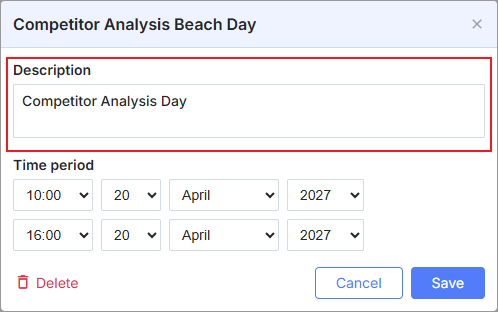
scheduler.locale.labels.section_text = 'Text';

scheduler.config.lightbox.sections = [
    { name:"text", height:50, map_to:"text", type:"textarea", focus:true },
    { name:"time", height:72, type:"time", map_to:"auto"}
];
Инициализация
По умолчанию в lightbox уже присутствует один контрол Textarea. Чтобы добавить дополнительное поле, выполните следующие шаги:
- Добавьте новую секцию в конфигурацию lightbox:
scheduler.config.lightbox.sections = [
    { name:"text", ... },
       { name:"location", height:50, map_to:"location", type:"textarea"},
    { name:"time", ...}
];
- Задайте метку для новой секции:
scheduler.locale.labels.section_location = "Location";
Свойства
Ниже приведены основные свойства, которые часто используются с контролом 'textarea' (полный список смотрите здесь):
| name | (string) имя секции |
| height | (number) высота секции |
| map_to | (string) имя свойства данных, связанного с этой секцией |
| type | (textarea,time,select,template,multiselect,radio,checkbox,combo) тип контрола секции |
| placeholder | (string) текст-подсказка, отображаемый, когда textarea пуста |
Need help?
Got a question about the documentation? Reach out to our technical support team for help and guidance. For custom component solutions, visit the Services page.