模板(Template)
一个用于容纳部分 HTML 内容的容器。
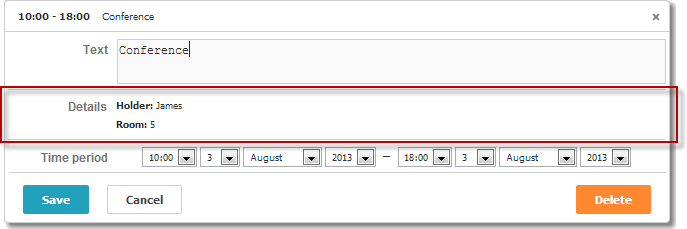
scheduler.locale.labels.section_template = 'Details';// 设置该区域的名称

scheduler.config.lightbox.sections = [
    { name:"text", height:50, map_to:"text", type:"textarea", focus:true},
    { name:"template", height: 40, type:"template", map_to:"my_template"},
    { name:"time", height:72, type:"time", map_to:"auto"}
];
scheduler.attachEvent("onEventCreated", function(id, e) {
    var ev = scheduler.getEvent(id);
    ev.my_template = "<b>Holder:</b>"+ ev.holder+"

<b>Room:</b>"+ ev.room;
});
初始化
要在 lightbox 中包含 Template 控件,需要执行以下步骤:
- 在 lightbox 配置中添加该区域:
scheduler.config.lightbox.sections = [
    { name:"text", ... },
       { name:"template", height: 40, type:"template", map_to:"my_template"},
    { name:"time", ...}
];
- 为该区域定义标签:
scheduler.locale.labels.section_template = 'Details';
- 通过事件为控件提供内容,例如 onBeforeLightbox 事件:
scheduler.attachEvent("onBeforeLightbox", function(id) {
    var ev = scheduler.getEvent(id);
    ev.my_template = "<b>Holder:</b>"+ ev.holder+"

<b>Room:</b>"+ ev.room;
    return true;
});
属性
以下是 'template' 控件常用的一些关键属性(完整列表请参见这里):
| name | (string) 区域的名称 |
| height | (number) 区域的高度 |
| map_to | (string) 映射到该区域的数据属性名 |
| type | (textarea,time,select,template,multiselect,radio,checkbox,combo) 区域中使用的控件类型 |
Need help?
Got a question about the documentation? Reach out to our technical support team for help and guidance. For custom component solutions, visit the Services page.