Multiselect(多选控件)
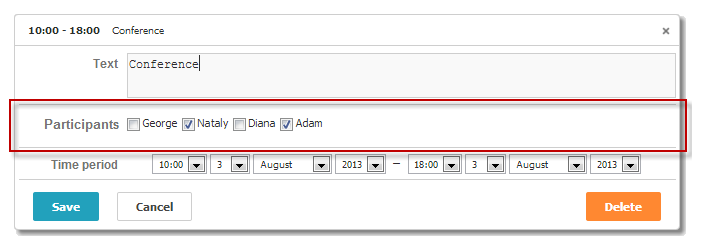
该控件提供一组复选框。
注释
请确保在 lightbox 中使用该控件前已启用 multiselect 扩展。
scheduler.plugins({
    multiselect: true /*!*/
});

scheduler.locale.labels.section_userselect = "Participants";

scheduler.config.lightbox.sections="["
    { name:"description", height:50, map_to:"text", type:"textarea", focus:true },
    { name:"userselect", height:22, map_to:"user_id", type:"multiselect",
    options: scheduler.serverList("users"), vertical:"false" },
    { name:"time", height:72, type:"time", map_to:"auto"}
];
Multiselect control in the lightbox
初始化
要在 lightbox 中包含 Multiselect 控件,请按照以下步骤操作:
- 在页面上启用 'multiselect' 扩展:
scheduler.plugins({
    multiselect: true
});
- 将 multiselect 区块添加到 lightbox 配置中:
scheduler.config.lightbox.sections =
    { name:"description", ... },
    { name:"userselect", height:22, map_to:"user_id", type:"multiselect",
    options: scheduler.serverList("user_id"), vertical:false },
    { name:"time", ...}
];
- 为该区块定义标签:
scheduler.locale.labels.section_userselect = "Participants";
Multiselect control in the lightbox
属性
以下是 'multiselect' 控件常用的一些关键属性(完整属性列表请参见 这里):
| name | (string) 区块的名称 |
| height | (number) 区块的高度 |
| map_to | (string) 映射到该区块的数据属性名 |
| type | (textarea,time,select,template,multiselect,radio,checkbox,combo) 区块使用的控件类型 |
| options | (array of objects) 定义控件的选项(适用于 'select'、'multiselect'、'radio'、'combo' 控件)。 每个对象表示一个选项,包含以下属性:
|
| script_url | (string) 用于动态加载 multiselect 选项的服务端脚本 URL。可选,仅在动态模式下使用。 |
| vertical | (boolean) 决定 multiselect 按钮是垂直(true)还是水平排列(适用于 'multiselect' 和 'radio' 控件) |
| delimiter | (string) 定义分隔 multiselect 值的分隔符。如果未指定,则使用全局 section_delimiter 设置。 |
为控件填充数据
通常,通过 options 参数为 multiselect 按钮设置可选值:
scheduler.config.lightbox.sections =
    {   name:"userselect", type:"multiselect",
        ...
        options:[
            { key: 1, label: 'George' },
            { key: 2, label: 'Nataly' },
            { key: 3, label: 'Diana' },
            { key: 4, label: 'Adam' }
    ]},
    ...
];
options 数组中的每个项都必须包含以下两个必需属性:
- key - 选项的唯一 ID
- label - 选项显示的文本标签
从服务器填充复选框
要从服务器获取复选框的值,请使用 serverList 方法:
scheduler.config.lightbox.sections = [
    {name:"description", ...},
    { name:"userselect", height:22, map_to:"user_id", type:"multiselect",
    options: scheduler.serverList("users"), vertical:"false" },
    {name:"time", ...}
];

scheduler.load("api/data");
这里,api/data 是一个 服务端脚本,返回事件以及 multiselect 按钮的选项,其格式如 데이터 포맷 예시 所示:
//response
{
   "data":[
      {
          "id":"1",
          "start_date":"2019-03-02 00:00:00",
          "end_date":"2019-03-04 00:00:00",
          "text":"dblclick me!",
          "user_id":"1,2"
      },
      {
          "id":"2",
          "start_date":"2019-03-09 00:00:00",
          "end_date":"2019-03-11 00:00:00",
          "text":"and me!",
          "user_id":"2,3"
      }
   ],
   "collections": {
      "users":[
         {"value":"1","label":"Lisa"},
         {"value":"2","label":"Bob"},
         {"value":"3","label":"Mike"}
      ]
   }
}
注释
可以使用 updateCollection 方法动态更新选项列表。
var oldOptions = scheduler.serverList("users").slice();
scheduler.updateCollection("users", [
         {"value":"4","label":"John"},
         {"value":"5","label":"Paul"},
         {"value":"6","label":"Ringo"},
         {"value":"7","label":"George"}
]);
动态加载
在静态模式下,所有事件参数选项都作为独立字段存储在数据库中,这样可以实现更灵活的逻辑,但需要额外的查询来加载全部选项。
在动态模式下,只有在需要时才加载选项。这减少了查询次数,但限制了自定义逻辑的实现能力。
在服务端,你应有类似如下的代码。
要启用动态模式,请在 options 属性旁添加 script_url 属性:
scheduler.config.lightbox.sections = [
    {name:"userselect", height:22, map_to:"user_id", type:"multiselect",
    options: scheduler.serverList("user_id"),
    script_url:'api/options'},
    ...
];
api/options 端点应返回如下 JSON 数据:
[
    {"value":"1","label":"Lisa"},
    {"value":"2","label":"Bob"},
    {"value":"3","label":"Mike"}
]
Need help?
Got a question about the documentation? Reach out to our technical support team for help and guidance. For custom component solutions, visit the Services page.