
Exploring better plans#
Planning Engine can answer "What would happen if we changed this?" before the application touches its accepted plan. It can also suggest who should fill a requirement, replace an assignment that no longer fits, or even out an existing imbalance.
Each capability fits a different decision: preview one proposed edit, compare several alternatives you've written, or let the engine pick among eligible resources. All of them start from a scheduled plan, so you always have a common point of comparison.
Ask what would happen before changing the plan#
A preview applies hypothetical changes, schedules the result, and returns the consequences. The accepted project stays as it is. The changes can move a task, revise a dependency, add a constraint, or switch an assignment.
In the delivery example, Ann is double-booked Monday afternoon. A preview can answer "What happens if Ben writes the guide?" Ben has the documentation skill and works that afternoon. The guide still fits Monday 13:00-17:00, Ann's overload goes away, and the Tuesday release is still possible.
The baseline is the accepted solved state you compare against. It's a current planning reference, not a stored historical baseline for tracking a project across months. If your application needs history, it keeps its own versions.
A preview doesn't commit its dates. If the accepted plan changes while you're still weighing an alternative, compare again against the new baseline before you accept the decision. The engine provides baseline checks, so your application can reject a proposal built on an outdated plan.
API: preview - Rust · WASM · JS · .NET · Java
Compare several alternatives#
Evaluation compares several change sets against the same reference, each one independently. One candidate's trial changes don't carry over into the next.
For each candidate, the engine applies the edits and schedules the result. It can also level that result, so you compare resource-feasible placements and not just the first dependency schedule.
In the example, both of these approaches remove Ann's Monday overload:
| Alternative | Guide placement | Implementation placement | Release | Practical consequence |
|---|---|---|---|---|
| Keep assignments and level | Ann, Tuesday afternoon | Monday afternoon + Tuesday morning | Tuesday 17:00 | Preserve ownership; use the guide's scheduling room. |
| Assign the guide to Ben | Ben, Monday afternoon | Monday afternoon + Tuesday morning | Tuesday 17:00 | Preserve the guide's earlier finish; change ownership. |
The schedule alone can't tell you whether changing ownership is a good idea. Your application can show both outcomes next to its own considerations, such as continuity, responsibility, or a person's preference.
A "who should take this task?" picker is a natural UI for evaluation. In this demo, clicking the person on a bar scores every candidate on a leveled copy of the plan. The list shows how each choice changes overload and the project finish:
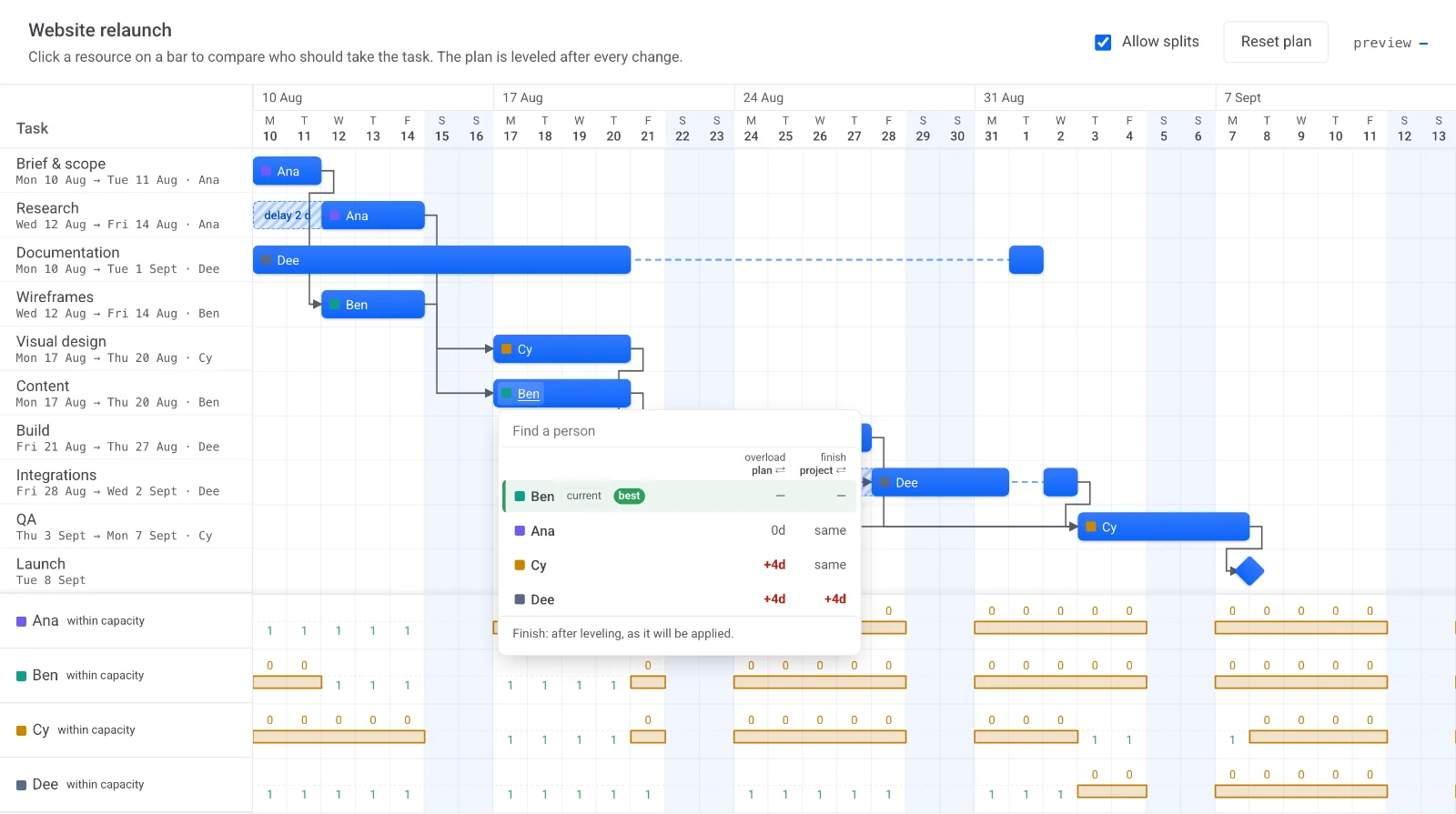
Evaluation reports project finish, the finishes of selected tasks, overload, conflicts, and cycles. You can focus the finish and nearby-overload measurements on the tasks you care about most. A failed candidate doesn't invalidate the other alternatives; it can be reported separately.
API: evaluate - Rust · WASM · JS · .NET · Java
Decide what better means#
By default, the engine's score combines three concerns:
Later project finish + remaining overload + a large penalty for each conflict or cycle.
The finish part counts only delay relative to the reference. Finishing earlier than the baseline doesn't earn a negative score. Overload is the sum of excess capacity across the chosen time buckets. Each reported conflict or cycle adds a fixed penalty of 1,000.
Lower is better. Still, the score is a scheduling heuristic. It isn't money, and it isn't a universal measure of project value. Time units and the detection basis affect its scale. A fixed penalty also can't guarantee that every valid plan ranks above every invalid one at any size.
Your application can rank the raw metrics instead: reject candidates with conflicts, require a particular finish, then prefer the least overload. If ownership changes or real staffing costs matter, put them in your application's decision policy. Don't treat the default score as a financial estimate.
Turn requirements into eligible people#
Skills describe what a worker can provide. Requirements describe what a task needs. A requirement can ask for a skill to be present, meet a minimum grade, stay below a limit, or equal a value. Every predicate in the requirement has to hold.
Here's the whole path from skills to an accepted assignment, which the rest of this page walks through:
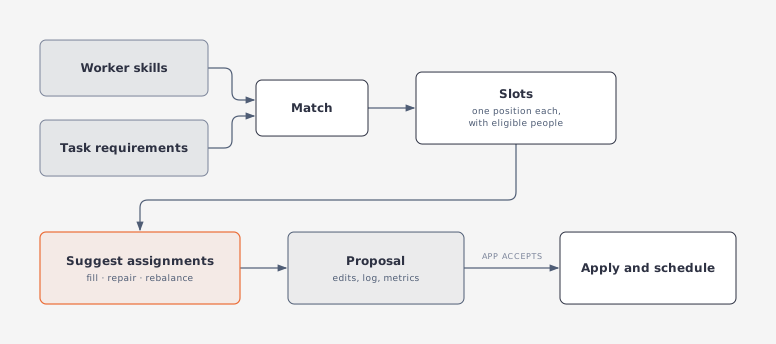
A requirement produces one or more slots. Each slot is one position to fill on one task, and it carries an ordered list of eligible resources. A requirement for two reviewers produces two slots. It doesn't mean one reviewer assigned at twice the rate.
For the guide, the documentation requirement makes both Ann and Ben eligible. For Review, the review requirement picks Ben. Eligibility only decides who gets considered. Calendar availability and the effect on the schedule are checked afterward.
Existing assignments can bind to slots automatically or through an explicit selection. Stable requirement identities keep those bindings across later runs. Assignments that aren't bound to a slot stay on their tasks. They can still reserve a person's capacity or keep the same person from being assigned twice to that task.
Applications can also pass eligible lists directly, without modeling skills. Skills and requirements are inputs to matching and suggestions; ordinary scheduling doesn't check them automatically.
API: slots - Rust · WASM · JS · .NET · Java
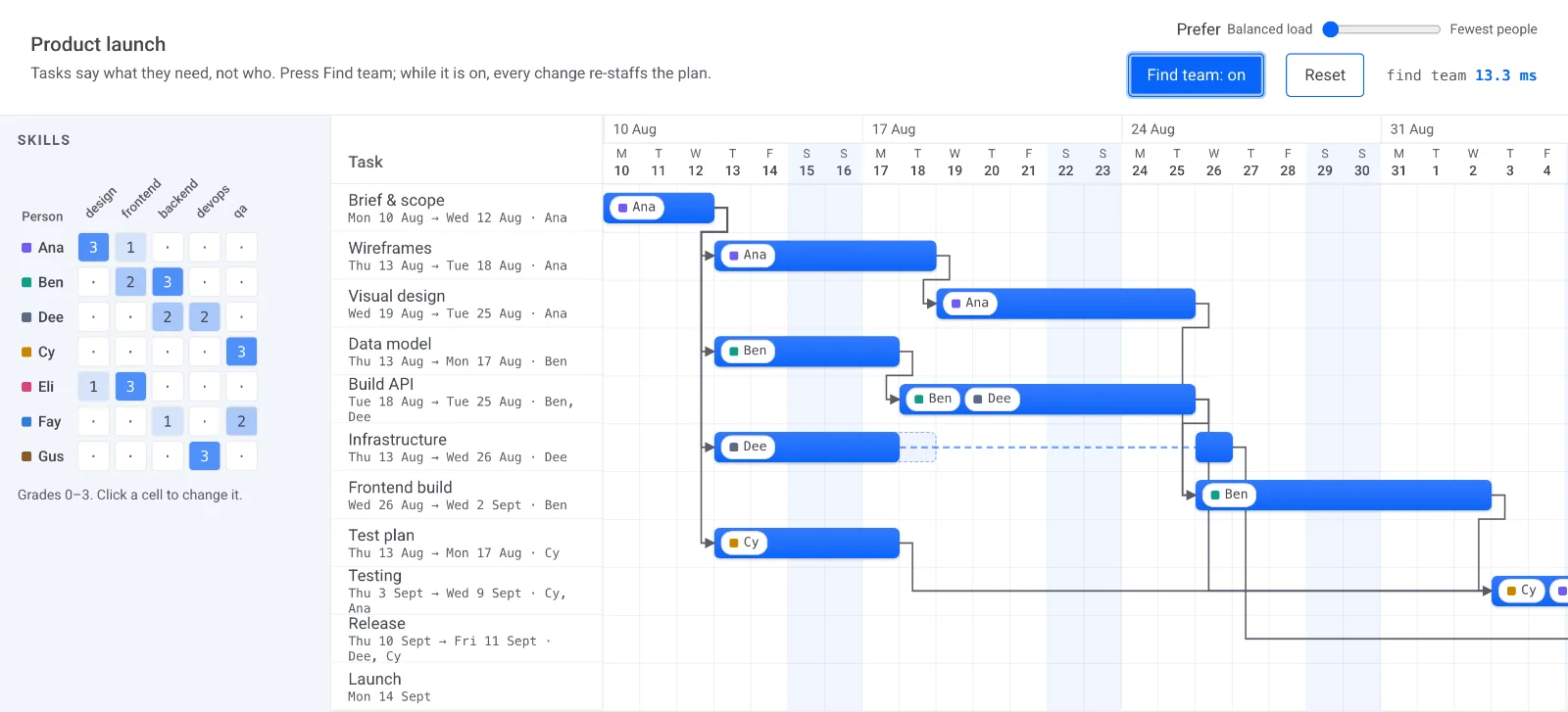
In this demo, tasks list only what they need, such as design ≥2 or backend ≥2 ×2. A skills matrix grades each person. One click turns the requirements into slots and fills them:
Fill, repair, or rebalance assignments#
Assignment suggestions cover three actions:
| Action | Situation | Behavior |
|---|---|---|
| Fill | A slot has no assignment. | Choose an eligible resource and propose a new assignment. |
| Repair | The incumbent resource is no longer eligible. | Choose an eligible replacement, preserving the assignment's rate and slice. |
| Rebalance | The incumbent remains eligible. | Change resource only when the scored result strictly improves. |
A guide slot with no writer is a fill. If the writer no longer meets the required grade, it's a repair. Ann's assignment is overloaded but still eligible, so that's a rebalance.
Here's a proposal that does both on a bigger plan. Unassigned tasks get filled (? → Ben), and overloaded ones move to someone else (Dee → Eli). Nothing changes until the user applies the proposal:
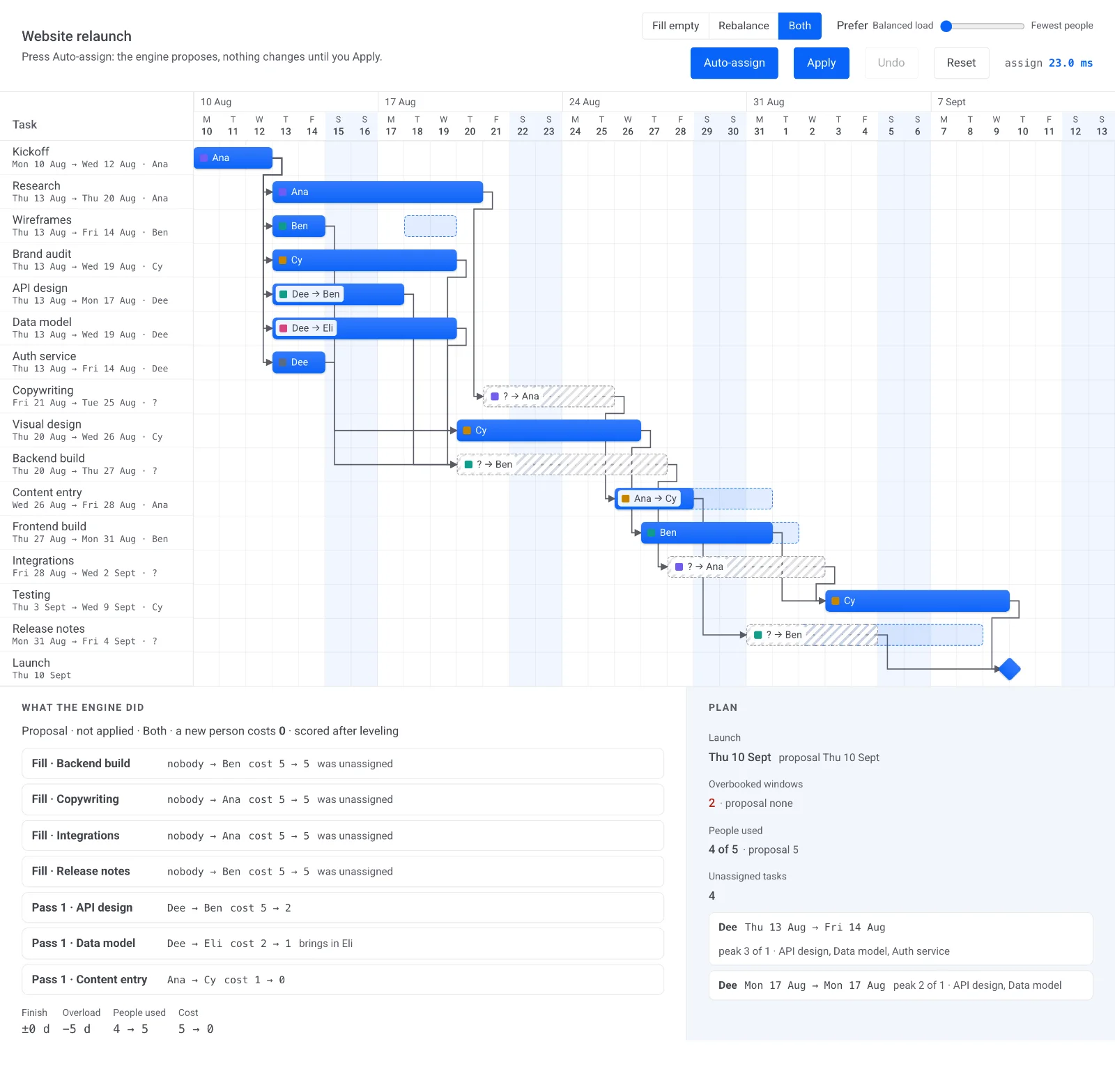
Your application picks which actions to request. It can also protect selected assignments from reassignment. Protection keeps the person on the task; it doesn't fix the task's dates against scheduling or leveling.
Once you target a fill or a repair, it's a required change. The engine picks the best eligible candidate it can use, even if leaving the slot empty or broken would score better. Rebalancing is more conservative. The incumbent wins ties, which avoids unnecessary churn.
If no candidate works, an empty slot stays unfilled, or an ineligible incumbent stays invalid. The engine doesn't silently remove the assignment. Your application decides whether to relax the requirement, expand the pool, or handle the case by hand.
API: suggestAssignments - Rust · WASM · JS · .NET · Java
Balance workload against team size#
Schedule quality on its own often favors spreading work across everyone available. Sometimes, though, you want to finish the plan with a smaller team.
The engine can add a penalty for each additional resource used from the candidate pool. A person counts as used when they have an active assignment, so giving them another slot doesn't pay the penalty again. Freeing their last assignment can lower the score.
In the running example, Ann and Ben are both already used, since Ben owns Review. Giving Ben the guide doesn't add anyone to the team. To explore hiring, the application could add a third eligible person, Cara, to the pool. Bringing Cara in would then cost the configured penalty.
A low penalty favors schedule and load improvements. A high penalty favors reusing current workers, even accepting more delay if the combined score comes out lower. With trial leveling on, the comparison shows that tradeoff directly. A busy incumbent might delay completion, while another worker avoids the delay but grows the team.
The penalty counts workers. It doesn't count salaries, onboarding costs, or total effort. It's a preference applied during selection, not a guaranteed minimum-team solver.
Understand how suggestions are chosen#
The engine processes slots in a deterministic order based on task start, task order, and slot order. For each slot, it tries the eligible resources, scores the resulting plans, and keeps the best choice before it moves on. Later slots see the assignments already chosen.
With trial leveling on, each candidate is measured after leveling. Those hypothetical leveling delays don't pile up in the working assignment plan between choices, though. Every choice is measured against the same reference, so a finish that's earlier locally is still judged against the original plan.
A resource that's already assigned anywhere on the task isn't tried again for another slot. When candidates score the same, the eligible list's preference order breaks the tie. During rebalance, a valid incumbent wins ties.
Extra rebalance passes can improve earlier choices after later slots have shifted the workload. They stop when a pass makes no move. With no worker-count penalty, the engine can skip a valid slot whose current resource isn't overloaded around the task. There's no load problem there to fix.
This is a greedy process. It doesn't try every combination of assignments. Visit order can change the answer, and swaps that block each other may stay unresolved. If a repair is blocked by a person who's freed later in the same pass, you might need another call. Candidates that fail calendar or scheduling validation are skipped, so an unfilled slot doesn't always mean its eligible list was empty.
Review and accept a proposal#
A suggestion returns proposed assignment edits, a log of decisions, any slots left unfilled or invalid, and predicted schedule metrics. The accepted project stays unchanged.
For the guide rebalance, the proposal can switch the resource from Ann to Ben, show the drop in overload, and keep Tuesday's release. Your application can show that decision next to a leveled version that keeps Ann as the writer.
To accept the proposal, apply its edits and schedule again. If the comparison used trial leveling, level the committed plan with the same choices you used in the trial. Trial delays and pauses aren't bundled into the assignment proposal.
Earlier leveling can hide the very contention you're investigating. Once the guide has moved to Tuesday, Ann no longer looks overloaded, so a later rebalance may have no reason to change the guide's owner. Clearing prior leveling for the comparison brings the underlying assignment contention back into view. Evaluation clears only its hypothetical reference. Suggestions can include the requested clears in their proposed edits, so the committed plan starts from the same conditions.
The gap policy matters too. With compression, applying the net proposal with the same scoring options reproduces the proposed outcome. Preservation is different. Sequential trial choices and applying all final edits at once can keep different preferred dates. In that mode, treat the prediction as an estimate and check the committed schedule.
Durable edits can be partially accepted if some operations are invalid. Before treating a proposal as fully committed, your application has to check the application report. If edits were rejected, reconcile the accepted project with the source data.
API: apply - Rust · WASM · JS · .NET · Java
Choose the right workflow#
| Question | Capability |
|---|---|
| What would this one edit change? | Preview its scheduled dates and diagnostics. |
| Which of these authored alternatives performs better? | Evaluate each independently, optionally with leveling. |
| Who is eligible for these requirements? | Build slots from skills and requirements, or provide eligible lists directly. |
| Who should fill or replace an assignment? | Request fills, repairs, or rebalancing and review the proposed changes. |
| Can the existing team do this work at different times? | Level an independent copy and compare its result. |