
DHTMLX Planning Engine#
What is DHTMLX Planning Engine?#
DHTMLX Planning Engine is a headless library for scheduling and resource planning. It calculates task dates, finds scheduling conflicts and resource overload, and helps you compare changes to a plan.
You describe a plan as tasks, dependencies, calendars, resources, and assignments. From that, Planning Engine tells you when work can happen, whether your people or equipment can cover it, and how a proposed change affects the rest of the project.
Where it fits#
Planning Engine runs behind your app's interface. That might be a Gantt chart, a staffing board, a grid, or a background job. Your app owns the screens, the data storage, and the call on which changes to accept. The engine gives back dates, diagnostics, load information, and planning alternatives.
Here's a Gantt demo running on Planning Engine. Someone drags Research two days later. The engine previews the change on a copy of the plan, and the app redraws everything downstream with the reason each task moved:
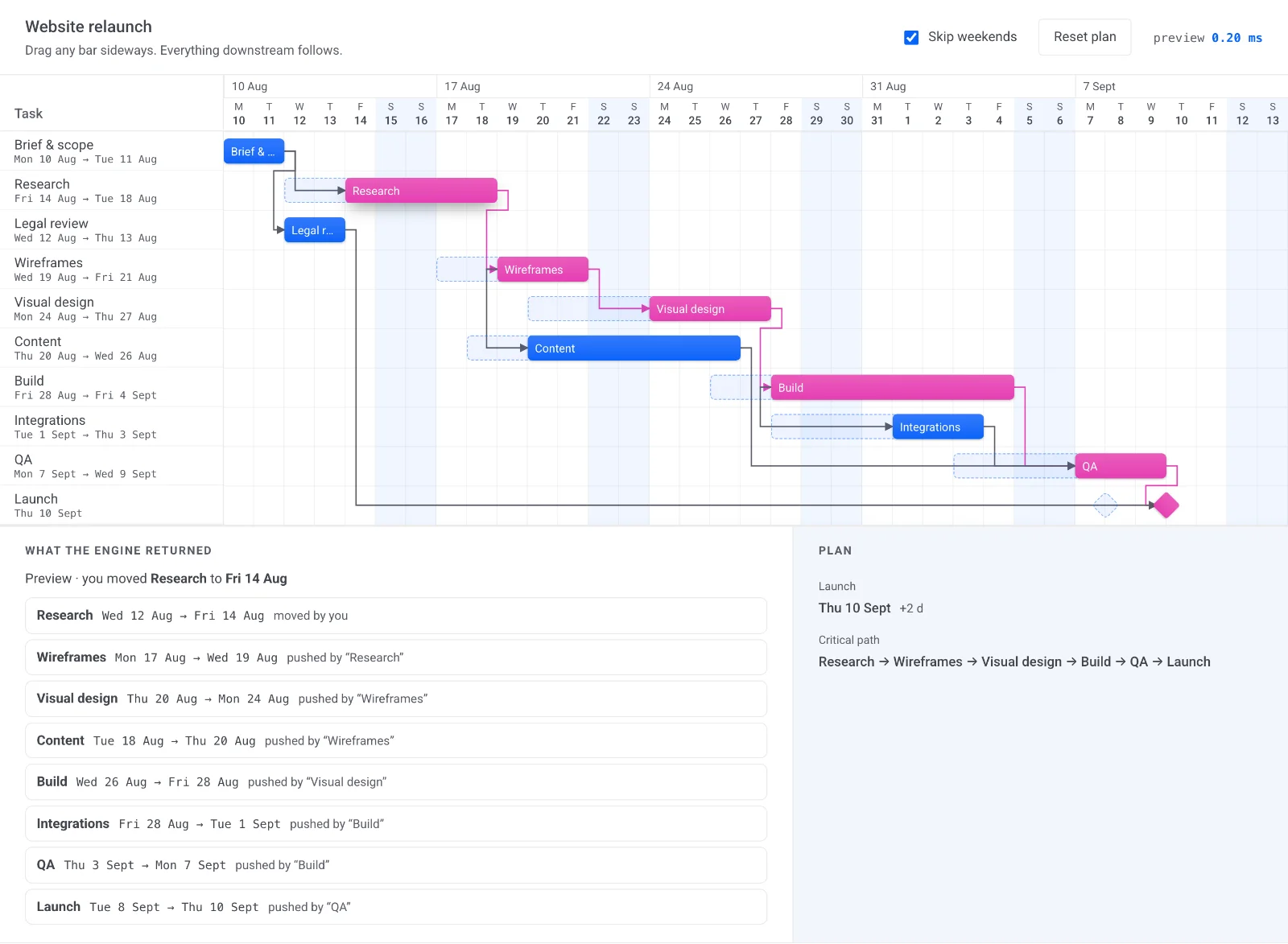
Planning Engine is available for Rust, WebAssembly and JavaScript (in the browser and Node.js), .NET, and Java. In the browser, your app can calculate previews without a round trip to the server. On the server, you can run validation and batch planning. You don't need an external planning service or a separate database.
The data model uses dhtmlxGantt field names, so it fits well into existing dhtmlxGantt apps. You can also use it with other interfaces, or with no UI at all.
What can it help with?#
Planning Engine answers the questions that come up in project delivery, service scheduling, and planning shared people or equipment:
| Question | Capability |
|---|---|
| When can the work start and finish? | Schedule dates from dependencies, working calendars, and enabled date constraints. |
| Where does the plan have problems? | Report dependency cycles, constraint conflicts, and resource overload; analyze critical work and slack. |
| How can we reduce overbooking? | Level resources by delaying tasks or introducing pauses where allowed. |
| What happens if something changes? | Preview an edit and inspect its effect before accepting it. |
| Which option works better? | Compare alternatives using finish dates, overload, and constraint violations. |
| Who could fill an unassigned role? | Match skill requirements and suggest assignments based on their effect on the plan. |
From a plan to a better plan#
The usual flow goes like this: describe work → schedule dates → inspect problems → explore improvements → accept changes.
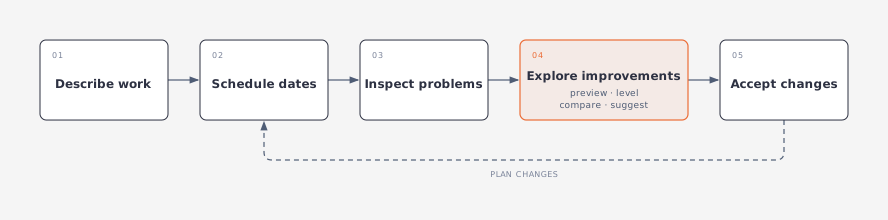
Scheduling, resource leveling, and assignment suggestions are separate operations. Scheduling sets the dates, but it can leave two tasks fighting over the same person. Leveling fixes that by moving or pausing work. Assignment suggestions look at who should do the work, based on the skills and requirements your app supplies.
You pick which operations to use. Your app might just schedule a project. Or it might show a preview while someone edits a task, or compare a few staffing options. Previews, evaluations, and assignment suggestions don't touch the accepted plan. Leveling does change the working project, so run it on a separate copy when users need to review the result first.
A small example#
Take a small website delivery project. Anna works Monday through Friday and has backend and frontend skills. Ben works Monday through Thursday and has frontend and testing skills. Each of them can take one full-capacity assignment at a time.
| Task | Depends on | Initial assignment |
|---|---|---|
| Build the API | - | Anna |
| Build the interface | - | Anna |
| Integration testing | API and interface | Unassigned; requires testing skills |
| Launch milestone | Integration testing | - |
At first, the API and the interface overlap. The dependencies allow it, but Anna can't do both at once. Testing also needs a qualified person before the project is fully staffed.
Each planning question gets its own answer here. Scheduling puts testing after both builds. Load analysis shows that Anna is overbooked. Leveling can move work around. A staffing alternative can try giving the interface to Ben, but keep Ben's four-day week in mind when you compare finish dates.
What to expect#
For the same ordered input and options, you get the same results every time. You have to supply calendars, capacity, skills, and date requirements explicitly. The engine only works from the plan your app gives it.
Moving work can push out the project's end date. Protected tasks or hard constraints can also leave some overload unresolved. Results include diagnostics, so your app can explain what still needs attention.
Task duration is working time. Adding people doesn't make a task shorter on its own. Leveling and assignment suggestions use heuristics to find useful improvements, and they don't guarantee a globally optimal plan.
Explore the concepts#
- Modeling a plan: describe work, calendars, capacity, and assignments.
- Scheduling work: see how dates are calculated and how to read conflicts.
- Resolving resource overload: inspect load and choose how work can move.
- Exploring better plans: preview edits, compare options, and suggest assignments.
Start integrating#
Planning Engine ships an SDK for each of five languages. Install the package for your stack, then follow its quick start:
| Language | Quick start | API reference |
|---|---|---|
| Rust | Rust quick start | Rust API |
| WASM | WASM quick start | WASM API |
| JavaScript | JavaScript quick start | JavaScript API |
| .NET | .NET quick start | .NET API |
| Java | Java quick start | Java API |