
MS Project functionality in Planning Engine#
Planning Engine can reproduce a lot of what Microsoft Project does with dependency scheduling, calendars, resource allocation and leveling. The big difference is how work relates to dates. The engine schedules the task duration you give it. MS Project can recalculate duration from work and resource units. So in the engine, assigning more people changes resource load. It doesn't make the task finish sooner.
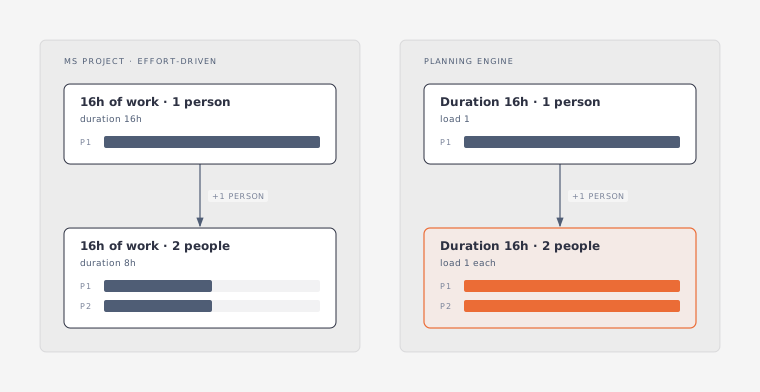
This guide walks through what you can reproduce, what your application has to handle, and what the engine doesn't support. API names below follow the common specification. Your language binding may use different casing.
| Functionality block | What can be reproduced | Main limits |
|---|---|---|
| Task scheduling | Duration-based scheduling, date constraints, ASAP/ALAP placement, protection of completed tasks | No effort-driven duration, remaining-work scheduling or soft deadlines |
| Dependencies | Dependency links, absolute working-time lag and negative lag | No percentage lag, elapsed lag or external project links |
| Resources | Capacity-limited work resources, selection for leveling, skills-based assignment | No time-varying capacity, material/cost resources or financial model |
| Assignments | Flat load rates and assignment slices within a task | No work contours, independent assignment leveling or assignment actuals |
| Calendars | Working hours, dated exceptions and task/resource calendar intersection | No inheritance, recurring exceptions or incremental calendar edits |
| Leveling | Task delays and splits, scoped leveling, priorities and slack limits | Bucket-based load approximation; no backward or independent assignment leveling |
| Scheduling analytics | Leaf-task slack, negative total slack and project-end criticality | No configurable critical threshold, multiple critical paths or exposed early/late dates |
Task scheduling, effort and progress#
What can be reproduced#
Planning Engine schedules tasks from durations, dependencies and date constraints. You can mix ASAP and ALAP behavior with the project's scheduling direction. A task with no driving links can keep its explicit start, and links can involve summary tasks.
You can also protect completed tasks from rescheduling. With use_progress enabled, any task with progress == 1 stays fixed. That way, finished tasks stay put while you plan the rest of the work.
What needs application-side handling#
For an elapsed-duration task, like concrete curing over a weekend, use a 24/7 task calendar. It's a workaround: Planning Engine has no per-task elapsed duration units such as edays and ehrs. You still need to think about how resource calendars interact with it. Setting use_calendars: false turns calendars off for the whole project, so it can't model a mix of elapsed-time and working-time tasks on its own.
If you import durations in weeks or months, convert them before scheduling. Planning Engine rejects those units, and the conversion policy is up to your application. Also note that the engine's day means one working date, however long that date is. MS Project instead uses configurable hours-per-day and days-per-week. So decide what "1 day" means before you expect the same dates.
What cannot be reproduced by the engine#
- Effort-driven scheduling and task types. There's no equivalent of the Fixed Units, Fixed Work and Fixed Duration rules based on Work = Duration × Units. Assignment
valueonly changes load. Adding a second person doesn't halve the duration, and reducing units doesn't stretch it. Don't treat duration-based scheduling as full MS Project Fixed Duration semantics either, because Planning Engine doesn't have the work model behind it. - Stored work independent of duration. A task can't express "40 hours of effort" as a separate amount of work. Your application could calculate durations itself, but then it owns that calculation and every recalculation after it.
- Partial progress and status-date replanning. There's no model for actual start/finish, remaining duration, or moving only unfinished work after a status date. A half-complete task moves as a whole, completed part included. A fractional progress value doesn't protect the completed part.
- Soft deadlines. You can't set a deadline that reports lateness and reduces total slack without constraining dates.
fnltis a hard finish limit, so it's not a replacement. Your application can show its own deadline warning, but native slack won't know about the deadline. - Per-task resource-calendar policy. Whether scheduling ignores resource calendars is a global setting,
config.calendar_mode. You can't mix policies by task in one project. - Dependencies taking precedence over conflicting constraints. With
apply_constraintsenabled, constraints always win. Turn it off and constraints are ignored completely. There's no mode that honors a constraint until it conflicts with a dependency.
Task splitting and its ownership limits are covered in the leveling section below.
Dependencies and lag#
What can be reproduced#
Planning Engine supports finish-to-start, start-to-start, finish-to-finish and start-to-finish links. Lag is an absolute amount in lag_unit, and it can be negative. Links on summary tasks work too, so they aren't a parity gap.
That covers dependencies like "start two working days after the predecessor finishes" or "start a fixed amount before the predecessor finishes."
What needs application-side handling#
Percentage lag, such as FS+50% of the predecessor's duration, isn't stored as part of the link. You can calculate an absolute lag from the current duration, but you'll have to recalculate it every time the predecessor's duration changes. Converting once won't keep percentage-lag behavior through later edits.
What cannot be reproduced by the engine#
Elapsed lag isn't supported. Lag runs on working time, so you can't express a two-day lag that runs through weekends. The 24/7 task-calendar workaround for elapsed duration doesn't help here, since it applies to tasks, not lag.
External predecessors and subprojects aren't supported either. Planning Engine has no equivalent of MS Project's cross-project dependencies.
Resources, availability and costs#
What can be reproduced#
Resources have a capacity, and assignments add load against it. That's enough to plan people or teams as capacity-limited work resources.
To get the effect of a per-resource "Can Level" setting, pass the resources you want in each call: level({scope: {resources}}). Resources outside that list aren't leveled.
For generic or team resources, use skills, requirements and suggestAssignments to pick and substitute people. Keep in mind that suggestions still follow the duration model above. Adding staff won't shorten a task by itself.
What needs application-side handling#
There's no Proposed versus Committed booking type. Leaving a resource out of scope.resources stops it from being leveled in that call, but overallocation detection still reports it. So this works for choosing what to level. It doesn't remove proposed bookings from load calculations.
What cannot be reproduced by the engine#
- Availability that changes over time.
capacityis a single number. You can't represent a person who's available at 50% next week, or a team shrinking from eight people to six, as a dated capacity profile. There's a design for this in the source backlog, but it isn't implemented yet. - Material and cost resources. Every resource is a capacity-limited work resource. There's no separate model for consumed quantities or cost-only resources.
- Financial scheduling. There are no standard or overtime rates, cost per use, dated rate tables or cost accrual. The cost that
evaluateuses is a scheduling heuristic, not money, so you can't use it to compare options by financial cost. - Overtime work. There's no way to shorten a task with overtime without changing its calendar. This also depends on effort-driven scheduling, which is missing.
Assignments and individual work plans#
What can be reproduced#
Assignments link resources to tasks at a flat load rate. Assignment slices add an offset and a duration within the task, so you can say a person works on only part of the task's span.
That gives you a limited participation window. It doesn't give each person their own independently scheduled work plan.
What cannot be reproduced by the engine#
Work contours and changing units within one assignment aren't supported. There are no front-loaded, bell-shaped or turtle-shaped profiles. The assignment rate is always flat.
Independent assignment leveling isn't supported either. You can set a slice offset, but leveling never changes it. And if you move an assignment's start later, the task's end doesn't move with it. The slice just gets clipped at the task end. So the engine can't do "delay one person's work and let the task finish later" through assignment-level leveling delay.
Assignment-level results and actuals aren't available. Scheduling output doesn't include start, finish and work for each assignment, and there's no tracking of actual and remaining work per assignment. If you need individual work reports, your application has to keep that data itself. Task dates alone won't give you the same per-assignment results.
Working-time calendars#
What can be reproduced#
Planning Engine supports working-time calendars, date exceptions with their own hours, and working intervals that cross midnight. It intersects task and resource calendars, so availability can depend on both the task's working time and the assigned resource's calendar.
That covers explicit holidays and date-specific hour changes, as long as your application supplies the dates.
What needs application-side handling#
Base-calendar inheritance has to live outside the engine. Each calendar stands alone. If several resource calendars are based on one company calendar, your application builds each of them and pushes changes, like a new holiday, to every copy.
Recurring exceptions have to be expanded into actual dates. You can supply an annual holiday or every second Friday for a planning horizon you choose. If the project runs past that horizon, you'll need to generate more exceptions. Planning Engine doesn't keep the recurrence rule.
Seasonal work weeks have no native date-range rule, and customWeeks is rejected. You can cover a bounded period with explicit dated exceptions, but you'll maintain those dates yourself instead of relying on a "summer hours" or "four-day week in Q3" rule.
What cannot be reproduced through incremental edits#
Change sets can't add or edit calendars. After you change calendar definitions, send the complete data through solve(data). For the same reason, an incremental apply can't introduce a new merged calendar.
So calendar inheritance and incremental editing are integration gaps, not just modeling gaps. Your application has to keep calendar copies in sync and resubmit them when definitions change.
Resource leveling and task splits#
What can be reproduced#
Planning Engine resolves resource contention by delaying tasks and splitting their work. You can clear previous leveling first, limit leveling to a date range, level only within slack, and pick tasks or resources through scope.tasks and scope.resources.
What needs application-side handling#
If you want before/after comparisons, save task dates before leveling. Planning Engine doesn't keep MS Project-style Preleveled Start and Finish fields. The call's updates show what changed, but a later solve won't preserve the earlier dates unless your application stored them.
You can pass pauses to describe manual splits, but manual pauses don't have their own ownership. Every pause is treated as by: "leveling", so clearFirst removes manual pauses along with the ones leveling created. To keep manual splits, your application needs its own records and handling. Skipping the clear isn't the same as clearing only the leveling-generated splits.
Where leveling results differ#
Load is measured per bucket. An assignment that touches a bucket adds its full value to it, whether or not it overlaps another assignment at the same moment.
For example, take one resource with capacity 1 and two assignments at 100%:
| Assignment | Working interval | Contribution to the day bucket |
|---|---|---|
| A | 08:00-12:00 | 1 |
| B | 13:00-17:00 | 1 |
With a day basis, Planning Engine sees a load of 2 and may delay B by a day, even though A and B never overlap. The source specification calls this a false overallocation compared with MS Project's minute-precision detection.
An hour basis shrinks the approximation but doesn't remove it. 08:00-08:30 and 08:30-09:00 still land in the same hour bucket. So a finer basis won't guarantee the same results as MS Project.
What cannot be reproduced by the engine#
- Minute, week or month leveling basis. Only hour and day bases are supported.
- Leveling manually scheduled tasks. Tasks with
auto_scheduling: falseare always fixed, with reasonfixed-task. - Per-task split permission.
allowSplitscontrols splitting globally. There's no per-task "leveling can split" switch. - Leveling assignments independently. Moves and splits happen at task level. There's no per-task option to let assigned resources move on their own.
- Leveling only remaining work. Partial progress isn't modeled, so leveling can't keep an in-progress task's completed part in place while moving the rest.
- Backward leveling. Leveling only runs forward, even though regular scheduling supports project direction.
- Shared-pool leveling across projects. Each call handles one project. There's no project priority for resolving contention between projects that share a team. The source specification marks this as probably out of scope.
Critical paths and scheduling analytics#
What can be reproduced#
Planning Engine reports total and free slack for leaf tasks, including negative total slack. A task is critical when its total slack is zero or less, measured against the project end.
That's enough to find tasks with no slack relative to the project finish. It doesn't cover every MS Project critical-path setting, though.
What needs application-side handling#
You can label tasks with your own threshold on the returned total slack, for example to highlight near-critical work. That's a display rule on top of the results. It doesn't change how the engine classifies critical tasks. If your threshold is in days, remember how Planning Engine defines a day (see the duration-unit notes above).
What cannot be reproduced by the engine#
A configurable critical-slack threshold isn't supported. Native criticality is fixed at total slack ≤ 0. You can't pick a number of days.
Multiple critical paths aren't supported. Independent chains are measured against the project end, not their own end. So a chain that finishes early isn't marked critical just because its tasks drive that chain's finish.
Early and late start/finish fields and summary slack aren't exposed. Slack comes back for leaf tasks only, and summaries are skipped. The engine does calculate late-pass dates internally, but it throws them away, so you can't get them from the API.
Soft deadlines don't affect slack calculations, as described in the task-scheduling section.