链接的颜色和样式自定义
您可以自定义任务之间连接线(链接)的外观,从而实现所需的甘特图效果。为依赖关系链接设置不同的颜色,有助于用户更容易地区分它们。
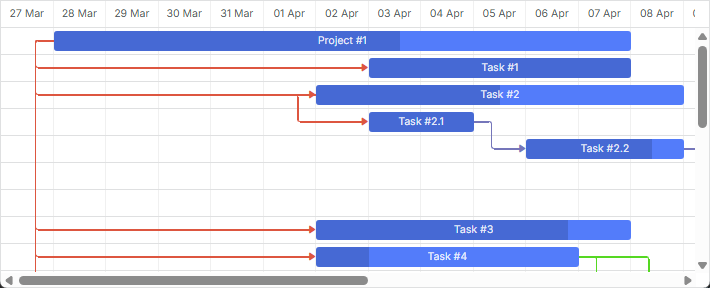
设置链接自定义样式有两种方式:
首先,让我们了解一下链接 DOM 结构,以便明白各部分的定位、尺寸、功能及默认样式。
链接 DOM 元素结构
链接的 DOM 元素结构如下:
- .gantt_task_link - 静态定位并且尺寸为零
- .gantt_line_wrapper/gantt_link_arrow/gantt_link_corner - 绝对定位
- .gantt_link_line_down(/up/right/left) - 在 wrapper 内部静态定位
- .gantt_line_wrapper/gantt_link_arrow/gantt_link_corner - 绝对定位
DOM 结构示例如下:
<div class="gantt_task_link" link_id="3">
    <div class="gantt_line_wrapper">
        <div class="gantt_link_line_left"></div>
      </div>
    <div class="gantt_line_wrapper">
        <div class="gantt_link_line_left"></div>
      </div>
    <div class="gantt_link_corner gantt_link_corner_left_down"></div>
    <div class="gantt_line_wrapper">
        <div class="gantt_link_line_down"></div>
      </div>
    <div class="gantt_link_corner gantt_link_corner_down_right"></div>
    <div class="gantt_line_wrapper">
        <div class="gantt_link_line_right"></div>
      </div>
    <div class="gantt_link_arrow gantt_link_arrow_right"></div>
</div>
各部分说明如下:
- gantt_task_link - 此元素尺寸为零并采用静态定位,作为所有链接部分的公共父元素,方便统一应用样式:
.gantt_task_link{
   --dhx-gantt-link-background:red;
}
您也可以通过 link_class 模板为该元素应用类。
关键路径链接
关键路径链接通过在 gantt_task_link 元素上添加 gantt_critical_link 类来设置样式。
- gantt_line_wrapper 控制链接的位置和尺寸。该元素为透明、绝对定位,并且略大于实际链接线,有助于提升鼠标选中准确度。
该元素的宽度由 link_wrapper_width 属性控制:
gantt.config.link_wrapper_width = 30;
- gantt_link_arrow 表示链接上的箭头。它是绝对定位的,根据方向可以有以下附加类:
- gantt_link_arrow_right
- gantt_link_arrow_left
- gantt_link_arrow_up
- gantt_link_arrow_down
目前仅使用 gantt_link_arrow_right 和 gantt_link_arrow_down。
箭头的尺寸由 link_arrow_size 属性定义:
gantt.config.link_arrow_size = 8;
- gantt_link_line_(dir) 是链接线可见的部分。将 dir 替换为 left、right、up 或 down。
您可以通过 link_line_width 属性调整该线条宽度:
gantt.config.link_line_width = 3;
- gantt_link_corner 是链接线的圆角部分。圆角半径由 link_radius 设置:
gantt.config.link_radius = 2;
将 gantt.config.link_radius = 1 可移除圆角。
重定义链接模板
自定义依赖关系链接时,需使用 link_class 模板。例如,按任务优先级为链接着色,可以这样实现:
根据依赖类型为链接着色
gantt.templates.link_class = function(link){
    var types = gantt.config.links;
    switch (link.type){
        case types.finish_to_start:
            return "finish_to_start";
            break;
        case types.start_to_start:
            return "start_to_start";
            break;
        case types.finish_to_finish:
            return "finish_to_finish";
            break;
        case types.start_to_finish:
            return "start_to_finish";
            break;
    }
};
如需为依赖关系链接的其他部分设置样式,请参考 의존성 링크 템플릿 文章中的模板。
同样的方法也适用于任务。详细内容请参见此处。
在链接对象属性中指定颜色
您也可以通过在数据对象中添加属性,为依赖关系链接指定自定义颜色:
- color - 定义链接的颜色

这是一个特殊属性。Gantt 会检测链接是否有该属性,并应用其值作为链接颜色。若未设置,则使用默认颜色。
在数据对象中设置链接颜色
var tasks = {
  data:[
     {id:1, text:"Project #1", start_date:"01-04-2013", duration:18},
     {id:2, text:"Task #1",    start_date:"02-04-2013", duration:8, parent:1},
     {id:3, text:"Task #2",    start_date:"11-04-2013", duration:8, parent:1}
  ],
  links:[
     {id:1, source:1, target:2, type:"1", color:"red"}, /*!*/
     {id:2, source:2, target:3, type:"0", color:"blue"},/*!*/
     {id:3, source:3, target:4, type:"0", color:"blue"},/*!*/
     {id:4, source:2, target:5, type:"2", color:"green"}/*!*/
  ]
};

gantt.init("gantt_here");
gantt.parse(tasks);

gantt.getLink(4).color = "green";
Related example: Link colors from the "color" property
通过 color 属性自定义颜色时,会添加内联样式,从而覆盖其他样式。这意味着关键路径不会高亮显示,任何自定义的链接颜色样式也不会生效。
如需让链接显示为关键路径,可以使用如下 CSS:
.gantt_critical_link {
  --dhx-gantt-link-background: #e63030 !important;
}
Related example: 关键任务和链接着色
如果链接对象设置了任何属性,则该链接会额外获得 "gantt_link_inline_color" 类。可利用该类覆盖其他样式:
.gantt_link_inline_color {
    opacity:0.4
}
color 属性支持任何有效的 CSS 颜色格式,例如:
link.color = "#FF0000";
link.color = "red";
link.color = "rgb(255,0,0)";
同样的方法也适用于任务。更多内容请参见此处。