Radio
一组单选按钮
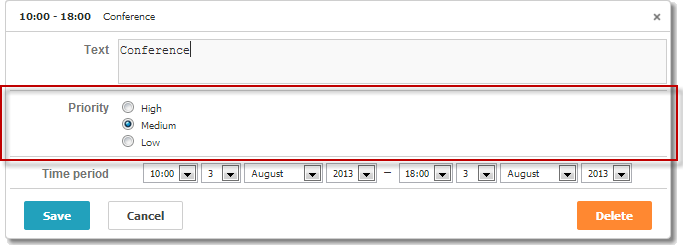
注释
请确保启用 editors 扩展,以便在 lightbox 中使用此控件
scheduler.plugins({
    editors: true /*!*/
});

var priorities = [
    { key: 1, label: 'High' },
    { key: 2, label: 'Medium' },
    { key: 3, label: 'Low' }
];

scheduler.locale.labels.section_priority = 'Priority';

scheduler.config.lightbox.sections = [
    { name:"text", height:50, map_to:"text", type:"textarea", focus:true },
    { name:"priority", height:58, options:priorities,
                map_to:"priority", type:"radio", vertical:true},
    { name:"time", height:72, type:"time", map_to:"auto"}
];
初始化
要在 lightbox 中包含 Radio 控件,请按照以下步骤操作:
- 在页面上启用 'editors' 扩展:
scheduler.plugins({
    editors: true
});
- 在 lightbox 配置中添加 radio 区块:
scheduler.config.lightbox.sections = [
    { name:"description", ... },
    { name:"radiobutton", height:58, options:priorities,
    map_to:"priority", type:"radio", vertical:true},
    { name:"time", ...}
];
- 定义该区块的标签:
scheduler.locale.labels.section_priority = 'Priority';
属性
以下是 'radio' 控件常用的主要属性(完整列表请参见 这里):
| name | (string) 区块的名称 |
| height | (number) 区块的高度 |
| map_to | (string) 该区块映射到的数据属性名 |
| type | (textarea,time,select,template,multiselect,radio,checkbox,combo) 区块控件的类型 |
| options | (对象数组) 定义控件的选项(用于 'select'、'multiselect'、'radio'、'combo' 控件)。 每个对象表示一个选项,包括:
|
| vertical | (boolean) 决定单选按钮是垂直(true)还是水平排列(适用于 'multiselect' 和 'radio' 控件) |
为控件填充数据
通常,单选按钮的值通过 options 参数设置:
scheduler.config.lightbox.sections =
    {      name:"alert", type:"select",
        ...
        options:[
            { key: 1, label: 'High' },
            { key: 2, label: 'Medium' },
            { key: 3, label: 'Low' }
    ]},
    ...
];
options 数组中的每一项都必须包含两个必需属性:
- key - 选项的 ID
- label - 选项的显示文本
从服务器获取单选按钮的值
要使用从服务器获取的数据填充单选按钮,请使用 serverList 方法:
scheduler.config.lightbox.sections = [
    {name:"description", ...},
    {name:"priority", map_to:"priority", type:"radio",
          options:scheduler.serverList("priority")},
    {name:"time", ...}
];

scheduler.load("./data/types.php");
load 方法的服务器响应应包含一个与 server list 名称匹配的集合,格式为 JSON,如 此示例 所示:
{
   "data":[
      {
          "id":"1",
          "start_date":"2019-03-02 15:00:00",
          "end_date":"2019-03-04 16:00:00",
          "text":"Interview",
          "priority":1
      },
      {
          "id":"2",
          "start_date":"2019-03-02 17:00:00",
          "end_date":"2019-03-04 18:00:00",
          "text":"Performance review",
          "type":2
      }
   ],
   "collections": {/*!*/
      "type":[/*!*/
         {"value":1,"label":"Low"},/*!*/
         {"value":2,"label":"Medium"},/*!*/
         {"value":3,"label":"High"}/*!*/
      ]/*!*/
   }/*!*/
}
如果你使用的是 PHP Connector 库,服务端代码可能如下所示:
//types.php
<?php
    require_once('../../../../connector-php/codebase/scheduler_connector.php');
    include ('../../common/config.php');

    $list = new JSONOptionsConnector($res, $dbtype);
    $list->render_table("types","typeid","typeid(value),name(label)");

    $scheduler = new JSONSchedulerConnector($res, $dbtype);
    $scheduler->set_options("type", $list);
    $scheduler->render_table(
        "tevents",
        "event_id",
        "start_date,end_date,event_name,type"
    );
?>
注释
请注意,可以使用 updateCollection 方法来刷新已获取的选项列表
Radio 控件的事件处理
dhtmlxScheduler API 没有为 Scheduler lightbox 中的单选按钮提供内置事件处理器。
不过,你可以按照如下方式为 Lightbox 中的 Radio 控件添加点击事件处理:
- 在 lightbox 打开后获取 radio 元素。
scheduler.attachEvent("onLightbox", function(){
    var node = scheduler.formSection("type").node;
    var radios = node.getElementsByTagName("input");
    ...
});
- 为 Lightbox 中的每个单选按钮绑定 onclick 事件。
scheduler.attachEvent("onLightbox", function(){
    ...
    for(var i = 0; i < radios.length; i++){
      radios[i].onclick = onRadioClick;
    }
});
- 定义单选按钮被点击时执行的函数。
function onRadioClick(event){
    var e = event || window.event,
        node = this;

    dhtmlx.message(node.value);
}
Related sample Radio 控件的事件处理
Need help?
Got a question about the documentation? Reach out to our technical support team for help and guidance. For custom component solutions, visit the Services page.