Vue.js와 함께하는 dhtmlxGantt
이 튜토리얼은 공식 래퍼 없이 Vue 앱에서 JS DHTMLX Gantt 패키지를 직접 사용하는 방법을 보여줍니다.
만약 Vue prop/이벤트, 래퍼가 관리하는 동기화, 래퍼 컴포저블이 필요하다면 Vue Gantt 사용을 권장합니다.
이 페이지는 저수준 통합을 위한 것입니다. Gantt 인스턴스를 직접 초기화하고 관리합니다.
사전 준비
- Node.js가 설치되어 있음
- Vue 3의 기본 지식(컴포넌트, refs, 생명주기 훅)
- Vue 3 프로젝트(이 튜토리얼은 Vite로 프로젝트를 만드는 방법을 보여줍니다)
1단계: Vue 프로젝트 생성
Vite로 Vue 3 앱 생성:
npm create vue@latest gantt-vue-app
cd gantt-vue-app
의존성을 설치하고 개발 서버를 한 번 시작해 프로젝트가 작동하는지 확인합니다:
- npm:
npm install
npm run dev
- yarn:
yarn install
yarn dev
앱은 http://localhost:5173에서 열려야 합니다.
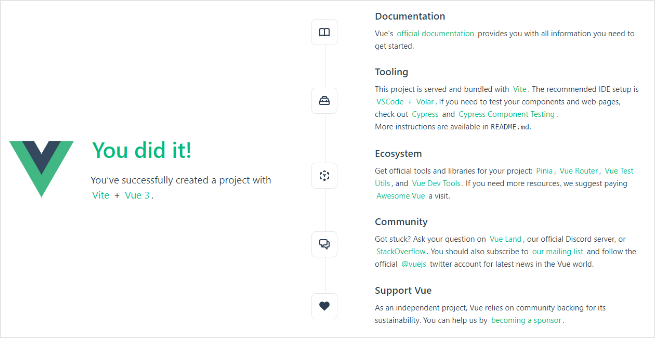
다음 단계 전에 개발 서버를 중지합니다(Ctrl+C).
2단계: JS Gantt 패키지 설치
JS Gantt 라이브러리의 프로페셔널 빌드는 비공개 npm을 통해 제공됩니다. 접근 권한을 얻으려면 설치 가이드를 따라주십시오.
평가 빌드(공개 튜토리얼 패키지):
- npm:
npm install @dhx/trial-gantt
- yarn:
yarn add @dhx/trial-gantt
프로페셔널 빌드(비공개 npm):
- npm:
npm install @dhx/gantt
- yarn:
yarn add @dhx/gantt
또한 패키지가 npm 모듈로 구성되어 있기 때문에 로컬 폴더에서 Gantt를 설치하는 것도 가능합니다. install from local folder
3단계: Gantt 컴포넌트 생성
src/components/GanttView.vue를 만들고 Vue 생명주기 훅에서 Gantt를 초기화합니다.
평가 빌드를 설치한 경우 아래 임포트를 사용합니다:
<script setup lang="ts">
import { onBeforeUnmount, onMounted, ref } from "vue";
import { Gantt, type GanttStatic } from "@dhx/trial-gantt";
import "@dhx/trial-gantt/codebase/dhtmlxgantt.css";

const container = ref<HTMLElement | null>(null);
let gantt: GanttStatic | null = null;

onMounted(() => {
  if (!container.value) return;

  gantt = Gantt.getGanttInstance();
  gantt.init(container.value);
});

onBeforeUnmount(() => {
  gantt?.destructor();
  gantt = null;
});
</script>

<template>
  <div ref="container" className="gantt-host"></div>
</template>

<style>
.gantt-host {
  width: 100%;
  height: 600px;
}
</style>
프로페셔널 빌드를 설치한 경우 패키지 임포트를 다음으로 바꿉니다:
import { Gantt, type GanttStatic } from "@dhx/gantt";
import "@dhx/gantt/codebase/dhtmlxgantt.css";
로컬 폴더에서 Gantt를 설치한 경우 임포트는 보통 다음과 같이 보입니다:
import { Gantt, type GanttStatic } from "dhtmlx-gantt";
import "dhtmlx-gantt/codebase/dhtmlxgantt.css";
4단계: 앱에서 Gantt 컴포넌트 렌더링
src/App.vue를 수정합니다:
<script setup lang="ts">
import GanttView from "./components/GanttView.vue";
</script>

<template>
  <GanttView />
</template>
차트가 페이지 높이를 사용하도록 전역 스타일을 업데이트합니다(예: src/assets/main.css).
html,
body,
#app {
  width: 100%;
  height: 100vh;
  margin: 0;
  padding: 0;
}
다시 앱을 실행하면 비어 있는 Gantt 차트가 나타나야 합니다.
5단계: 데이터 제공
src/demo-data.ts를 생성합니다:
export function getData() {
  return {
    data: [
      {
        id: 10,
        text: "Project #1",
        start_date: "2026-02-02 00:00",
        duration: 6,
        progress: 0.4,
        open: true
      },
      {
        id: 1,
        text: "Task #1",
        start_date: "2026-02-02 00:00",
        duration: 2,
        progress: 0.6,
        parent: 10
      },
      {
        id: 2,
        text: "Task #2",
        start_date: "2026-02-04 00:00",
        duration: 3,
        progress: 0.2,
        parent: 10
      }
    ],
    links: [{ id: 1, source: 1, target: 2, type: "0" }]
  };
}
src/components/GanttView.vue를 업데이트하고 데이터를 파싱합니다:
<script setup lang="ts">
import { onBeforeUnmount, onMounted, ref } from "vue";
import { Gantt, type GanttStatic } from "@dhx/trial-gantt";
import "@dhx/trial-gantt/codebase/dhtmlxgantt.css";
import { getData } from "../demo-data";

const container = ref<HTMLElement | null>(null);
let gantt: GanttStatic | null = null;

onMounted(() => {
  if (!container.value) return;

  gantt = Gantt.getGanttInstance();
  gantt.config.date_format = "%Y-%m-%d %H:%i";
  gantt.init(container.value);
  gantt.parse(getData());
});

onBeforeUnmount(() => {
  gantt?.destructor();
  gantt = null;
});
</script>

<template>
  <div ref="container" className="gantt-host"></div>
</template>

<style>
.gantt-host {
  width: 100%;
  height: 600px;
}
</style>
페이지를 다시 로드하면 작업과 의존성 링크가 있는 Gantt 차트를 볼 수 있습니다.
6단계: 변경 캡처 및 저장
차트 변경을 처리하고 백엔드로 보낼 때는 dataProcessor를 사용합니다.
gantt.init(...) 이후에 핸들러를 추가합니다:
gantt.createDataProcessor((entity, action, data, id) => {
  console.log("[dp]", entity, action, data, id);
});
DHTMLX Gantt는 dataProcessor 핸들러의 Promise 응답을 허용합니다. 백엔드가 생성 시 ID를 변경하면 { id: newId } 또는 { tid: newId } 와 같은 객체를 반환하여 Gantt가 레코드를 매핑할 수 있도록 합니다.
전체 백엔드 패턴은 server-side integration 문서를 참조하십시오.
결과
이제 Vue 앱에서 직접 JS Gantt를 통합했습니다:
- Vue가 컴포넌트 생명주기를 관리합니다
- 코드가 Gantt 인스턴스를 초기화하고 파괴합니다
- 데이터는
gantt.parse(...)로 로드됩니다 - 편집 변경은
gantt.createDataProcessor(...)로 처리할 수 있습니다
보안 주의사항
Gantt는 백엔드를 SQL 인젝션, XSS, CSRF로부터 보호하지 않습니다. 백엔드의 검증, 권한 부여 및 출력 정화는 여전히 여러분의 책임입니다.
주요 위험 영역과 완화 지침은 Application Security를 참조하십시오.