dhtmlxGantt с Vue.js
Этот учебник показывает, как использовать пакет JS DHTMLX Gantt напрямую в приложении Vue без официальной обертки.
Если вам нужны пропсы/события Vue, синхронизация, управляемая оберткой, и обертки-композисы, используйте Vue Gantt вместо.
Эта страница предназначена для низкоуровневой интеграции. Вы инициализируете и управляете экземпляром Gantt самостоятельно.
Необходимые условия
- Node.js установлен
- Базовые знания Vue 3 (компоненты, refs, хуки жизненного цикла)
- Проект Vue 3 (в этом руководстве показано, как создать его с помощью Vite)
1. Создание проекта Vue
Создайте приложение Vue 3 с Vite:
npm create vue@latest gantt-vue-app
cd gantt-vue-app
Установите зависимости и запустите dev-сервер один раз, чтобы подтвердить, что проект работает:
- npm:
npm install
npm run dev
- yarn:
yarn install
yarn dev
Приложение должно быть доступно по адресу http://localhost:5173.
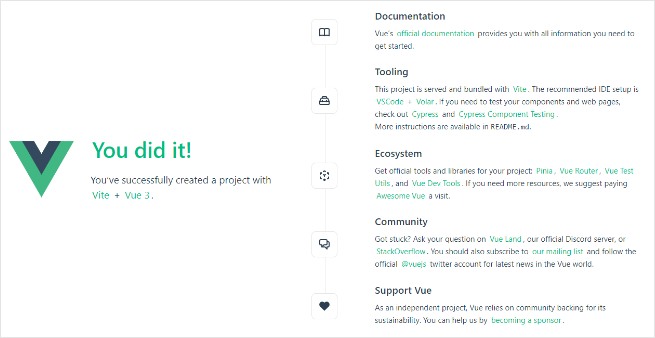
Остановите dev-сервер (Ctrl+C) перед следующим шагом.
2. Установка пакета JS Gantt
Профессиональные сборки библиотеки JS Gantt доступны через приватный npm. Следуйте руководству по установке, чтобы получить доступ.
Оценочная сборка (публичный пакет учебника):
- npm:
npm install @dhx/trial-gantt
- yarn:
yarn add @dhx/trial-gantt
Профессиональная сборка (приватный npm):
- npm:
npm install @dhx/gantt
- yarn:
yarn add @dhx/gantt
Также можно установить Gantt из локальной папки, потому что пакет структурирован как npm-модуль.
3. Создание компонента Gantt
Создайте src/components/GanttView.vue и инициализируйте Gantt во хуках жизненного цикла Vue.
Если вы установили оценочную сборку, используйте эти импорты:
<script setup lang="ts">
import { onBeforeUnmount, onMounted, ref } from "vue";
import { Gantt, type GanttStatic } from "@dhx/trial-gantt";
import "@dhx/trial-gantt/codebase/dhtmlxgantt.css";

const container = ref<HTMLElement | null>(null);
let gantt: GanttStatic | null = null;

onMounted(() => {
  if (!container.value) return;

  gantt = Gantt.getGanttInstance();
  gantt.init(container.value);
});

onBeforeUnmount(() => {
  gantt?.destructor();
  gantt = null;
});
</script>

<template>
  <div ref="container" className="gantt-host"></div>
</template>

<style>
.gantt-host {
  width: 100%;
  height: 600px;
}
</style>
Если вы установили профессиональную сборку, замените импорты пакета:
import { Gantt, type GanttStatic } from "@dhx/gantt";
import "@dhx/gantt/codebase/dhtmlxgantt.css";
Если вы устанавливали Gantt из локальной папки, импорты обычно выглядят так:
import { Gantt, type GanttStatic } from "dhtmlx-gantt";
import "dhtmlx-gantt/codebase/dhtmlxgantt.css";
4. Отображение компонента Gantt в приложении
Замените src/App.vue:
<script setup lang="ts">
import GanttView from "./components/GanttView.vue";
</script>

<template>
  <GanttView />
</template>
Чтобы график занимал всю высоту страницы, обновите глобальные стили (например, src/assets/main.css):
html,
body,
#app {
  width: 100%;
  height: 100vh;
  margin: 0;
  padding: 0;
}
Запустите приложение снова. Вы должны увидеть пустой Gantt-график.
5. Предоставление данных
Создайте src/demo-data.ts:
export function getData() {
  return {
    data: [
      {
        id: 10,
        text: "Project #1",
        start_date: "2026-02-02 00:00",
        duration: 6,
        progress: 0.4,
        open: true
      },
      {
        id: 1,
        text: "Task #1",
        start_date: "2026-02-02 00:00",
        duration: 2,
        progress: 0.6,
        parent: 10
      },
      {
        id: 2,
        text: "Task #2",
        start_date: "2026-02-04 00:00",
        duration: 3,
        progress: 0.2,
        parent: 10
      }
    ],
    links: [{ id: 1, source: 1, target: 2, type: "0" }]
  };
}
Обновите src/components/GanttView.vue и разоберите данные:
<script setup lang="ts">
import { onBeforeUnmount, onMounted, ref } from "vue";
import { Gantt, type GanttStatic } from "@dhx/trial-gantt";
import "@dhx/trial-gantt/codebase/dhtmlxgantt.css";
import { getData } from "../demo-data";

const container = ref<HTMLElement | null>(null);
let gantt: GanttStatic | null = null;

onMounted(() => {
  if (!container.value) return;

  gantt = Gantt.getGanttInstance();
  gantt.config.date_format = "%Y-%m-%d %H:%i";
  gantt.init(container.value);
  gantt.parse(getData());
});

onBeforeUnmount(() => {
  gantt?.destructor();
  gantt = null;
});
</script>

<template>
  <div ref="container" className="gantt-host"></div>
</template>

<style>
.gantt-host {
  width: 100%;
  height: 600px;
}
</style>
Перезагрузите страницу. Вы должны увидеть Gantt-график с задачами и связью зависимостей.
6. Захват и сохранение изменений
Используйте dataProcessor для обработки изменений на диаграмме и отправки их на ваш бэкенд.
Добавьте обработчик после gantt.init(...):
gantt.createDataProcessor((entity, action, data, id) => {
  console.log("[dp]", entity, action, data, id);
});
DHTMLX Gantt принимает ответы Promise от обработчиков dataProcessor. Если ваш бэкенд изменяет идентификаторы при создании, верните объект вроде { id: newId } или { tid: newId }, чтобы Gantt смог переназначить запись.
Для полноценных схем взаимодействия с бэкендом см. раздел серверная интеграция.
Результат
У вас теперь приложение Vue с прямой интеграцией JS Gantt:
- Vue управляет жизненным циклом компонента
- ваш код инициализирует и разрушает экземпляр Gantt
- данные загружаются с помощью
gantt.parse(...) - редактирование можно обрабатывать с помощью
gantt.createDataProcessor(...)
Примечание по безопасности
Gantt не защищает ваш бэкенд от SQL-инъекций, XSS или CSRF. Валидация на стороне сервера, авторизация и очистка выходных данных остаются вашей ответственностью.
Изучите Безопасность приложений для основных областей риска и рекомендаций по снижению рисков.