Typeselect Control
info
This functionality is available in the PRO Edition only.
A select box for changing the type of a task.
The control loads options from the types object and has the default onchange handler. Everything else is identical to Select Control.
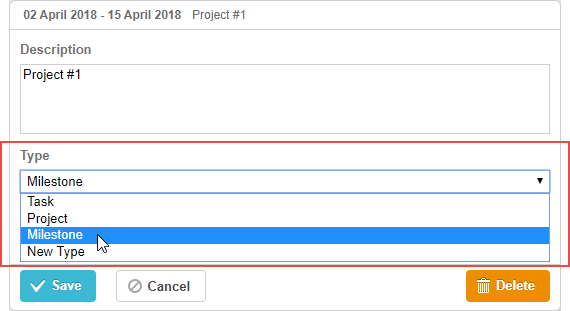
gantt.config.lightbox.sections = [
    {name:"description", height:38, map_to:"text", type:"textarea", focus:true},
    {name: "type", type: "typeselect", map_to: "type"},                             /*!*/
    {name: "time", height: 72, type: "duration", map_to: "auto"}
];
Initialization
To add the typeselect control to the lightbox, just add a section to the lightbox configuration as in:
gantt.config.lightbox.sections = [
    {name:"description", height:38, map_to:"text", type:"textarea",focus:true},
    {name: "type", type: "typeselect", map_to: "type"},                             /*!*/
    {name: "time", height: 72, type: "duration", map_to: "auto"}
];
- Each type of a task has its lightbox. You can create a new type of tasks and define a specific structure of the lightbox for this type.
- Once the user changes the type of a task through the control, the control refreshes the lightbox structure according to the selected value.
- The control loads options from the types object and has the default onchange handler.
- The section with name="type" already has a label specified as "Type". If you want to set a different label for the section, use the following code:
gantt.locale.labels.section_type = "New label for the section";
Properties
The following properties are mostly important and commonly set for the typeselect control (see the full list here):
- name - (string) the section name
- height - (number) the section height
- map_to - (string) the name of a data property that will be mapped to the section
- type - (string) the type of the section control
- focus - (boolean) if set to true, the section will take focus on opening the lightbox
- filter - (function) sets a filtering function for the types of tasks. Takes the type name as a parameter
Need help?
Got a question about the documentation? Reach out to our technical support team for help and guidance. For custom component solutions, visit the Services page.