Template Control
A container with some HTML content inside.
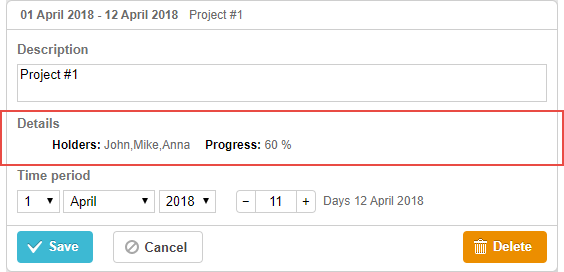
gantt.config.lightbox.sections = [
    {name:"description", height:38, map_to:"text", type:"textarea", focus:true},
    {name:"template", height:16, type:"template", map_to:"my_template"}, /*!*/
    {name:"time", height:72, type:"duration", map_to:"auto"}
];

gantt.locale.labels.section_template = "Details";

gantt.attachEvent("onBeforeLightbox", function(id) {
      var task = gantt.getTask(id);
       task.my_template = "<span id='title1'>Holders: </span>"+ task.users
    +"<span id='title2'>Progress: </span>"+ task.progress*100 +" %";
    return true;
});
Initialization
To add the template control to the lightbox, follow these steps:
- Add a section to the lightbox configuration:
gantt.config.lightbox.sections = [
    {name:"description", height:38, map_to:"text", type:"textarea", focus:true},
    {name:"template", height:16, type:"template", map_to:"my_template"}, /*!*/
    {name:"time", height:72, type:"duration", map_to:"auto"}
];
- Set a label for the section:
gantt.locale.labels.section_template = "Details";
- Set the content of the control with the help of some event, e.g. the onBeforeLightbox event:
gantt.attachEvent("onBeforeLightbox", function(id) {
      var task = gantt.getTask(id);
       task.my_template = "<span id='title1'>Holders: </span>"+ task.users
    +"<span id='title2'>Progress: </span>"+ task.progress*100 +" %";
    return true;
});
Properties
The following properties are mostly important and commonly set for the template control (see the full list here):
- name - (string) the section name
- height - (number) the section height
- map_to - (string) the name of a data property that will be mapped to the section
- type - (string) the type of the section control
- focus - (boolean) if set to true, the section will take focus on opening the lightbox
Need help?
Got a question about the documentation? Reach out to our technical support team for help and guidance. For custom component solutions, visit the Services page.