Quick Info (Touch Support)
The library includes the Quick Info extension that allows displaying a popup with details about the task when a user touches the task on the screen.
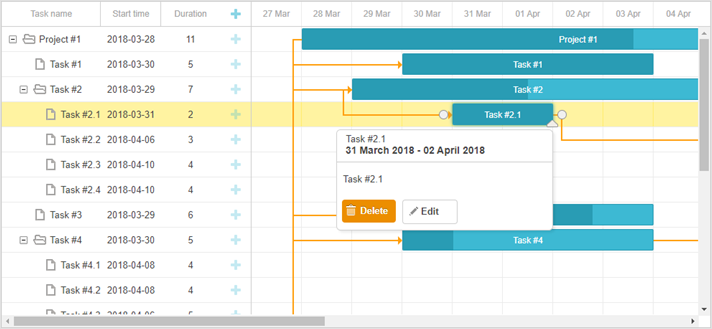
To start using the extension, enable the "Quick Info" plugin using the gantt.plugins method.
gantt.plugins({
    quick_info: true
});
To disable the quick_info extension, set the show_quick_info property to false:
gantt.config.show_quick_info = false;
gantt.init("gantt_here");
API overview
The Quick Info extension provides a set of API that allows you to manipulate the settings of Quick Info, to control its behavior or modify the appearance of a popup.
You may use either [the API of the gantt.ext.quickInfo object](guides/quick-info.md #quickinfoobject) or public API of dhtmlxGantt that is listed below:
Methods
- showQuickInfo - displays the pop-up task form for the specified task
- hideQuickInfo - hides the pop-up task form (if it's currently active)
Events
- onQuickInfo - fires when the pop-up edit form appears
- onAfterQuickInfo - fires after the pop-up edit form is closed
Properties
- quick_info_detached - defines whether the task form will appear from the left/right side of the screen or near the selected task
- quickinfo_buttons - stores a collection of buttons resided in the pop-up task's details form
Templates
- quick_info_class - specifies the CSS class that will be applied to the pop-up edit form
- quick_info_content - specifies the content of the pop-up edit form
- quick_info_date - specifies the date of the pop-up edit form
- quick_info_title - specifies the title of the pop-up edit form
QuickInfo object
The default behavior of the Quick Info extension implies that the popup will appear over a selected task automatically.
Starting from v7.0, the functionality of the Quick Info is extended; the gantt.ext.quickInfo object, that provides methods for control of the popup manually, is added.
The methods available via the gantt.ext.quickInfo object are:
- show() - displays the quick info popup for a specified task. It takes one parameter:
- id - (string|number) the id of a task/link/resource
- show() - displays the quick info popup at specific coordinates. The parameters are:
- top - (number) the X coordinate
- left - (number) the Y coordinate
- hide() - hides the quick info popup. The method can take one optional parameter:
- [ force ] - (boolean) defines whether the quick info will disappear immediately when gantt.config.quick_info_detached is set to false. Providing true as a parameter of the hide method will remove the popup immediately, otherwise - the popup will disappear after a short animation.
- setContainer() - sets a container where the quick info will be displayed.
- container - (string|HTMLElement) a QuickInfo container. If no custom container specified, QuickInfo will be placed into the first of the found nodes: gantt.$task, gantt.$grid, gantt.$layout
- getNode() - returns the HTMLElement of the quick info popup. Returns null if the quick info is not initialized
- setContent(config) - (object) puts the content into the quick info. It takes a configuration object of a quick info as a parameter.
The configuration object has the following structure:
- taskId - (string|number) optional, the id of the task to which the action buttons of the quick info will be connected
- header - optional, the header of the pop-up edit form which may include:
- title - (string) optional, the title of the pop-up edit form
- date - (string) optional, the date of the pop-up edit form
- content - (string) optional, the content of the pop-up edit form
- buttons - (string[]) optional, buttons to be placed in the pop-up edit form
If neither header nor buttons are specified, the related areas of the quick info popup will be hidden.
Showing Quick Info
You can show the popup for a specified task, link, resource panel or define another position on the screen where the popup will be displayed via the gantt.ext.quickInfo.show() method:
// show the popup for the specified task
var task = gantt.getTask(10);
gantt.ext.quickInfo.show(task.id);

// show the popup at specific coordinates
gantt.ext.quickInfo.show(100, 200);
An example of how to show the popup for a resource is given below:
const quickInfo = gantt.ext.quickInfo;
gantt.attachEvent("onGanttReady", function(){
    quickInfo.setContainer(document.body);
})

gantt.attachEvent("onEmptyClick", function (e) {
  const domHelpers = gantt.utils.dom;
  const resourceElement = domHelpers.closest(e.target, "[data-resource-id]");
  if(resourceElement){
    const resourceId = resourceElement.getAttribute("data-resource-id");
    const resource = gantt.$resourcesStore.getItem(resourceId);
    const position = resourceElement.getBoundingClientRect();
    quickInfo.show(position.right, position.top);

    const assignedTasks = gantt.getResourceAssignments(resourceId).map(function(assign){
        return gantt.getTask(assign.task_id).text;
    });

    quickInfo.setContent({
        header: {
        title: resource.text,
        date: ""
    },
        content: "Assigned tasks: " + assignedTasks.join(", "),
        buttons: []
    });
  }
});
And here is an example of showing the popup for a specified link:
const quickInfo = gantt.ext.quickInfo;
gantt.attachEvent("onLinkClick", function(id,e){
    //any custom logic here
    const link = gantt.getLink(id);
    const linksFormatter = gantt.ext.formatters.linkFormatter();

    const domHelpers = gantt.utils.dom;
    const position = domHelpers.getRelativeEventPosition(e, gantt.$task_data);

    const sourceTask = gantt.getTask(link.source);
    const targetTask = gantt.getTask(link.target);
    quickInfo.show(position.x, position.y);

    let linkDescr = "";

    if (link.type === gantt.config.links.start_to_start){
        linkDescr = "Start to start";
    } else if (link.type === gantt.config.links.start_to_finish){
        linkDescr = "Start to finish";
    } else if (link.type === gantt.config.links.finish_to_finish){
        linkDescr = "Finish to Finish";
    } else {
        linkDescr = "Finish to start";
    }

    quickInfo.setContent({
        header: {
            title: `${linkDescr} link`,
            date: ""
        },
        content: `Source: ${sourceTask.text}


                    Target: ${targetTask.text}`,
        buttons: []
    });
});
Hiding Quick Info
To hide a pop-up edit form, make use of the gantt.ext.quickInfo.hide() method. The method depends on the gantt.config.quick_info_detached config and presupposes two possible options:
- when called without parameters, the pop-up edit form will be hidden from the screen after a short animation
gantt.config.quick_info_detached = false;
gantt.init("gantt_here");

// hide the popup after a short animation
gantt.ext.quickInfo.hide();
- if you want to hide the quick info at once, pass true as a parameter to the hide method:
gantt.config.quick_info_detached = false;
gantt.init("gantt_here");

// hide the popup immediately
gantt.ext.quickInfo.hide(true);
Note, that if the gantt.config.quick_info_detached config is set to true, the method will always hide the popup immediately.
Creating a custom QuickInfo
By default, a quick info popup contain a title, date, content, buttons and looks like this:

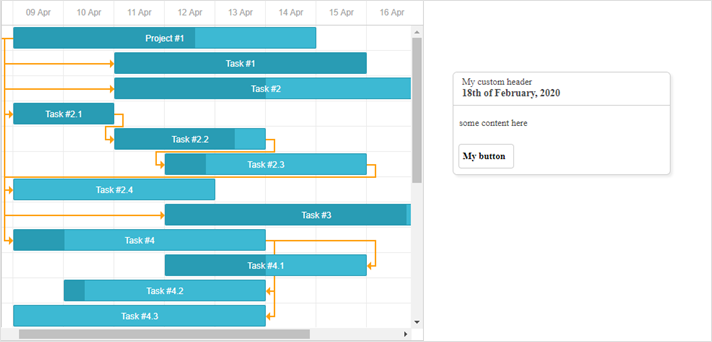
In case you want to change the appearance of the pop-up edit form or create a custom one, you may define the desired HTML content via the gantt.ext.quickInfo.setContent() method:
gantt.locale.labels.custom_button = "My button"
gantt.ext.quickInfo.setContent({
    header:{
        title: "My custom header",
        date: "18th of February, 2020"
    },
    content: "some content here",
    buttons: ["custom_button"]
})
As a result, the following quick info popup will appear on the page:

Adding custom buttons with custom behavior
The $click object allows you to add custom behavior for custom buttons placed into the pop-up edit form:
gantt.config.quickinfo_buttons="[""icon_delete","icon_edit","advanced_details_button"];
gantt.locale.labels["advanced_details_button"] = "Advanced Info";
gantt.init("gantt_here");

gantt.$click.buttons.advanced_details_button="function(id){"
    gantt.message("These are advanced details");
    return false; //blocks the default behavior
};
Setting a container for QuickInfo
You can use the gantt.ext.quickInfo.setContainer() method to make the quick info popup to be displayed in a custom container:
const quickInfo = gantt.ext.quickInfo;
quickInfo.setContainer(document.body); /*!*/
gantt.ext.quickInfo.show(1300,100);
gantt.locale.labels.custom_button = "My button"
gantt.ext.quickInfo.setContent({
    header:{
        title: "My custom header",
        date: "18th of February, 2020"
    },
    content: "some content here",
    buttons: ["custom_button"]
});
Now, the pop-up with custom content will be rendered in document.body outside the container of Gantt: