自定义事件颜色
有三种方式可以自定义事件的颜色:
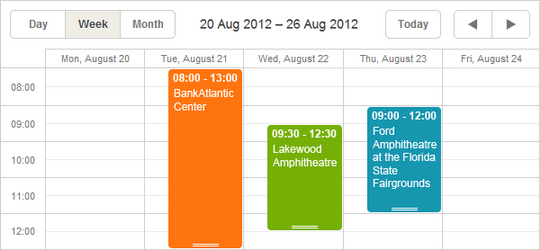
在事件对象属性中指定颜色
要为事件分配自定义颜色,只需在事件数据对象中添加以下一个或两个属性:
- textColor - 设置事件字体颜色;
- color - 设置事件背景颜色。

Setting the event's color in the data object
scheduler.parse([
   {id:1, start_date:"2019-05-21",end_date:"2019-05-25",text:"Task1", color:"red"},
   {id:2, start_date:"2019-06-02",end_date:"2019-06-05",text:"Task2", color:"blue"}
],"json");
...
scheduler.getEvent(1).color = "yellow";
scheduler.updateEvent(1);
请注意,这些是特殊属性。scheduler 会自动检测它们,并将指定的颜色应用到事件的容器和文本上。如果未设置这些属性,则会使用默认颜色。
这些属性支持任何有效的 CSS 颜色格式,例如:
ev.color = "#FF0000";
ev.color = "red";
ev.color = "rgb(255,0,0)";
为事件附加额外的 CSS 类
另一种设置事件颜色的方法是为事件添加自定义 CSS 类。
技术实现
你可以使用 event_class 模板为事件应用 CSS 类。
默认情况下,模板如下所示:
scheduler.templates.event_class = function(start, end, ev){
     return "";
}
该函数返回的字符串会被添加到事件的 class 属性中,因此你可以根据事件的状态返回不同的类名。
示例
假设你希望根据事件属于经理还是员工来设置不同的颜色:经理为绿色,员工为橙色。实现步骤如下:
- 在数据模型中添加一个额外的属性,例如 'type',用于标识用户类型:'manager' 或 'employee'。
 2. 创建与这些类型对应的 CSS 类,如 'manager_event' 和 'employee_event'。CSS 代码可能如下:
Redefining the default CSS classes
~~~html
<style>
  .manager_event {
        --dhx-scheduler-event-background: #009966;
        --dhx-scheduler-event-color: black;
  }

  .employee_event {
        --dhx-scheduler-event-background: #FF9933;
        --dhx-scheduler-event-color: black;
  }
</style>
对于 6.0 及之前版本的 Scheduler(不支持 CSS 变量),可以使用如下样式:
<style>
  /* 日/周视图下的事件 */
  .dhx_cal_event.manager_event div{
  background-color: #009966 !important;
  color: black !important;
  }
  .dhx_cal_event.employee_event div{
  background-color: #FF9933 !important;
  color: black !important;
  }

  /* 月视图下的多日事件 */
  .dhx_cal_event_line.manager_event{
  background-color: #009966 !important;
  color: black !important;
  }
  .dhx_cal_event_line.employee_event{
  background-color: #FF9933 !important;
  color: black !important;
  }

  /* 月视图下的定时事件 */
  .dhx_cal_event_clear.manager_event{
  color: black !important;
  }
  .dhx_cal_event_clear.employee_event{
  color: black !important;
  }
</style>
- 最后,重写 event_class 模板为事件分配类名:
Applying additional CSS classes to events:
scheduler.templates.event_class = function (start, end, event) {
  if (event.type == 'manager') return "manager_event";
  return "employee_event";
};
通过数据加载颜色
当颜色来自后端数据(例如任务颜色取决于阶段或分配的资源,无法硬编码)时,可以根据数据动态生成样式。
假设你有一个分配了用户的任务列表,任务样式取决于用户属性:
[
  {"key":1, "label":"John", "backgroundColor":"#03A9F4", "textColor":"#FFF"},
  {"key":2, "label":"Mike", "backgroundColor":"#f57730", "textColor":"#FFF"},
  {"key":3, "label":"Anna", "backgroundColor":"#e157de", "textColor":"#FFF"},
  {"key":4, "label":"Bill", "backgroundColor":"#78909C", "textColor":"#FFF"},
  {"key":7, "label":"Floe", "backgroundColor":"#8D6E63", "textColor":"#FFF"}
]
在这种情况下,用户及其颜色与 scheduler 分开管理,scheduler 事先并不知道用户 ID 或颜色。
实际做法如下:
- 为该集合定义一个命名的 serverList:
scheduler.serverList("people");
-
通过支持的 数据格式 或自定义 XHR 请求将这些选项加载到页面。
-
加载后,根据数据动态生成 CSS 样式:
scheduler.attachEvent("onLoadEnd", function(){
  // 使用唯一的 ID 作为样式元素
  var styleId = "dynamicSchedulerStyles";

  // 如果样式元素已存在,则复用

  var element = document.getElementById(styleId);
  if(!element){
  element = document.createElement("style");
  element.id = styleId;
  document.querySelector("head").appendChild(element);
  }
  var html = [];
  var resources = scheduler.serverList("people");

  // 为每个用户创建 CSS 规则并插入样式元素

  resources.forEach(function(r){
        html.push(`.event_resource_${r.key} {
            --dhx-scheduler-event-background:${r.backgroundColor};
            --dhx-scheduler-event-color:${r.textColor};
        }`);
  });
  element.innerHTML = html.join("");
});
- 然后,在 event_class 模板中为事件分配生成的类名:
scheduler.templates.event_class = function (start, end, event) {
  var css = [];

  if(event.owner_id){
  css.push("event_resource_" + event.owner_id);
  }

  return css.join(" ");
};
Need help?
Got a question about the documentation? Reach out to our technical support team for help and guidance. For custom component solutions, visit the Services page.