工具提示(v6.0)
本文档适用于 dhtmlxScheduler 6.0 及早期版本。如果您使用的是 dhtmlxScheduler 7.0+,请参阅以下详情 此处。
要在事件上显示工具提示,您应在页面上仅激活一次 Tooltip 扩展。
scheduler.plugins({
    tooltip: true
});
此后,工具提示将使用默认设置显示。
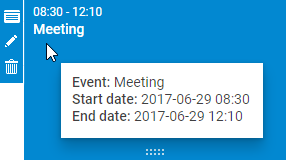
要配置工具提示,您可以使用以下 API:
方法
- hide() - 隐藏工具提示
- show(event,text) - 在浏览器事件位置显示工具提示,内容为指定文本。该方法共接受两个参数:
- event - 浏览器事件
- text - 工具提示内容,将被添加到工具提示元素的 innerHTML
tooltip.hide();
tooltip.show(event, text);
配置属性
- className - 将应用于工具提示的 CSS 类名
- timeout_to_display - 以毫秒为单位的延迟,在事件显示工具提示之前(默认值 50)
- timeout_to_hide - 以毫秒为单位的延迟,在工具提示隐藏之前(默认值 50)
- delta_x - 光标位置的向右偏移量(若为正,则偏移量为 15)
- delta_y - 光标位置的向上偏移量(若为正,则偏移量为 -20)
scheduler.config.className = 'dhtmlXTooltip tooltip';
scheduler.config.timeout_to_display = 50;
scheduler.config.timeout_to_hide = 50;
scheduler.config.delta_x = 15;
scheduler.config.delta_y = -20;
模板
- tooltip_text - 指定工具提示的文本
- tooltip_date_format - 指定在工具提示中显示的开始日期和结束日期的格式
const format = scheduler.date.date_to_str("%Y-%m-%d %H:%i");
scheduler.templates.tooltip_text = function(start,end,event) {
    return "<b>Event:</b> "+event.text+"

<b>Start date:</b> "+
    format(start)+"

<b>End date:</b> "+format(end);
};
Need help?
Got a question about the documentation? Reach out to our technical support team for help and guidance. For custom component solutions, visit the Services page.