刻度和事件框的尺寸
如果你使用 dhtmlxScheduler 6.0 或更早版本,请参阅此处的详细信息 here。
在本文中,我们将讨论如何管理事件和时间刻度的尺寸。
短事件显示
首先,让我们了解默认的事件框显示行为:
- 默认刻度单位高度为 44px(或小时高度),由 hour_size_px 定义
- 事件框的最小高度为 20px,由 scheduler.xy.min_event_height 设置定义
- 由于一个事件的高度不能小于 20px,15分钟和5分钟的事件将具有相同的高度
- 高度小于 42px 的事件使用一种特殊显示模式,并获得额外的 CSS 类以启用较短事件的显示:
.dhx_cal_event--small- 高度小于 42px 的事件.dhx_cal_event--xsmall- 高度小于 30px 的事件
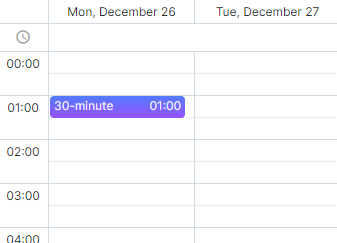
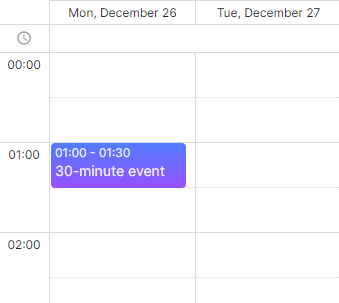
你可以增加时间刻度的高度,以提升这类事件的可见性:
scheduler.config.hour_size_px = 90;
scheduler.render();// 或 scheduler.init(...)
自定义事件框
可以完全覆盖事件框的渲染函数。要实现这一点,应该使用 renderEvent 方法,它允许你为事件设置自己的模板:
scheduler.renderEvent = function(container, ev) {
    //您的自定义代码
}
请阅读相关章节 - 自定义事件框。
防止短事件重叠
为了单独显示短事件并消除它们重叠的可能性,应将 separate_short_events 选项设置为 true:
scheduler.config.separate_short_events = true;
注释
此配置从 v7.0 开始默认启用。若使用 Scheduler 的早期版本,您需要手动启用它。
如何更改刻度间距
要更改默认的刻度间距,您需要重写 hour_scale 模板。
要使刻度间距等于 30 分钟,可以按如下方式重写模板:
const format = scheduler.date.date_to_str("%H:%i");
const step = 30;

scheduler.templates.hour_scale = function(date){
    let html="";
    for (let i = 0; i < 60/step; i++){
        html += "<div style='height:22px;line-height:22px;'>"+format(date)+"</div>";
        date = scheduler.date.add(date,step,"minute");
    }
    return html;
}

相关示例: 自定义 Y 轴
Need help?
Got a question about the documentation? Reach out to our technical support team for help and guidance. For custom component solutions, visit the Services page.