Select Control
A drop-down list box.
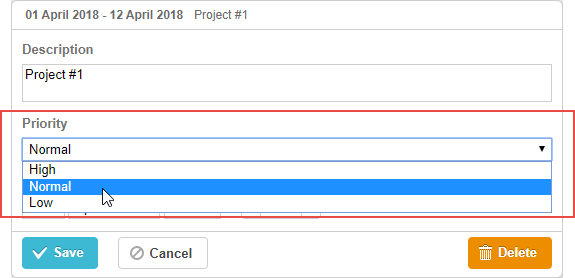
gantt.config.lightbox.sections = [
    {name:"description", height:38, map_to:"text", type:"textarea", focus:true},
    {name:"priority", height:22, map_to:"priority", type:"select", options: [ /*!*/
        {key:1, label: "High"},                                               /*!*/
        {key:2, label: "Normal"},                                             /*!*/
        {key:3, label: "Low"}                                                 /*!*/
     ]},                                                                      /*!*/
    {name:"time", height:72, type:"duration", map_to:"auto"}
];

gantt.locale.labels.section_priority = "Priority";
Initialization
To add the select control to the lightbox, follow these steps:
- Add a section to the lightbox configuration:
var opts = [
    {key:1, label: "High"},
    {key:2, label: "Normal"},
    {key:3, label: "Low"}
];

gantt.config.lightbox.sections = [
    {name:"description", height:38, map_to:"text", type:"textarea",focus:true},
    {name:"priority", height:22, map_to:"priority",type:"select",options:opts},      /*!*/
    {name:"time", height:72, type:"duration", map_to:"auto"}
];
- Set a label for the section:
gantt.locale.labels.section_priority = "Priority";
Properties
The following properties are mostly important and commonly set for the select control (see the full list here):
- name - (string) the section name
- height - (number) the section height
- map_to - (string) the name of a data property that will be mapped to the section
- type - (string) the type of the section control
- focus - (boolean) if set to true, the section will take focus on opening the lightbox
- options - (array) an array of objects. Defines select options of the control (used for the select, checkbox and radio controls). Each object in the array specifies a single option and takes
the following properties:
- key - (string) the option id. This attribute is compared with the task data property to assign options to tasks
- label - (string) the option label
- default_value - (any) the default value of the section's control. Applied only if the input value is underfined
- onchange - (function) specifies the 'onChange' event handler function for the section's control
Populating control with data
Generally, to set values for the select control, use the options parameter:
gantt.config.lightbox.sections = [
    { name:"priority",height:22, map_to:"priority",type:"select",
      options: [
        {key:1, label: "High"},
        {key:2, label: "Normal"},
        {key:3, label: "Low"}
    ]}
];
Items in the options parameter have 2 mandatory properties:
- key - the option id
- label - the option label
Populating control with data from the server
To populate the control from the server, set the options option to the value returned by the serverList method:
gantt.config.lightbox.sections = [
    {name:"description", ...},
    { name:"priority",map_to:"priority",type:"select",
        options:gantt.serverList("priority")}, /*!*/
    {name:"category", map_to:"category", type:"select",
        options:gantt.serverList("category")}, /*!*/
    {name:"time", ...}
];
gantt.init("gantt_here");
gantt.load("/data");
The output of the /data url is the following:
{
  "tasks":[
    {"id":1,"text":"Project #2","start_date":"01-04-2020","duration":18,"parent":0},
    {"id":2,"text":"Task #1","start_date":"02-04-2020","duration":8,"parent":1},
    {"id":3,"text":"Task #2","start_date":"11-04-2020","duration":8,"parent":1}
  ],
  "links":[
    {"id":1,"source":1,"target":2,"type":"1"},
    {"id":2,"source":2,"target":3,"type":"0"}
  ],
  "collections": { /*!*/
    "priority":[
        {"value":"1","label":"Low"},
        {"value":"2","label":"Medium"},
        {"value":"3","label":"High"}
    ],
    "category":[
        {"value":"1","label":"Simple"},
        {"value":"2","label":"Complex"},
        {"value":"3","label":"Unknown"}
    ]
  }
}
Loading options via dhtmlxConnector
Here is a sample of dhtmlxConnector initialization:
//data.php
<?php
    include('connector-php/codebase/gantt_connector.php');

    $res = new PDO("mysql:host=localhost;dbname=gantt", "root", "");

    $list = new OptionsConnector($res);
    $list->render_table("priorities","id","id(value),name(label)");

    $gantt = new JSONGanttConnector($res);
    $gantt->set_options("priority", $list);
    $gantt->render_links("gantt_links","id","source_task(source),
                    target_task(target),type");
    $gantt->render_table("gantt_tasks","id","start_date,duration,text,progress,
                    sortorder,parent");
?>
Need help?
Got a question about the documentation? Reach out to our technical support team for help and guidance. For custom component solutions, visit the Services page.