Empty State Screen
Starting from v8.0, the library includes the ability to display an empty screen ("empty state") with the placeholder element in the grid if there is no data loaded in the Gantt chart.
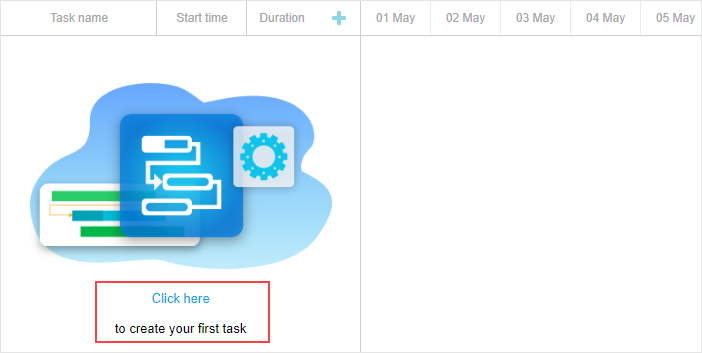
By default, the placeholder element is hidden. To show it, use the show_empty_state config:
gantt.config.show_empty_state = true;
EmptyStateElement object
The "empty state" comes with a set of API methods provided by the emptyStateElement extension.
Display of the "empty state" is possible not only when there are no tasks loaded in the gantt. You may display it also if the tasks are loaded but filtered and they are not visible on the page. For that, use the isEnabled() method:
gantt.ext.emptyStateElement.isEnabled = function (){
    return !gantt.getVisibleTaskCount().length;
}
If you want to display the "empty state" in the timeline area not in the grid, use the getContainer() method:
gantt.ext.emptyStateElement.getContainer = function() {
    return gantt.$task_data.closest(".gantt_layout_content");
};
To change the content rendered in the "empty state", apply the renderContent() method:
gantt.ext.emptyStateElement.renderContent = function (container) {
    const placeholderTextElement = `<div className='gantt_empty_state_text'>
    <div className='gantt_empty_state_text_link' data-empty-state-create-task>
       ${gantt.locale.labels.empty_state_text_link}</div>
    <div className='gantt_empty_state_text_description'>
       ${gantt.locale.labels.empty_state_text_description}</div>
    </div>`;
    const placeholderImageElement = "<div className='gantt_empty_state_image'></div>";

    const placeholderContainer = `<div className='gantt_empty_state'>
       ${placeholderImageElement}${placeholderTextElement}</div>`;
    container.innerHTML = placeholderContainer;
}