工具提示 (v6.0)
本文适用于 dhtmlxScheduler 6.0 及更早版本。7.0 及以上版本请参见此处的详细信息。
要为事件启用工具提示,需在页面上激活 Tooltip 扩展。
scheduler.plugins({
    tooltip: true
});
启用后,工具提示将使用默认配置显示。
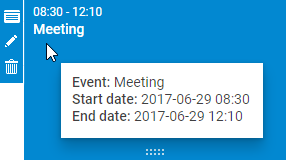
可以使用以下 API 自定义工具提示功能:
方法
- hide() - 隐藏工具提示
- show(event,text) - 在浏览器事件发生的位置显示带有指定内容的工具提示。该方法接受两个参数:
- event - 浏览器事件对象
- text - 要插入到工具提示 innerHTML 的内容
tooltip.hide();
tooltip.show(event, text);
配置属性
- className - 指定应用于工具提示的 CSS 类名
- timeout_to_display - 工具提示显示前的延迟(毫秒),默认为 50
- timeout_to_hide - 工具提示消失前的延迟(毫秒),默认为 50
- delta_x - 相对于光标的水平偏移量(正值向右偏移,默认为 15)
- delta_y - 相对于光标的垂直偏移量(正值向下偏移,默认为 -20)
scheduler.config.className = 'dhtmlXTooltip tooltip';
scheduler.config.timeout_to_display = 50;
scheduler.config.timeout_to_hide = 50;
scheduler.config.delta_x = 15;
scheduler.config.delta_y = -20;
模板
- tooltip_text - 定义工具提示中显示的内容
- tooltip_date_format - 定义工具提示中起止日期的日期格式
var format = scheduler.date.date_to_str("%Y-%m-%d %H:%i");
scheduler.templates.tooltip_text = function(start,end,event) {
    return "<b>Event:</b> "+event.text+"

<b>Start date:</b> "+
    format(start)+"

<b>End date:</b> "+format(end);
};
Need help?
Got a question about the documentation? Reach out to our technical support team for help and guidance. For custom component solutions, visit the Services page.