网格中行高调整
可以修改网格中各个行的高度。
dhtmlxGantt 库提供两种方式来管理行高:
- 为需要的任务对象同时设置行高和任务条的高度;
- 通过拖动网格行的底部边框。
注释
本功能在 v7.1 及以上版本可用。
设置行高
您可以根据需要调整某一行的高度。
注释
单独的行高目前与 static background rendering 不兼容。
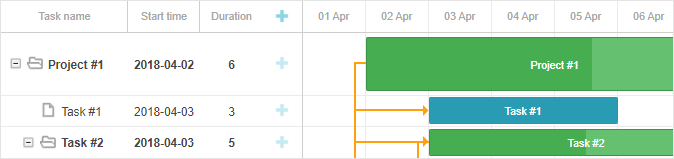
为此,您需要在数据集中重新定义任务对象的 row_height 和 bar_height 属性:
在数据集中指定任务的类型
gantt.parse({
    data: [
        { id: 11, text: "Project #1", type: "project", progress: 0.6, open: true,
            row_height: 70, bar_height: 60 }, /*!*/
        { id: 12, text: "Task #1", start_date: "03-04-2018", duration: "5",
            parent: "11", progress: 1, open: true },
        { id: 13, text: "Task #2", start_date: "03-04-2018", type: "project",
            parent: "11", progress: 0.5, open: true }
    ],
    links: []
});
或您也可以动态实现:
gantt.getTask(11).row_height = 50;
gantt.getTask(11).bar_height = 25;
// 重新渲染 Gantt 以应用更改
gantt.render();
如果任务对象的 row_height 和 bar_height 属性未指定或为空(默认状态),将使用 gantt.config.row_height 和 gantt.config.bar_height 的值。
通过拖放调整行高
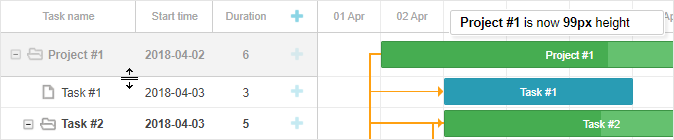
为了让用户能够通过拖动行的底部边框来调整网格中的行高,请将 gantt.config.resize_rows 选项设置为 true:
gantt.config.resize_rows = true;
gantt.config.min_task_grid_row_height 选项提供在调整大小时可为任务设置的最小行高:
gantt.config.min_task_grid_row_height = 45;
事件
有 4 个事件可用于处理通过拖放调整行高的行为:
- onBeforeRowResize - 在用户开始通过拖拽调整行高之前触发
- onRowResize - 当用户拖动行边框以调整行高时触发
- onBeforeRowResizeEnd - 在行高调整完成之前触发
- onAfterRowResize - 在行高调整完成之后触发
Need help?
Got a question about the documentation? Reach out to our technical support team for help and guidance. For custom component solutions, visit the Services page.