Multi-Task Selection
Starting from version 3.2, the library provides the multiselect extension that allows you to select multiple tasks at once.
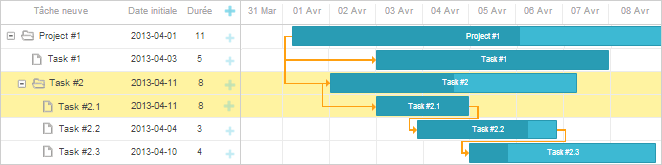
Activating multi-task selection
To activate multi-task selection for tasks, enable it using the gantt.plugins method:
<!DOCTYPE html>
<html>
<head>
   <script src="codebase/dhtmlxgantt.js"></script>
   <link href="codebase/dhtmlxgantt.css" rel="stylesheet">
</head>
<body>
    gantt.plugins({ /*!*/
        multiselect: true /*!*/
    }); /*!*/
    //your code will be here
</body>
</html>
Multiselection and Indent/Outdent tasks
Once the extension is activated, multi-task selection will be automatically enabled.
To disable extension, use the multiselect option: Disabling multi-task selection
gantt.config.multiselect = false;
One-time update for multiple tasks
To update multiple tasks/links at once, use the batchUpdate method:
gantt.batchUpdate(function () {
    var tasks = gantt.getTaskByTime();
    for(var i = 0; i < tasks.length; i++){
        var task = tasks[i];
        task.start_date = gantt.date.add(task.start_date, 1, "day");
        task.end_date = gantt.calculateEndDate(task.start_date, task.duration);
        gantt.updateTask(task.id);
    }
});
The method allows you to update multiple tasks/links at once with a single re-rendering instead of making multiple updates with multiple re-renderings.
Multiselection and Indent/Outdent tasks
Iterator
To iterate over all selected tasks in the Gantt chart, use the eachSelectedTask method:
gantt.batchUpdate(function () {
    gantt.eachSelectedTask(function(task_id){
        if(gantt.isTaskExists(task_id))
            gantt.deleteTask(task_id);
    });
});
Multiselection and Indent/Outdent tasks
Simultaneous indentation/outdentation
Multi-task selection allows you to apply different operations to multiple tasks at once. For example, you can add an indentation/outdentation thereby transforming tasks to sub-tasks and vice versa.
Multiselection and Indent/Outdent tasks
Checking if a task is selected
To check if a task is currenly selected, use the isSelectedTask method:
gantt.templates.task_class =
gantt.templates.grid_row_class =
gantt.templates.task_row_class = function (start, end, task) {
    if (gantt.isSelectedTask(task.id))
        return "gantt_selected";
};
Multiselection and Indent/Outdent tasks
To toggle between selected and unselected states, use the toggleTaskSelection method:
gantt.toggleTaskSelection("t_1"); //"t_1" is the task's id
gantt.render();
Getting all selected tasks
To get all tasks that are currently selected, use the getSelectedTasks method:
gantt.getSelectedTasks();
To get the last selected task, use the getLastSelectedTask method:
gantt.getLastSelectedTask();
Limiting multi-task selection within one level
To deny selecting tasks from different levels, use the multiselect_one_level option:
gantt.config.multiselect_one_level = true;
gantt.init('gantt_here');
Multi-task selection and drag-n-drop
When the multiselect.js extension is activated, you can select several tasks by holding either the Ctrl or Shift key and drag the selected tasks horizontally at once.
To disable this functionality, set the drag_multiple method to false:
gantt.config.drag_multiple = true;
Multiselection and Indent/Outdent tasks
Opening editor with one click
In the single selection mode, Gantt opens the inline editor after you click on a task.
In the multi selection mode, after you click on an unselected task, Gantt will select it, and will open the inline editor only after the second click. If you want Gantt to open the inline editor after the first click, enable the inline_editors_multiselect_open config.
gantt.plugins({
  multiselect: true
});

...

gantt.config.inline_editors_multiselect_open = true;
API events
When multi-task selection is enabled, selecting a task or a range of tasks will trigger both the general onTaskSelected / onTaskUnselected events, and events specific to the multiselect extension.
Multi-task selection has the following events flow:
- onBeforeMultiSelect - fires before selecting task or a range of tasks, blockable
- onBeforeTaskMultiSelect - fires before task selection state is being changed (the task is being selected or unselected), blockable
- onTaskMultiSelect - fires after the task selection state has changed (the task has been selected/unselected)
- onTaskUnselected - is called for each task of the multiselection range
- onTaskSelected - is called for each task of the multiselection range
- onMultiSelect - fires after selection of a task or a range of tasks has been completed