Hospital management system demo
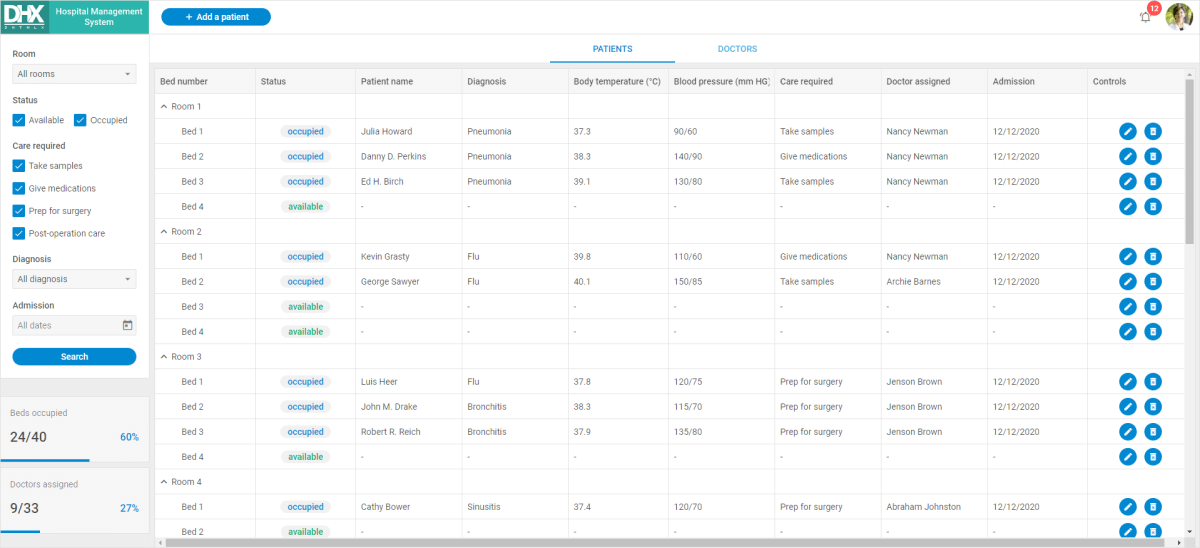
This demo application shows how to create a hospital management system with DHTMLX Diagram and the following DHTMLX Suite widgets: Sidebar, Grid in the TreeGrid mode, Tabbar, DataView, Window, Toolbar, and Form.
How to download
Open the Hospital Management System demo and click the Download Demo button in the bottom right corner of the page.
Complete the form to start the download. You then receive an email with the download link.
Follow the link in the email to get a free 30-day trial version. You receive a .zip file with the hospital management system demo. Save the file and unpack it into your working directory.
The DHTMLX JavaScript Demos page contains more demos.
How to start
To run the demo, follow the instructions in the README.md file.
Demo overview
The hospital management system demo shows how to organize DHTMLX widgets and which components they include. You can use the demo to build your own management system.
Pay attention to the Patient Registration Form. It contains built-in DatePicker, Combo, Input, and RadioGroup controls, and more.
Grid in the TreeGrid mode is the main widget of the demo. Use this widget to manage the hospital in real time. Tabbar helps you organize the information in this Grid.
The demo also uses DHTMLX Diagram to visualize the hospital management hierarchy.
For more details, check Hospital Management System in JavaScript.
License
A free 30-day trial version of the demo is for evaluation only. You can read the Evaluation License Terms when you fill in the download form.
After the trial period is over, you receive messages about using an unlicensed product.
How to start with a license
If you want to continue to use this demo in your project after the evaluation, you have to purchase the DHTMLX Suite PRO Edition license. See the available license types for more information.
After the purchase, replace the .js and .css files of the evaluation version with the licensed DHTMLX Suite files to keep using the demo.