调整时间刻度与事件框的尺寸
如果您使用的是 dhtmlxScheduler 6.0 或更早版本,详细信息请参见 这里。
本文介绍如何调整事件框和时间刻度的尺寸。
短事件的显示
首先,让我们看看事件框的默认表现:
- 时间刻度单元的默认高度为 44px(对应一小时),详见 hour_size_px。
- 事件框的最小高度为 20px,由 scheduler.xy.min_event_height 配置项设置。
- 由于事件不能短于 20px,所以 15 分钟和 5 分钟的事件最终高度相同。
- 高度低于 42px 的事件会采用特殊显示模式,并获得额外的 CSS 类以处理短事件:
.dhx_cal_event--small针对高度小于 42px 的事件.dhx_cal_event--xsmall针对高度小于 30px 的事件
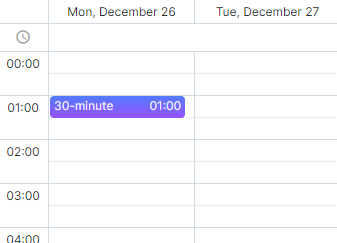
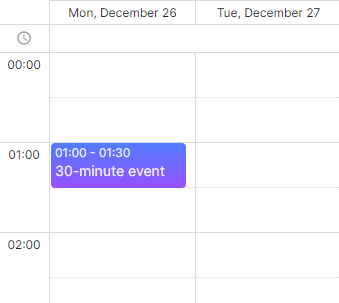
为了让这些短事件更明显,您可以增加时间刻度的高度:
scheduler.config.hour_size_px = 90;
scheduler.render();// 或 scheduler.init(...)
自定义事件框
您可以通过重写渲染函数,完全自定义事件框的渲染方式。可以使用 renderEvent 方法,定义自己的事件模板:
scheduler.renderEvent = function(container, ev) {
    //您的自定义代码
}
更多信息请参见相关章节 - 커스텀 이벤트 박스。
防止短事件重叠
为避免短事件重叠,可以将 separate_short_events 选项设置为 true:
scheduler.config.separate_short_events = true;
注释
从 7.0 版本开始,此设置默认启用。只有在使用旧版 Scheduler 时才需要手动激活。
如何更改刻度间距
如需调整默认的刻度间距,可以重写 hour_scale 模板。例如,将刻度间距设置为 30 分钟,可以这样重写模板:
var format = scheduler.date.date_to_str("%H:%i");
var step = 30;

scheduler.templates.hour_scale = function(date){
    var html="";
    for (var i="0;" i<60/step; i++){
        html+="<div>"+format(date)+"</div>";
        date = scheduler.date.add(date,step,"minute");
    }
    return html;
}

相关示例:
Need help?
Got a question about the documentation? Reach out to our technical support team for help and guidance. For custom component solutions, visit the Services page.