Text align
用于管理 Diagram 元素内文本对齐方式的复合控件
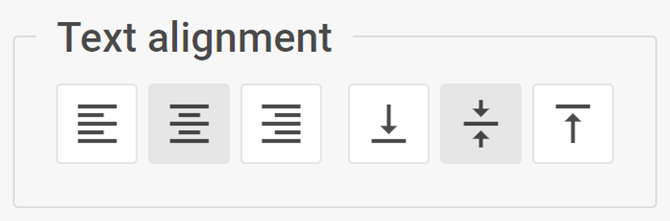
用法
{
    type: "textAlign",

    hidden?: boolean, // 默认为 false
    disabled?: boolean, // 默认为 false

    css?: string,
    width?: string | number | "content", // 默认为 "content"
    height?: string | number | "content", // 默认为 "content"
    padding?: string | number, // 默认为 "0 16px"

    label?: string,
    labelAlignment?: "left" | "right" | "center", // 默认为 "left"
    align?: "start" | "center" | "end" | "between" | "around" | "evenly", // 默认为 "between"
    compact?: boolean, // 默认为 false

    // 服务属性
    $properties?: object
}
描述
基本属性
type- (必需)控件的类型。将其设置为"textAlign"hidden- (可选)定义是否隐藏该控件。默认为 falsedisabled- (可选)定义控件是启用(false)还是禁用(true)状态。默认为 falsecss- (可选)为控件添加样式类width- (可选)控件的宽度。默认为"content"height- (可选)控件的高度。默认为"content"padding- (可选)设置控件组内内容的内边距。默认为 "0 16px"label- (可选)指定控件的标签labelAlignment- (可选)定义标签的位置。默认为"left"align- (可选)设置控件组内各控件的对齐方式。默认为"between"compact- (可选)指定紧凑模式,移除缩进和边框。默认为 false
服务属性
$properties- (可选)允许您在复合控件内覆盖基础控件的值。您可以基于基础控件配置 Text align 控件的以下元素:textAlign- (toggleGroup) 设置文本的水平对齐方式textVerticalAlign- (toggleGroup) 设置文本的垂直对齐方式
示例
const editor= new dhx.DiagramEditor("editor_container", {
    type: "mindmap",
    view: {
        editbar: {
            properties: {
                $shape: [
                    {
                        type: "textAlign",
                        label: "Text align"
                    }
                ]
            }
        }
    }
});