Combo
基本输入控件,表示带有一组选项的高级可编辑选择框。
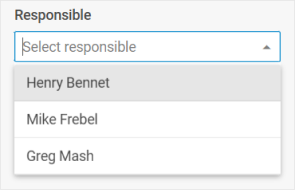
用法
{
    type: "combo",
    options: (object | string)[],
    key?: string | string[],
    wrap?: boolean, // 默认为 false

    css?: string,
    disabled?: boolean, // 默认为 false
    hidden?: boolean, // 默认为 false
    height?: string | number | "content", // 默认为 "content"
    width?: string | number | "content", // 默认为 "content"
    padding?: string | number,

    filter?: (item: any, input: string) => boolean,
    eventHandlers?: {
        [eventName: string]: {
            [className: string]: (event: Event, id: string | number) => void | boolean;
        };
    },
    itemHeight?: number | string, // 默认为 32
    itemsCount?: boolean | ((count: number) => string),
    listHeight?: number | string, // 默认为 224
    multiselection?: boolean, // 默认为 false
    placeholder?: string,
    readOnly?: boolean, // 默认为 false
    selectAllButton?: boolean, // 默认为 false
    template?: (item: object) => string,
    virtual?: boolean, // 默认为 false

    // 当 `wrap:true` 时,请查看 Fieldset 的标签属性
    label?: string,
    labelWidth?: string | number,
    labelPosition?: "left" | "top", // 默认为 "top"

    // 服务属性和方法
    $on?: { [eventName: string]: function },
    $handler?: function,
    $setValue?: function,
    $layout?: function
}
Combo 内部的选项配置对象:
{
    id: string | number,
    value: string | number
}
描述
Combo 属性
基本属性
type-(必需)控件的类型,设置为"combo"options-(必需)Combo 选项的数组,每个选项可以设置为 string,也可以设置为包含一组key:value对的 object —— 选项的属性及其值key-(可选)指定/修改属性的名称,或该属性在 Diagram 项对象中的路径wrap-(可选)允许显示外部包装。默认值为 falsecss-(可选)为控件添加样式类disabled-(可选)定义控件是启用(false)还是禁用(true)状态。默认值为 falsehidden-(可选)定义 Combo 是否隐藏。默认值为 falseheight-(可选)控件的高度。默认值为"content"width-(可选)控件的宽度。默认值为"content"padding-(可选)设置 Combo 控件的单元格与边框之间的内边距filter-(可选)设置用于过滤 Combo 选项的自定义函数。查看详情eventHandlers-(可选)为 Combo 项自定义模板的 HTML 元素添加事件处理程序。查看详情itemHeight-(可选)设置选项列表中单元格的高度。默认值为 32itemsCount-(可选)显示已选中选项的总数listHeight-(可选)设置选项列表的高度。默认值为 224multiselection-(可选)在 Combo 中启用多选功能。默认值为 falseplaceholder-(可选)在 Combo 的输入框中设置占位符readOnly-(可选)使 Combo 变为只读(只能从列表中选择选项,不能在输入框中输入文字)。默认值为 falseselectAllButton-(可选)定义是否显示"全选"按钮。默认值为 falsetemplate-(可选)设置弹出列表中选项的显示模板virtual-(可选)在滚动选项列表时启用数据的动态加载。默认值为 falselabel-(可选)为控件指定标签labelPosition-(可选)定义标签的位置:"left"|"top"。默认值为"top"labelWidth-(可选)设置控件标签的宽度
服务属性和方法
警告
请注意,我们强烈建议不要重新定义默认类型控件的服务属性和方法,因为这可能会导致其功能出现问题。
$on-(可选)- 允许设置事件监听器。该对象具有以下属性:$handler-(可选)- 一个回调函数,用于处理 Combo Form 控件的change事件以及 DataCollection 的change事件触发时的操作。使用以下参数调用:$setValue-(可选)- 一个回调函数,用于在控件初始化时以及 DataCollection 中的值发生更改时设置 Combo Form 控件的值。使用以下参数调用:object- 具有以下属性的对象:editor- Diagram Editor 的对象control- 组件所基于的 Combo Form 控件的对象value- Diagram 项的值
$layout-(可选)- 一个回调函数,用于设置控件的结构。返回 Combo Form 控件的配置。使用以下参数调用:object- 不包含服务属性的控件配置
选项属性
id- 返回id属性并将其传递到表单数据中。应始终填写该属性,以避免出现意外行为value-value属性显示在输入框中
示例
const editor = new dhx.DiagramEditor("editor_container", {
    type: "org",
    view: {
        editbar: {
            properties: {
                $shape: [
                    {
                        type: "combo",
                        key: "responsible",
                        label: "Responsible",
                        placeholder: "Select responsible",
                        options: ["Henry Bennet", "Mike Frebel", "Greg Mash"]
                    }
                ]
            }
        }
    }
});
editor.parse([
    { "id": "shape_1" },
    { "id": "shape_2", "parent": "shape_1", "responsible": undefined },
    { "id": "shape_3", "parent": "shape_1", "responsible": "Henry Bennet" }
]);
启用多选功能
const editor = new dhx.DiagramEditor("editor_container", {
    type: "org",
    view: {
        editbar: {
            properties: {
                $shape: [
                    {
                        type: "combo",
                        key: "responsible",
                        multiselection: true,
                        label: "Responsible",
                        placeholder: "Select responsible",
                        options: ["Henry Bennet", "Mike Frebel", "Greg Mash"]
                    }
                ]
            }
        }
    }
});
editor.parse([
    { "id": "shape_1" },
    { "id": "shape_2", "parent": "shape_1", "responsible": [] },
    { "id": "shape_3", "parent": "shape_1", "responsible": ["Henry Bennet", "Mike Frebel"] }
]);
将选项设置为对象
const editor = new dhx.DiagramEditor("editor_container", {
    type: "org",
    view: {
        editbar: {
            properties: {
                $shape: [
                    {
                        type: "combo",
                        key: "responsible",
                        multiselection: true,
                        label: "Responsible",
                        placeholder: "Select responsible",
                        options: ["Henry Bennet", "Mike Frebel", { id: 1, value: "Greg Mash" }]
                    }
                ]
            }
        }
    }
});
editor.parse([
    { "id": "shape_1" },
    { "id": "shape_2", "parent": "shape_1", "responsible": [] },
    { "id": "shape_3", "parent": "shape_1", "responsible": ["Mike Frebel", 1] }
]);