与 Angular 的集成
本指南假设您已熟悉 Angular 的概念和模式。如需了解背景知识,请参考 Angular documentation。
DHTMLX Kanban 与 Angular 兼容。完整代码示例可在 GitHub 上查看。
创建项目
在创建项目之前,请先安装 Angular CLI 和 Node.js。
以下命令使用 Angular CLI 创建一个新的 my-angular-kanban-app 项目:
ng new my-angular-kanban-app
在出现提示时,禁用服务端渲染(SSR)和静态站点生成(SSG/Prerendering),以使项目与本指南保持一致。
该命令会安装所有必要工具,无需额外运行其他命令。
安装依赖
进入新创建的应用目录:
cd my-angular-kanban-app
使用 yarn 包管理器安装依赖并启动开发服务器:
yarn
yarn start
应用将会在本地地址(例如 http://localhost:3000)运行。
创建 Kanban
停止开发服务器并安装 Kanban 包。
步骤 1. 安装包
下载 试用版 Kanban 包,并按照 README 文件中的步骤进行操作。试用版可使用 30 天。
步骤 2. 创建组件
创建一个用于挂载 Kanban 和 Toolbar 的 Angular 组件。创建 src/app/kanban/ 文件夹,并在其中添加 kanban.component.ts 文件。
导入源文件
打开 kanban.component.ts 并导入 Kanban 源文件。导入路径取决于所使用的包版本:
- 对于从本地文件夹安装的 PRO 版本:
import { Kanban, Toolbar } from 'dhx-kanban-package';
- 对于试用版:
import { Kanban, Toolbar } from '@dhx/trial-kanban';
本教程使用 Kanban 的试用版。
设置容器并初始化 Kanban
要显示带有 Toolbar 的 Kanban,需要设置两个容器并调用构造函数。以下代码片段定义了组件模板、引用容器并创建实例:
import { Kanban, Toolbar } from '@dhx/trial-kanban';
import { Component, ElementRef, OnInit, ViewChild, OnDestroy, ViewEncapsulation} from '@angular/core';

@Component({
    encapsulation: ViewEncapsulation.None,
    selector: "kanban", // 在 "app.component.ts" 文件中以 <kanban /> 形式使用的模板名
    styleUrls: ["./kanban.component.css"], // 引入 css 文件
    template:  `<div class = "component_container">
                    <div #toolbar_container></div>
                    <div #kanban_container class = "widget"></div>
                </div>`
})

export class KanbanComponent implements OnInit, OnDestroy {
    // 初始化 Toolbar 容器
    @ViewChild("toolbar_container", { static: true }) toolbar_container!: ElementRef;
    // 初始化 Kanban 容器
    @ViewChild("kanban_container", { static: true }) kanban_container!: ElementRef;

    private _kanban!: Kanban;
    private _toolbar!: Toolbar;

    ngOnInit() {
        // 初始化 Kanban 组件
        this._kanban = new Kanban(this.kanban_container.nativeElement, {});

        // 初始化 Toolbar 组件
        this._toolbar = new Toolbar(this.toolbar_container.nativeElement, {
            api: this._kanban.api,
            // 其他配置属性
        });
    }

    ngOnDestroy(): void {
        this._kanban.destructor(); // 销毁 Kanban
        this._toolbar.destructor(); // 销毁 Toolbar
    }
}
添加样式
为 Kanban 和容器添加样式。在 src/app/kanban/ 目录下创建 kanban.component.css 文件:
/* 导入 Kanban 样式 */
@import "@dhx/trial-kanban/dist/kanban.css";

/* 为初始页面指定样式 */
html,
body{
    height: 100%;
    padding: 0;
    margin: 0;
}

/* 为 Kanban 和 Toolbar 容器指定样式 */
.component_container {
    height: 100%;
    margin: 0 auto;
}

/* 为 Kanban 容器指定样式 */
.widget {
    height: calc(100% - 56px);
}
加载数据
要填充 Kanban,需要提供一组数据。在 src/app/kanban/ 目录下创建 data.ts 文件:
export function getData() {
    const columns = [
        {
            label: "Backlog",
            id: "backlog"
        },
        {
            label: "In progress",
            id: "inprogress"
        },
        // ...
    ];

    const cards = [
        {
            id: 1,
            label: "Integration with Angular/React",
            priority: 1,
            color: "#65D3B3",
            start_date: new Date("01/07/2021"),
            users: [3, 2],
            column: "backlog",
            type: "feature",
        },
        {
            label: "Archive the cards/boards ",
            priority: 3,
            color: "#58C3FE",
            users: [4],
            progress: 1,
            column: "backlog",
            type: "feature",
        },
        // ...
    ];

    const rows = [
        {
            label: "Feature",
            id: "feature",
        },
        {
            label: "Task",
            id: "task",
        }
    ];

    return { columns, cards, rows };
}
打开 kanban.component.ts,导入数据集,并在 ngOnInit() 中将数据属性传入 Kanban 配置对象:
import { Kanban, Toolbar } from '@dhx/trial-kanban';
import { getData } from "./data"; // 导入数据
import { Component, ElementRef, OnInit, ViewChild, OnDestroy, ViewEncapsulation} from '@angular/core';

@Component({
    encapsulation: ViewEncapsulation.None,
    selector: "kanban",
    styleUrls: ["./kanban.component.css"],
    template:  `<div class = "component_container">
                    <div #toolbar_container></div>
                    <div #kanban_container class = "widget"></div>
                </div>`
})

export class KanbanComponent implements OnInit, OnDestroy {
    @ViewChild("toolbar_container", { static: true }) toolbar_container!: ElementRef;
    @ViewChild("kanban_container", { static: true }) kanban_container!: ElementRef;

    private _kanban!: Kanban;
    private _toolbar!: Toolbar;

    ngOnInit() {
        const { cards, columns, rows } = getData(); // 初始化数据属性
        this._kanban = new Kanban(this.kanban_container.nativeElement, {
            columns, // 应用列数据
            cards, // 应用卡片数据
            rows, // 应用行数据
            rowKey: "type",
            // 其他配置属性
        });

        this._toolbar = new Toolbar(this.toolbar_container.nativeElement, {
            api: this._kanban.api,
            // 其他配置属性
        });
    }

    ngOnDestroy(): void {
        this._kanban.destructor();
        this._toolbar.destructor();
    }
}
也可以在创建实例后,通过 ngOnInit() 中的 setConfig() 或 parse() 方法加载数据:
import { Kanban, Toolbar } from '@dhx/trial-kanban';
import { getData } from "./data"; // 导入数据
import { Component, ElementRef, OnInit, ViewChild, OnDestroy, ViewEncapsulation} from '@angular/core';

@Component({
    encapsulation: ViewEncapsulation.None,
    selector: "kanban",
    styleUrls: ["./kanban.component.css"],
    template:  `<div class = "component_container">
                    <div #toolbar_container></div>
                    <div #kanban_container class = "widget"></div>
                </div>`
})

export class KanbanComponent implements OnInit, OnDestroy {
    @ViewChild("toolbar_container", { static: true }) toolbar_container!: ElementRef;
    @ViewChild("kanban_container", { static: true }) kanban_container!: ElementRef;

    private _kanban!: Kanban;
    private _toolbar!: Toolbar;

    ngOnInit() {
        const { cards, columns, rows } = getData(); // 初始化数据属性
        this._kanban = new Kanban(this.kanban_container.nativeElement, {
            columns: [],
            cards: [],
            rows: [],
            rowKey: "type",
            // 其他配置属性
        });

        this._toolbar = new Toolbar(this.toolbar_container.nativeElement, {
            api: this._kanban.api,
            // 其他配置属性
        });

        // 通过 setConfig() 或 parse() 方法应用数据
        this._kanban.setConfig({
            columns,
            cards,
            rows
        });
    }

    ngOnDestroy(): void {
        this._kanban.destructor();
        this._toolbar.destructor();
    }
}
Kanban 组件现已可以使用。当该元素渲染时,Kanban 会初始化并加载数据。有关支持的配置属性的完整列表,请参阅 Kanban API 参考。
事件处理
用户在 Kanban 中的操作会触发事件。通过监听事件可以响应特定操作。完整列表请参阅 Kanban 事件参考。
打开 kanban.component.ts 并扩展 ngOnInit() 方法:
// ...
ngOnInit() {
    this._kanban = new Kanban(this.kanban_container.nativeElement, {});

    this._kanban.api.on("add-card", (obj) => {
        console.log(obj.columnId);
    });
}

ngOnDestroy(): void {
    this._kanban.destructor();
}
步骤 3. 将 Kanban 添加到应用中
要在应用中注册 KanbanComponent,请打开 src/app/app.component.ts 并替换默认代码:
import { Component } from "@angular/core";

@Component({
    selector: "app-root",
    template: `<kanban/>`
})
export class AppComponent {
    name = "";
}
在 src/app/ 目录下创建 app.module.ts 并声明 KanbanComponent:
import { NgModule } from "@angular/core";
import { BrowserModule } from "@angular/platform-browser";

import { AppComponent } from "./app.component";
import { KanbanComponent } from "./kanban/kanban.component";

@NgModule({
    declarations: [AppComponent, KanbanComponent],
    imports: [BrowserModule],
    bootstrap: [AppComponent]
})
export class AppModule {}
打开 src/main.ts 并替换现有代码:
import { platformBrowserDynamic } from "@angular/platform-browser-dynamic";
import { AppModule } from "./app/app.module";
platformBrowserDynamic()
    .bootstrapModule(AppModule)
    .catch((err) => console.error(err));
运行应用,在页面上查看已填充数据的 Kanban 看板。
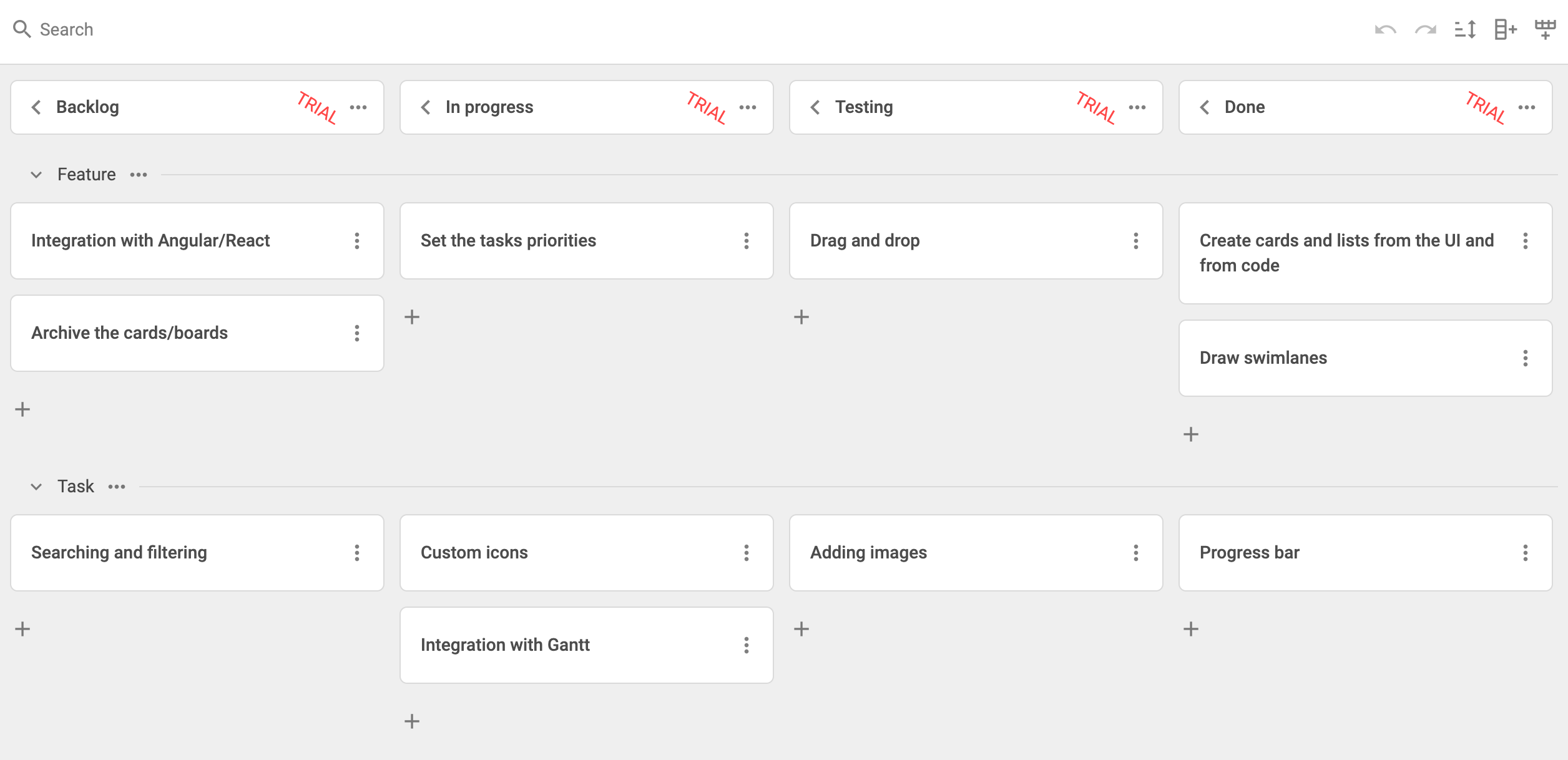
在 GitHub 上查看完整项目。