Displaying Contents of Tasks
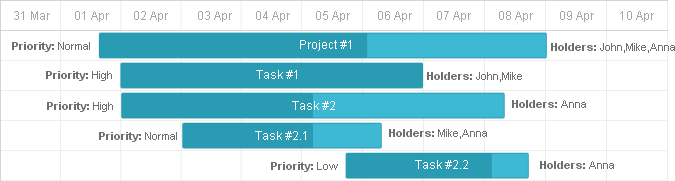
A text near a task bar allows you to show additional information related to the task. In most cases, it's some assigned resource - persons, materials etc.
Customizing format of task bars
To change the default format of task bars, you can use the task_text template:
gantt.templates.task_text="function(start,end,task){"
    return "<b>Text:</b> "+task.text+",<b> Holders:</b> "+task.users;
};
It can contain any HTML content that should be displayed inside of the task bar.

Assigning a text to the left side of a bar
To place a text block on the left side of a task bar, use the leftside_text template:
gantt.templates.leftside_text = function(start, end, task){
    return "<b>Priority: </b>" +task.priority;
};
Assigning a text to the right side of a bar
To place a text block on the right side of a task bar, use the rightside_text template:
gantt.templates.rightside_text = function(start, end, task){
    return "<b>Holders: </b>" + task.users;
};
Need help?
Got a question about the documentation? Reach out to our technical support team for help and guidance. For custom component solutions, visit the Services page.