menu
설명
선택 사항. 컨텍스트 메뉴 표시 여부(boolean인 경우) 또는 구성 파라미터(function인 경우)를 지정합니다
사용법
menu?: boolean;
// or
menu?: function(config: object);
컨텍스트 메뉴 표시 또는 숨기기
컨텍스트 메뉴를 숨기려면 menu config를 false로 설정합니다. 기본 컨텍스트 메뉴를 표시하려면 menu config를 true로 설정합니다.
menu: true // 기본 컨텍스트 메뉴를 표시합니다

// or

menu: false // 컨텍스트 메뉴를 숨깁니다
컨텍스트 메뉴 수정
컨텍스트 메뉴를 수정하려면 menu config를 config 객체를 파라미터로 받는 콜백으로 설정합니다. config 객체는 다음 구조를 가질 수 있습니다:
config: {
    type: "user" | "toolbar" | "task",
    id?: string | number,
    source?: (string | number)[],
    store: object
};
파라미터
config 객체는 다음 파라미터를 포함할 수 있습니다:
type- (필수) 컨텍스트 메뉴의 유형. 다음 값 중 하나를 지정할 수 있습니다:"user"- 사용자 관련 컨텍스트 메뉴"toolbar"- toolbar 관련 컨텍스트 메뉴"task"- 작업 관련 컨텍스트 메뉴
id- (선택 사항 | 필수) 프로젝트의 ID.type: "toolbar"인 경우 이 파라미터는 필수입니다source- (선택 사항 | 필수) 작업 ID를 포함하는 배열.type: "task"인 경우 이 파라미터는 필수입니다store- (필수)getMenuOptions()메서드에 전달되어야 하는 읽기 전용 DataStore
반환값
콜백은 다음 값 중 하나를 반환해야 합니다:
-
boolean- 기본 컨텍스트 메뉴를 표시하려면true, 컨텍스트 메뉴를 숨기려면false -
object[]- 컨텍스트 메뉴 항목 데이터를 저장하는 객체 배열. 각 객체는 다음 구조를 가질 수 있습니다:{
id: string | number,
icon?: string,
label?: string,
hotkey?: string,
value?: Date,
data?: object[],
handler?: function,
css?: string,
type?: string
}-
id- (필수) 메뉴 항목의 ID -
icon- (선택 사항) 메뉴 항목의 아이콘 (기본적으로wxi폰트에서 가져옵니다) -
label- (선택 사항) 메뉴 항목의 텍스트 -
hotkey- (선택 사항) 해당 메뉴 항목 동작의 단축키 -
value- (선택 사항) 마감일. "datepicker"에 유효합니다 -
data- (선택 사항) 메뉴 항목의 하위 항목을 저장하는 객체 배열 -
handler- (선택 사항) 사용자 정의 메뉴 항목의 동작을 수행하는 핸들러 -
css- (선택 사항) CSS 클래스 -
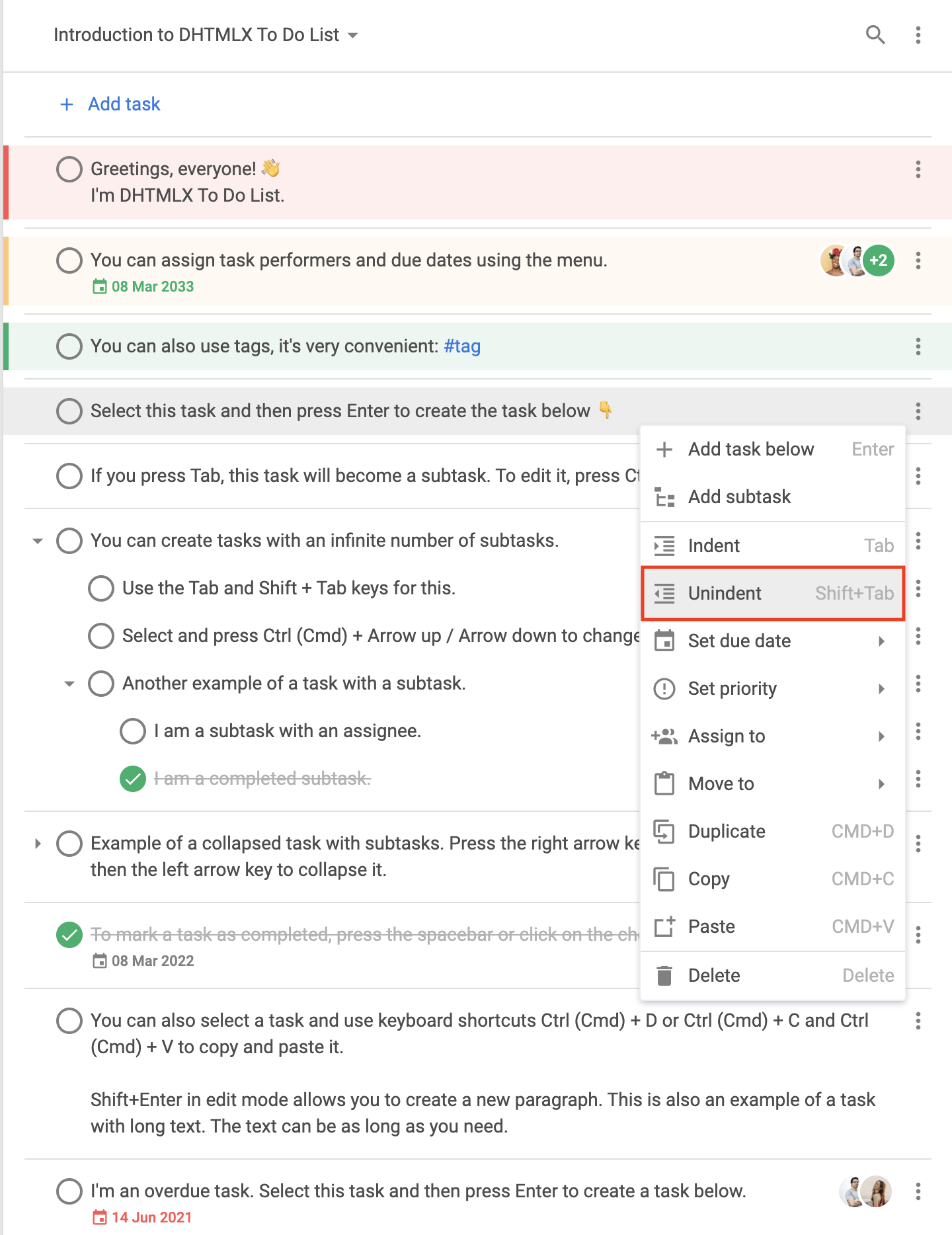
type- (선택 사항) 메뉴 항목 유형. 다음 유형을 지정할 수 있습니다:"item"- 기본 메뉴 항목
"item"유형의 기본 구조{
type: "item",
id: string,
icon: string,
label: string,
hotkey: string,
data: [ // if required
// ... same objects for sub-items
]
}
"separator"- 메뉴 항목을 구분하는 선
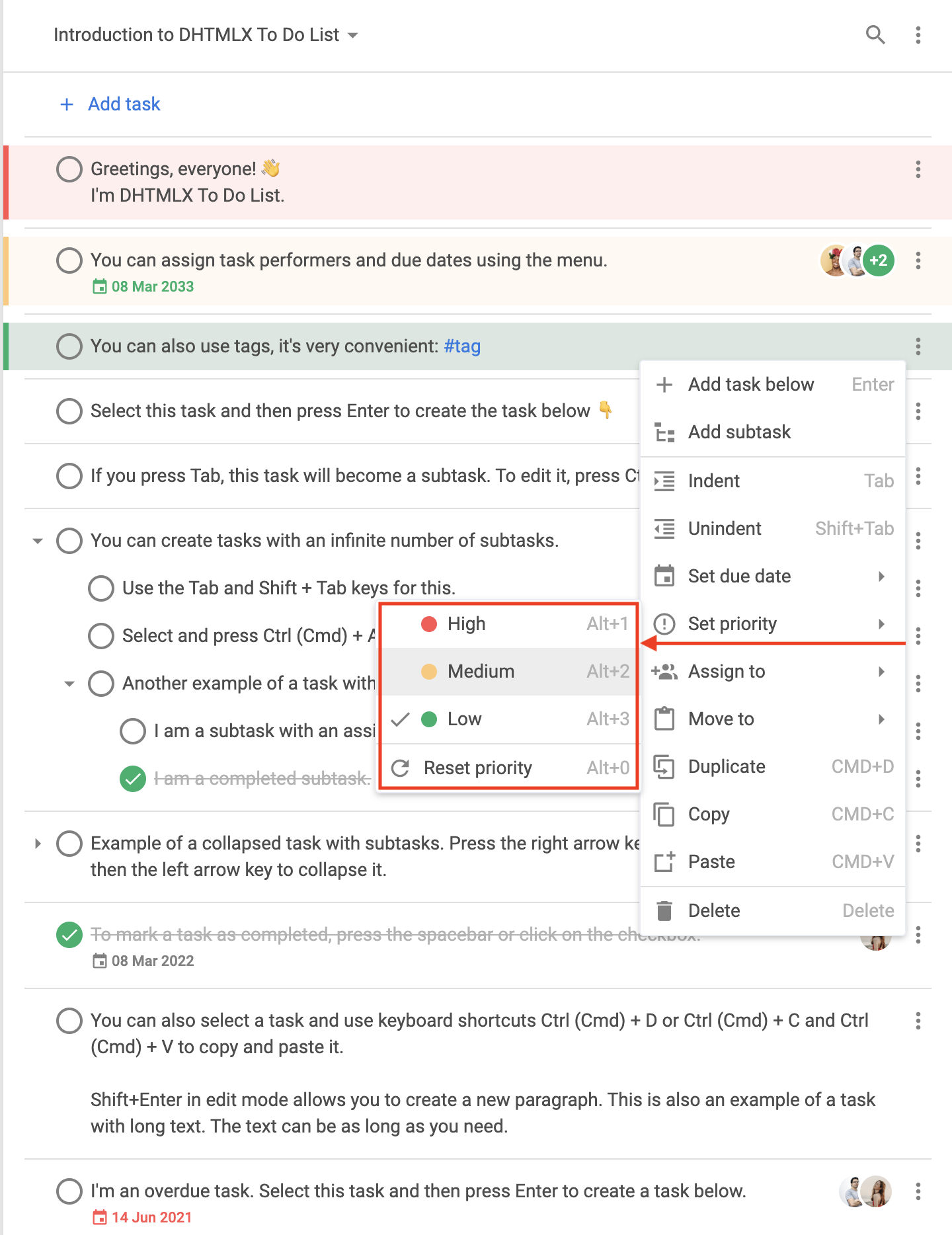
"separator"유형의 기본 구조{ type: "separator" }"priority"- 우선순위 설정을 위한 메뉴 항목
"priority"유형의 기본 구조기본적으로
"setPriority"항목의 하위 메뉴에는 High, Medium, Low 항목이 표시됩니다.{ // High priority
type: "priority",
label: "High",
color: "#ff5252",
hotkey: "Alt+1",
icon: "empty",
id: "priority:1"
},
{ // Medium priority
type: "priority",
label: "Medium",
color: "#ffc975",
hotkey: "Alt+2",
icon: "empty",
id: "priority:2"
},
{ // Low priority
type: "priority",
label: "Low",
color: "#0ab169",
hotkey: "Alt+3",
icon: "empty",
id: "priority:3"
}
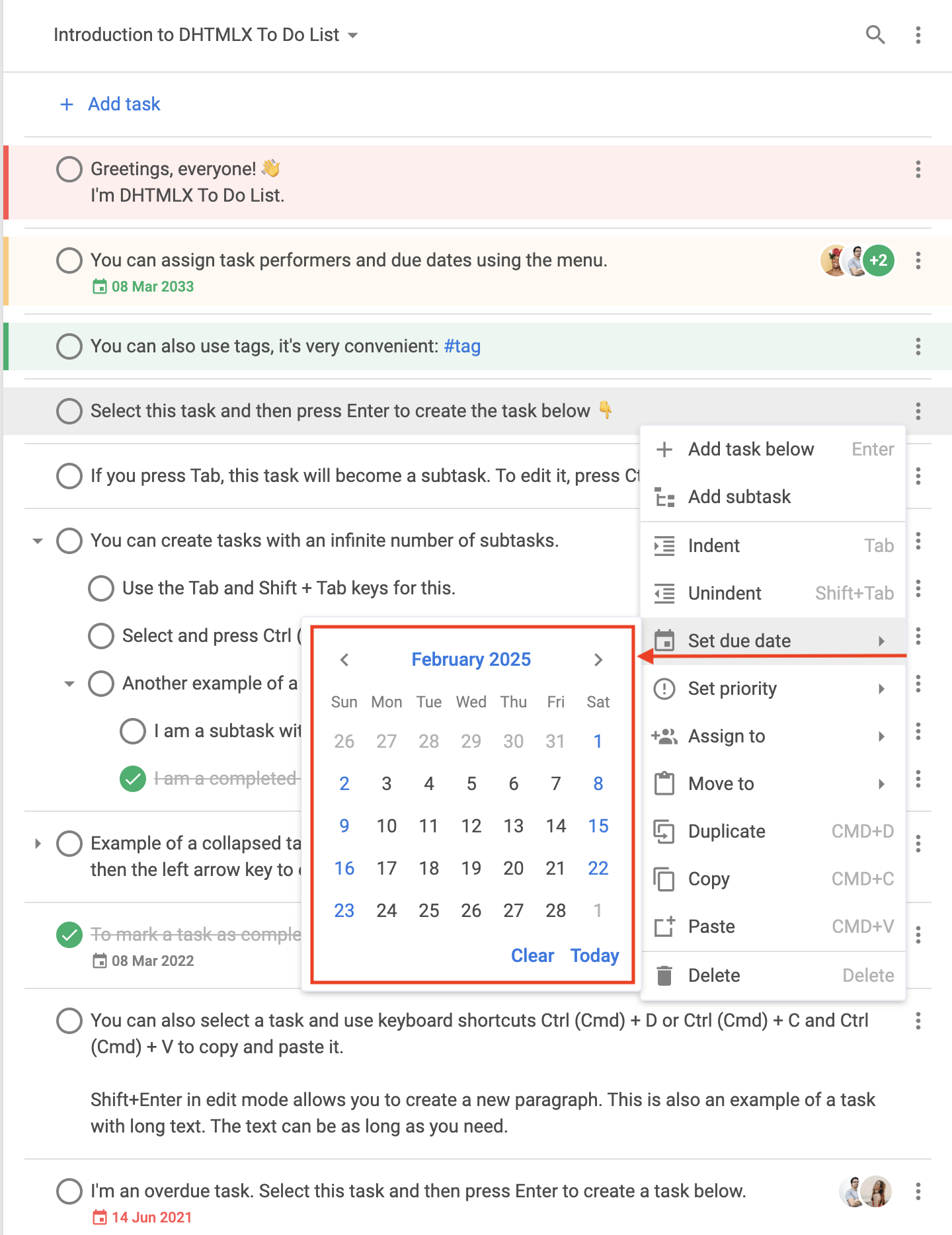
"datepicker"- 날짜 설정을 위한 메뉴 항목
"datepicker"유형의 기본 구조기본적으로
"datepicker"항목은"setDate"항목의 하위 메뉴에 표시됩니다.{
type: "datepicker",
id: "dueDate", // default ID
value: new Date(), // selected date
store: object // readonly
}
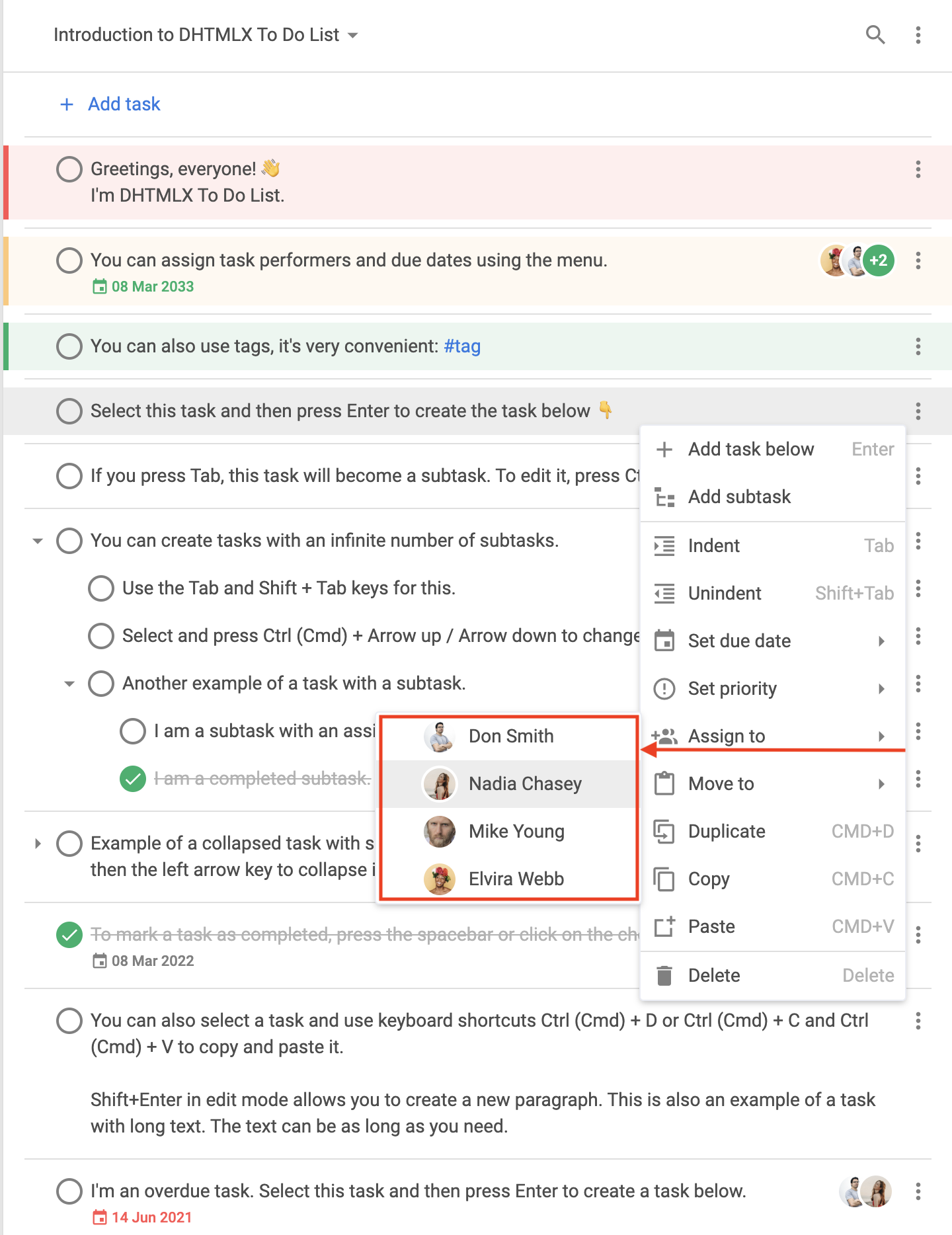
"user"- 작업에 사용자를 할당하기 위한 메뉴 항목
"user"유형의 기본 구조{
type: "user",
id: string,
label: string,
avatar: string, // the path to the user avatar
color: string, // the color for the automatic avatar if the link to the picture is not provided, default color is "#0AB169"
icon: string, // the icon displayed to the left of the avatar and marks the user as assigned
clickable: boolean, // the value that marks the item as clickable
checked: boolean // the value that marks the user that this option represents as assigned
}
-
예제
const { ToDo, Toolbar, getMenuOptions } = todo;

const menu = function (config) {
    let options = getMenuOptions(config);

    const { source, store, type } = config;
    if (type === "task") {
        // leaving only some of the default menu options
        options = options.filter(o => {
            return (
                o.id == "addSubtask" ||
                o.id == "setDate" ||
                o.id == "setPriority" ||
                o.id == "assign"
            );
        });
        // adding new menu options
        options.push({ type: "separator" });
        options.push({
            type: "item",
            icon: "calendar",
            label: "Add current date",
            id: "addDate",
            handler: () => {
                source.forEach(id => {
                    list.updateTask({
                        id,
                        task: {
                            due_date: new Date()
                        }
                    });
                });
            }
        });
        const task = store.getTask(source[0]);
        if (task.checked) {
            options.push({
                type: "item",
                icon: "undo",
                label: "Mark incomplete",
                id: "uncheck",
                handler: () => {
                    list.uncheckTask({
                        id
                    });
                }
            });
        } else {
            options.push({
                type: "item",
                icon: "check",
                label: "Complete",
                id: "check",
                handler: () => {
                    source.forEach(id => {
                        list.checkTask({
                            id
                        });
                    });
                }
            });
        }
    }

    return options;
};

new ToDo("#root", {
    tasks,
    users,
    projects,
    menu
});
변경 로그: menu config는 v1.3에서 추가되었습니다
관련 예제: