公式与函数
从 v4.0 起,DHTMLX Spreadsheet 软件包内置了一组预定义公式,可用于对字符串和数字进行各类计算。这些公式与 Excel 和 Google Sheets 兼容。
备注
公式中的小写字母会自动转换为大写字母。
函数
以下列出了所有可用函数及其详细说明。
布尔运算符
您可以使用逻辑表达式比较两个值,表达式返回 TRUE 或 FALSE。
| Operator | Example | Description |
|---|---|---|
| = | =A1=B1 | 若单元格 A1 的值等于单元格 B1 的值,则返回 TRUE;否则返回 FALSE。 |
| <> | =A1<>B1 | 若单元格 A1 的值不等于单元格 B1 的值,则返回 TRUE;否则返回 FALSE。 |
| > | =A1>B1 | 若单元格 A1 的值大于单元格 B1 的值,则返回 TRUE;否则返回 FALSE。 |
| < | =A1<B1 | 若单元格 A1 的值小于单元格 B1 的值,则返回 TRUE;否则返回 FALSE。 |
| >= | =A1>=B1 | 若单元格 A1 的值大于或等于单元格 B1 的值,则返回 TRUE;否则返回 FALSE。 |
| <= | =A1<=B1 | 若单元格 A1 的值小于或等于单元格 B1 的值,则返回 TRUE;否则返回 FALSE。 |
请在我们的在线示例工具中查看示例。
日期函数
| Function | Formula | Description |
| DATE | =DATE(year,month,day) | 将年、月、日三个独立值合并并返回一个日期。 |
| DATEDIF | =DATEDIF(start_date,end_date,unit) | 返回两个日期之间的天数、月数或年数。 unit 参数用于指定返回信息的类型。 |
| DATEVALUE | =DATEVALUE(date_text) | 将以文本形式存储的日期转换为序列号。 |
| DAY | =DAY(date) | 从指定日期中返回该月中的日期数,范围为 1 到 31。 |
| DAYS | =DAYS(end_date, start_date) | 返回两个日期之间的天数。 |
| DAYS360 | =DAYS360(start_date,end_date,[method]]) | 基于 360 天年(即 12 个 30 天月)计算两个日期之间的天数。 |
| EDATE | =EDATE(start_date, months) | 返回距起始日期之前或之后 n 个月的同一天日期。 |
| EOMONTH | =EOMONTH(start_date, months) | 返回指定起始日期之前或之后 n 个月的最后一天日期。 |
| ISOWEEKNUM | =ISOWEEKNUM(date) | 返回指定日期在当年中对应的 ISO 周编号。 |
| MONTH | =MONTH(date) | 返回指定日期所在的月份。 |
| NETWORKDAYS | =NETWORKDAYS(start_date, end_date, [holidays]) | 返回两个日期之间完整工作日的天数。工作日不包括周末以及 holidays 中指定的任何日期。 |
| NETWORKDAYSINTL | =NETWORKDAYSINTL(start_date, end_date, [weekend], [holidays]) | 返回两个日期之间完整工作日的天数。 可选的 weekend 参数用于指定一周中哪些天视为周末。 周末和节假日不计入工作日。 |
| NOW | =NOW() | 返回当前日期。 |
| TIMEVALUE added in v4.3 | =TIMEVALUE(time_text) | 返回文本字符串所表示时间的十进制数值。 |
| WEEKDAY | =WEEKDAY(date,[return_type]) | 返回指定日期对应的星期几。 return_type 参数用于指定将一周的哪一天视为第一天。 |
| WEEKNUM | =WEEKNUM(date,[return_type]) | 返回指定日期所在的周编号。 return_type 参数用于指定将一周的哪一天视为第一天。 |
| WORKDAY | =WORKDAY(start_date, days, [holidays]) | 返回距起始日期之前或之后 n 个工作日的最近工作日日期。 工作日不包括周末以及 holidays 中指定的任何日期。 |
| WORKDAYINTL | =WORKDAYINTL(start_date, days, [weekend], [holidays]) | 返回距起始日期之前或之后 n 个工作日的最近工作日日期。 可选的 weekend 参数用于指定一周中哪些天视为周末。 周末和节假日不计入工作日。 |
| YEAR | =YEAR(date) | 返回指定日期的年份。 |
| YEARFRAC | =YEARFRAC(start_date, end_date, [basis]) | 返回指定日期的年份。 可选的 basis 参数用于指定日期计算基准类型。 |
请在我们的在线示例工具中查看示例。
财务函数
| 函数 | 公式 | 描述 |
| ACCRINT | =ACCRINT(issue, id, sd, rate, par, frequency, [basis], [calc_method]), where:
| 返回定期付息证券的应计利息。 |
| BINOM.DIST added in v4.3 | =BINOM.DIST(number_s, trials, probability_s, cumulative), where:
| 返回单项二项分布的概率值。 |
| BINOM.DIST.RANGE added in v4.3 | =BINOM.DIST.RANGE(trials, probability_s, number_s, [number_s2]), where:
| 使用二项分布返回试验结果的概率。 |
| BINOM.INV added in v4.3 | =BINOM.INV(trials, probability_s, alpha), where:
| 返回使累积二项分布大于或等于临界值的最小值。 |
| BITLSHIFT added in v4.3 | =BITLSHIFT(number, shift_amount), where:
| 返回向左移动指定位数后的数字。 |
| BITOR added in v4.3 | =BITOR(number1, number2), where:
| 返回表示两个数字按位 OR 运算结果的十进制数。 |
| BITRSHIFT added in v4.3 | =BITRSHIFT(number, shift_amount), where:
| 返回向右移动指定位数后的数字。 |
| BITXOR added in v4.3 | =BITXOR(number1, number2), where:
| 返回表示两个数字按位 XOR 运算结果的十进制数。 |
| COMPLEX added in v4.3 | =COMPLEX(real_num, i_num, [suffix]), where:
| 将实部系数和虚部系数转换为 x + yi 或 x + yj 形式的复数。 |
| CORREL added in v4.3 | =CORREL(array1, array2), where:
Text, logical values, or empty cells are ignored. Cells with zero values are included. The arrays must have equal number of data points. | 返回两个单元格区域的相关系数。 |
| COVAR added in v4.3 | =COVAR(array1, array2), where:
Text, logical values, or empty cells are ignored. Cells with zero values are included. The arrays must have equal number of data points. | 返回协方差,即两个数据集中每对数据点偏差乘积的平均值。 |
| COVARIANCE.P added in v4.3 | =COVARIANCE.P(array1, array2), where:
Text, logical values, or empty cells are ignored. Cells with zero values are included. The arrays must have equal number of data points. | 返回总体协方差,即两个数据集中每对数据点偏差乘积的平均值。 |
| COVARIANCE.S added in v4.3 | =COVARIANCE.S(array1, array2), where:
Text, logical values, or empty cells are ignored. Cells with zero values are included. The arrays must have equal number of data points. | 返回样本协方差,即两个数据集中每对数据点偏差乘积的平均值。 |
| DB | =DB(cost, salvage, life, period, [month]), where:
| 使用固定余额递减法计算指定期间内资产的折旧值。 |
| DDB | =DDB(cost, salvage, life, period, [factor]), where:
| 使用双倍余额递减法或其他指定方法计算指定期间内资产的折旧值。 |
| DEC2BIN added in v4.3 | =DEC2BIN(number), where:
| 将十进制数转换为二进制数。 |
| DEC2HEX added in v4.3 | =DEC2HEX(number), where:
| 将十进制数转换为十六进制数。 |
| DEC2OCT added in v4.3 | =DEC2OCT(number), where:
| 将十进制数转换为八进制数。 |
| DELTA added in v4.3 | =DELTA(number1, [number2]), where:
| 测试两个数字是否相等。若 number1 = number2 则返回 1;否则返回 0。 |
| DEVSQ added in v4.3 | =DEVSQ(number1, [number2], ...), where:
Text, logical values, or empty cells are ignored. Cells with zero values are included. | 返回数据点与其样本均值之间偏差的平方和。 |
| DOLLARDE | =DOLLARDE(fractional_dollar, fraction) | 将以整数部分和分数部分表示的美元价格转换为以小数表示的美元价格。 |
| DOLLARFR | =DOLLARFR(decimal_dollar, fraction) | 将十进制数表示的美元价格转换为分数形式的美元价格。 |
| EFFECT | =EFFECT(nominal_rate, npery) nominal_rate must be >= 0, npery must be > 1. | 根据给定的名义年利率和每年的复利计算期数,返回有效年利率。 仅适用于数值。 |
| ERF added in v4.3 | =ERF(lower_limit, [upper_limit]), where:
| 返回在 lower_limit 与 upper_limit 之间积分的误差函数值。 |
| ERFC added in v4.3 | =ERFC(x), where:
| 返回在 x 到无穷大之间积分的互补误差函数值。 |
| EXP added in v4.3 | =EXP(number), where:
| 返回常数 e(等于 2.71828182845904)的指定次幂的值。 |
| FISHER added in v4.3 | =FISHER(x), where:
| 计算给定值的 Fisher 变换。 |
| FISHERINV added in v4.3 | =FISHERINV(y), where:
| 计算 Fisher 变换的反变换,返回介于 -1 与 +1 之间的值。 |
| FV | =FV(rate, nper, pmt, [pv], [type]), where:
| 计算投资的终值。 |
| FVSCHEDULE | =FVSCHEDULE(principal, schedule), where:
| 返回初始本金(即现值)在应用一系列复利利率后的终值。 |
| GAMMA added in v4.3 | =GAMMA(number) If Number is a negative integer or 0, GAMMA returns the #Error value. | 返回 Gamma 函数的值。 |
| GEOMEAN added in v4.3 | =GEOMEAN(number1, [number2], ...) where:
Text, logical values, or empty cells are ignored. Cells with zero values are included. | 返回一组正数数组或区域的几何平均值。 |
| GESTEP added in v4.3 | =GESTEP(number, [step]) where:
| 若 number ≥ step 则返回 1;否则返回 0。 |
| HARMEAN added in v4.3 | =HARMEAN(number1, [number2], ...) where:
Text, logical values, or empty cells are ignored. Cells with zero values are included. | 返回数据集的调和平均值。 |
| HEX2BIN added in v4.3 | =HEX2BIN(number) where:
| 将十六进制数转换为二进制数。 |
| HEX2DEC added in v4.3 | =HEX2DEC(number) where:
| 将十六进制数转换为十进制数。 |
| HEX2OCT added in v4.3 | =HEX2OCT(number) where:
| 将十六进制数转换为八进制数。 |
| IMABS added in v4.3 | =IMABS(inumber) where:
| 返回 x + yi 或 x + yj 格式复数的绝对值。 |
| IMAGINARY added in v4.3 | =IMAGINARY(inumber) where:
| 返回 x + yi 或 x + yj 格式复数的虚部系数。 |
| IMCONJUGATE added in v4.3 | =IMCONJUGATE(inumber) where:
| 返回 x + yi 或 x + yj 格式复数的共轭复数。 |
| IMCOS added in v4.3 | =IMCOS(inumber) where:
| 返回 x + yi 或 x + yj 格式复数的余弦值。 |
| IMCOSH added in v4.3 | =IMCOSH(inumber) where:
| 返回 x + yi 或 x + yj 格式复数的双曲余弦值。 |
| IMCOT added in v4.3 | =IMCOT(inumber) where:
| 返回 x + yi 或 x + yj 格式复数的余切值。 |
| IMCSC added in v4.3 | =IMCSC(inumber) where:
| 返回 x + yi 或 x + yj 格式复数的余割值。 |
| IMCSCH added in v4.3 | =IMCSCH(inumber) where:
| 返回 x + yi 或 x + yj 格式复数的双曲余割值。 |
| IMDIV added in v4.3 | =IMDIV(inumber1, inumber2) where:
| 返回 x + yi 或 x + yj 格式两个复数的商。 |
| IMEXP added in v4.3 | =IMEXP(inumber) where:
| 返回 x + yi 或 x + yj 格式复数的指数值。 |
| IMLN added in v4.3 | =IMLN(inumber) where:
| 返回 x + yi 或 x + yj 格式复数的自然对数值。 |
| IMPOWER added in v4.3 | =IMPOWER(inumber, number) where:
| 返回以 x + yi 或 x + yj 文本格式表示的复数的指定次幂。 |
| IMPRODUCT added in v4.3 | =IMPRODUCT(inumber1, [inumber2], ...) where:
| 返回 x + yi 或 x + yj 格式的 1 至 255 个复数的乘积。 |
| IMREAL added in v4.3 | =IMREAL(inumber) where:
| 返回 x + yi 或 x + yj 格式复数的实部系数。 |
| IMSEC added in v4.3 | =IMSEC(inumber) where:
| 返回 x + yi 或 x + yj 格式复数的正割值。 |
| IMSECH added in v4.3 | =IMSECH(inumber) where:
| 返回 x + yi 或 x + yj 格式复数的双曲正割值。 |
| IMSIN added in v4.3 | =IMSIN(inumber) where:
| 返回 x + yi 或 x + yj 格式复数的正弦值。 |
| IMSINH added in v4.3 | =IMSINH(inumber) where:
| 返回 x + yi 或 x + yj 格式复数的双曲正弦值。 |
| IMSQRT added in v4.3 | =IMSQRT(inumber) where:
| 返回 x + yi 或 x + yj 格式复数的平方根。 |
| IMSUB added in v4.3 | =IMSUB(inumber1, inumber2) where:
| 返回 x + yi 或 x + yj 格式两个复数的差。 |
| IMSUM added in v4.3 | =IMSUB(inumber1, [inumber2], ...) where:
| 返回 x + yi 或 x + yj 格式两个或多个复数的和。 |
| IMTAN added in v4.3 | =IMTAN(inumber) where:
| 返回 x + yi 或 x + yj 格式复数的正切值。 |
| IPMT | =IPMT(rate, per, nper, pv, [fv], [type]), where:
| 返回基于定期、固定付款及固定利率的投资在给定期间内的利息偿还额。 |
| IRR | =IRR(values, [guess]), where:
| 返回一系列定期现金流的内部收益率(IRR)。 |
| ISPMT | =ISPMT(rate, per, nper, pv), where:
| 计算等额本金贷款(或投资)在指定期间内支付(或收取)的利息。 |
| LARGE added in v4.3 | =LARGE(array, k), where:
| 返回数组中第 k 个最大值。 |
| MEDIAN added in v4.3 | =MEDIAN(number1, [number2], ...), where:
| 返回给定数字的中位数。 |
| NOMINAL | =NOMINAL(effect_rate, npery), effect_rate must be >= 0, npery must be > 1. | 根据给定的有效利率和每年的复利计算期数,返回名义年利率。 |
| NPER | =NPER(rate,pmt,pv,[fv],[type]), where:
| 返回基于定期、固定付款及固定利率的投资的付款期数。 |
| NPV | =NPV(rate,value1,[value2],...), where:
| 使用折现率及一系列未来支出(负值)和收益(正值)计算投资的净现值。 |
| OCT2BIN added in v4.3 | =OCT2BIN(number), where:
| 将八进制数转换为二进制数。 |
| OCT2DEC added in v4.3 | =OCT2DEC(number), where:
| 将八进制数转换为十进制数。 |
| OCT2HEX added in v4.3 | =OCT2HEX(number), where:
| 将八进制数转换为十六进制数。 |
| PDURATION | =PDURATION(rate, pv, fv), where:
All arguments must be positive values. | 返回投资达到指定价值所需的期数。 |
| PERCENTILE added in v4.3 | =PERCENTILE(array, k), where:
| 返回区域中数值的第 k 个百分位数。 |
| PERCENTILE.EXC added in v4.3 | =PERCENTILE.EXC(array, k), where:
| 返回区域中数值的第 k 个百分位数。 |
| PERCENTILE.INC added in v4.3 | =PERCENTILE.INC(array, k), where:
| 返回区域中数值的第 k 个百分位数。 |
| PERMUT added in v4.3 | =PERMUT(number, number_chosen), where:
| 返回给定数量元素的排列数。 |
| PMT | =PMT(rate, nper, pv, [fv], [type]), where:
| 根据固定付款额和固定利率计算贷款的每月还款额。 |
| PPMT | =PPMT(rate, per, nper, pv, [fv], [type]), where:
| 返回基于定期、固定付款及固定利率的投资在指定期间内的本金偿还额。 |
| PV | =PV(rate, nper, pmt, [fv], [type]), where:
| 返回基于固定利率的贷款或投资的现值。 |
| QUARTILE added in v4.3 | =QUARTILE(array, quart), where:
| 返回数据集的四分位数。 |
| QUARTILE.EXC added in v4.3 | =QUARTILE(array, quart), where:
| 根据 0 到 1 之间(不含端点)的百分位值,返回数据集的四分位数。 |
| QUARTILE.INC added in v4.3 | =QUARTILE.INC(array, quart), where:
| 根据 0 到 1 之间(含端点)的百分位值,返回数据集的四分位数。 |
| SIGN added in v4.3 | =SIGN(number), where:
| 返回数字的符号。若数字为正数则返回 1,若为 0 则返回 0,若为负数则返回 -1。 |
| SMALL added in v4.3 | =SMALL(array, k), where:
| 返回数据集中按位置排列的第 k 个最小值。 |
| STEYX added in v4.3 | =STEYX(known_y's, known_x's), where:
Text, logical values, or empty cells are ignored. Zero values are included. | 返回回归中每个 x 对应的预测 y 值的标准误差。 |
| SYD added in v4.3 | =SYD(cost, salvage, life, per), where:
| 返回资产在指定期间内按年数总和法计算的折旧值。 |
| TBILLPRICE added in v4.3 | =TBILLPRICE(settlement, maturity, discount), where:
| 返回国库券每 $100 面值的价格。 |
| TBILLYIELD added in v4.3 | =TBILLYIELD(settlement, maturity, pr), where:
| 返回国库券的收益率。 |
| WEIBULL added in v4.3 | =WEIBULL(x, alpha, beta, cumulative), where:
| 返回威布尔分布。 |
| WEIBULL.DIST added in v4.3 | =WEIBULL(x, alpha, beta, cumulative), where:
| 返回威布尔分布。 |
请在我们的代码片段工具中查看示例。
信息函数
| 函数 | 公式 | 描述 |
| ISBINARY | =ISBINARY(value) | 如果值为二进制,则返回 TRUE;否则返回 FALSE。 |
| ISBLANK | =ISBLANK(A1) | 如果单元格为空,则返回 TRUE;否则返回 FALSE。 |
| ISEVEN | =ISEVEN(number) | 如果数字为偶数,则返回 TRUE;如果数字为奇数,则返回 FALSE。 仅适用于整数。 |
| ISNONTEXT | =ISNONTEXT(value) | 如果单元格包含文本以外的任何值,则返回 TRUE;否则返回 FALSE。 |
| ISNUMBER | =ISNUMBER(value) | 如果单元格包含数字,则返回 TRUE;否则返回 FALSE。 |
| ISODD | =ISODD(number) | 如果数字为奇数,则返回 TRUE;如果数字为偶数,则返回 FALSE。 仅适用于整数。 |
| ISTEXT | =ISTEXT(value) | 如果值为文本,则返回 TRUE;否则返回 FALSE。 |
| N | =N(value) | 返回转换为数字的值。 |
在我们的示例工具中查看示例。
查找函数
| 函数 | 公式 | 描述 |
| HLOOKUP added in v4.3 | =HLOOKUP(lookup_value, table_array, row_index, [range_lookup]), where:
| 在水平表格中查找某个值 |
| INDEX added in v4.3 | =INDEX(array, row_num, [column_num]), where:
| 返回区域或数组中指定位置的值。 |
| LOOKUP added in v4.3 | =LOOKUP(lookup_value, lookup_vector, [result_vector]), where:
| 在单列或单行区域中查找某个值,并返回另一个单列或单行区域中相同位置的值。 |
| MATCH added in v4.3 | =MATCH(lookup_value, lookup_array, [match_type]), where:
| 在单元格区域中搜索指定项,然后返回该项在区域中的相对位置。 |
| VLOOKUP added in v4.3 | =VLOOKUP(lookup_value, table_array, column_index_num, [range_lookup]), where:
| 在垂直表格中通过匹配第一列来查找某个值 |
| XLOOKUP added in v4.3 | =XLOOKUP(lookup_value, lookup_array, return_array, [if_not_found], [match_mode]), where:
| 在区域或数组中进行搜索,并返回与第一个匹配项对应的值。如果不存在匹配项,XLOOKUP 可以返回最接近的(近似)匹配结果。 |
| XMATCH added in v4.3 | =XMATCH(lookup_value, lookup_array, [match_mode]), where:
| 执行查找并返回在垂直或水平区域中的位置。 |
数学函数
| ABS | 返回数字的绝对值。数字的绝对值始终为正数。 |
| ACOS | 返回数字的反余弦值(即反三角余弦)。反余弦是余弦值为 number 的角度。数字必须在 -1 到 1 之间(含端点)。返回的角度以弧度表示,范围为 0(零)到 pi。 |
| ACOSH | 返回数字的反双曲余弦值。数字必须大于或等于 1。 |
| ACOT | 返回数字的反余切主值(即反三角余切)。返回的角度以弧度表示,范围为 0(零)到 pi。 |
| ACOTH | 返回数字的反双曲余切值。数字的绝对值必须大于 1。 |
| ADD | 返回两个值的和。 空单元格、逻辑值(如 TRUE)或文本将被忽略。 |
| ARABIC | 将罗马数字转换为阿拉伯数字。 |
| ASIN | 返回数字的反正弦值(即反三角正弦)。反正弦是正弦值为 number 的角度。数字必须在 -1 到 1 之间(含端点)。返回的角度以弧度表示,范围为 -pi/2 到 pi/2。 |
| ASINH | 返回数字的反双曲正弦值。反双曲正弦是双曲正弦值为 number 的数值。适用于实数。 |
| ATAN | 返回数字的反正切值(即反三角正切)。反正切是正切值为 number 的角度。返回的角度以弧度表示,范围为 -pi/2 到 pi/2。适用于目标角度的正切值。 |
| ATAN2 | 返回坐标 (x,y) 的反正切值。返回值以弧度表示,范围为 -pi 到 pi(不含 -pi)。 |
| ATANH | 返回数字的反双曲正切值。数字必须在 -1 到 1 之间(不含 -1 和 1)。适用于实数。 |
| AVEDEV added in v4.3 | 返回数据点与其均值的绝对偏差的平均值。 数组或引用中的空单元格、逻辑值、文本或错误值将被忽略。值为 0 的单元格会被计入。 |
| AVERAGE | 计算一组数字的平均值(算术平均数)。 数组或引用中的逻辑值、空单元格以及包含文本的单元格将被忽略。 但值为零的单元格会被计入。 |
| AVERAGEA added in v4.3 | 计算参数列表中所有值的平均值(算术平均数)。 参数可以是:数字;包含数字的名称、数组或引用;数字的文本表示形式;或引用中的逻辑值(如 TRUE 和 FALSE)。 数组或引用中的空单元格和文本值将被忽略。 |
| AVERAGEIF added in v6.0 | 返回满足给定条件的区域内所有单元格的平均值(算术平均数)。 接受两个必需参数(要计算的区域和条件)以及一个可选参数(若与计算区域不同,则为要求平均值的单元格区域)。 |
| AVERAGEIFS added in v6.0 | 返回满足多个条件的所有单元格的平均值(算术平均数)。 接受一个必需的平均值区域参数,后跟一对或多对条件区域与条件参数。 |
| BASE | 将数字转换为指定的进制(基数)。 数字必须为整数,且大于或等于 0 且小于 2^53。 基数是要将数字转换成的进制,必须为 2 到 36 之间的整数(含端点)。 |
| BITAND added in v4.3 | 返回两个数字的按位"与"运算结果。 数字必须为整数,且大于或等于 0 且小于 (2^48)-1。 |
| CEILING | 将数字向上舍入到最接近的整数,或最接近指定有效位数的倍数。 |
| COMBIN | 返回两个给定整数的组合数:项目总数(number)和每个组合中的项目数(number_chosen):
|
| COMBINA | 返回两个给定整数(允许重复)的组合数。参数为:项目总数(number)和每个组合中的项目数(number_chosen):
|
| COS | 返回以弧度表示的角度的余弦值。 |
| COSH | 返回实数的双曲余弦值。 |
| CSC | 返回以弧度表示的角度的余割值。 |
| CSCH | 返回以弧度表示的角度的双曲余割值。 |
| COT | 返回以弧度表示的角度的余切值。 |
| COTH | 返回双曲角度的双曲余切值。 |
| COUNT | 统计包含数字的单元格数量,以及参数列表中数字的个数。 数组或引用中的空单元格、逻辑值、文本或错误值不会被计入。 |
| COUNTA | 统计包含数字、文本、逻辑值、错误值及空文本("")的单元格数量;值为零的单元格不计入。 该函数不计入空单元格。 |
| COUNTBLANK | 返回指定区域中空单元格的数量。 值为零的单元格不计入。 |
| COUNTIF added in v6.0 | 统计区域内满足给定条件的单元格数量。 接受两个参数:要计算的单元格区域和定义哪些单元格需要计入的条件。 |
| COUNTIFS added in v6.0 | 统计满足多个条件的单元格数量。 接受一对或多对区域与条件参数;只有满足所有条件的单元格才会被计入。 |
| DECIMAL | 将给定进制(基数)的数字文本表示形式转换为十进制数字。 基数必须为 2 到 36 之间的整数(含端点)。 |
| DEGREES | 将弧度转换为度。 |
| DIVIDE | 返回一个数除以另一个数的结果。 |
| EQ | 若第一个参数等于第二个参数,则返回 TRUE;否则返回 FALSE。 |
| EVEN | 返回数字向上舍入到最接近的偶数整数的结果。 |
| FACT | 返回数字的阶乘。数字必须在 1 到 n 之间。如果数字不是整数,则截断小数部分。 |
| FACTDOUBLE | 返回数字的双阶乘。数字必须在 1 到 n 之间。如果数字不是整数,则截断小数部分。 |
| FLOOR | 将数字向下舍入(趋向零)到最接近指定有效位数倍数的值。有效位数必须在 1 到 n 之间。 若数字为正数,则向下舍入并趋向零;若数字为负数,则向下舍入并远离零。 |
| GCD | 返回两个或多个整数的最大公约数。该函数接受 1 到 255 个数值,这些值应为整数。若某个值不是整数,则截断小数部分。 |
| GT | 若第一个参数大于第二个参数,则返回 TRUE;否则返回 FALSE。 |
| GTE | 若第一个参数大于或等于第二个参数,则返回 TRUE;否则返回 FALSE。 |
| INT | 返回数字向下舍入到最接近整数的结果。 |
| LN | 返回正实数的自然对数。 |
| LOG | 返回正实数以指定底数的对数。若省略底数,则默认为 10。 |
| LOG10 | 返回正实数以 10 为底的对数。 |
| LT | 若第一个参数小于第二个参数,则返回 TRUE;否则返回 FALSE。 |
| LTE | 若第一个参数小于或等于第二个参数,则返回 TRUE;否则返回 FALSE。 |
| MAX | 返回一组值中的最大值。 该函数忽略空单元格、逻辑值 TRUE 和 FALSE 以及文本值。若参数中不包含数字,MAX 返回 0(零)。 |
| MAXIFS added in v6.0 | 返回满足一组给定条件的单元格中的最大值。 接受一个必需的最大值区域参数,后跟一对或多对条件区域与条件参数。 |
| MIN | 返回一组值中的最小值。 数组或引用中的空单元格、逻辑值或文本将被忽略。若参数中不包含数字,MIN 返回 0(零)。 |
| MINIFS added in v6.0 | 返回满足一组给定条件的单元格中的最小值。 接受一个必需的最小值区域参数,后跟一对或多对条件区域与条件参数。 |
| MINUS | 返回两个数字的差值。 |
| MOD | 返回数字除以除数后的余数。结果与除数的符号相同。 |
| MROUND | 返回数字舍入到最接近指定有效位数倍数的结果。number 和 multiple 的值必须具有相同的符号。 |
| MULTINOMIAL | 返回一组值的和的阶乘与各值阶乘之积的比值。该函数接受 1 到 255 个数值,这些值必须大于或等于 0。 |
| MULTIPLY | 返回两个数字相乘的结果。 |
| NE | 若第一个参数不等于第二个参数,则返回 TRUE;否则返回 FALSE。 |
| ODD | 返回数字向上舍入到最接近的奇数整数的结果。 |
| PI | 返回数字 3.14159265358979(数学常数 pi,精确到 15 位)。 |
| POW | 返回数字的指定次幂的结果。 适用于实数。 |
| POWER | 返回数字的指定次幂的结果。 适用于实数。 |
| PRODUCT | 将所有以参数形式给出的数字相乘并返回乘积。 只有数组或引用中的数字才会参与相乘。数组或引用中的空单元格、逻辑值和文本将被忽略。 |
| QUOTIENT | 返回整除的结果(不含余数)。 适用于实数。 |
| RADIANS | 将度转换为弧度。 |
| RAND | 返回一个大于或等于 0 且小于 1 的随机数。 每次重新计算电子表格时都会返回一个新的随机数。 |
| RANDBETWEEN | 返回两个指定数字之间的随机数。 每次重新计算电子表格时都会返回一个新的随机数。 |
| ROMAN | 将阿拉伯数字转换为罗马数字。 |
| ROUND | 返回数字舍入到指定位数的结果。 |
| ROUNDDOWN | 返回数字向下舍入到指定位数的结果。 |
| ROUNDUP | 返回数字向上舍入到指定位数的结果。 |
| SEC | 返回以弧度表示的角度的正割值。 适用于数值。 |
| SECH | 返回以弧度表示的角度的双曲正割值。 适用于数值。 |
| SIN | 返回以弧度表示的角度的正弦值。 |
| SINH | 返回实数的双曲正弦值。 |
| SQRT | 返回数字的正平方根。 |
| SQRTPI | 返回数字与 pi 的乘积的平方根。数字必须大于或等于 0。 |
| STDEV | 基于代表总体样本的数据计算标准差。 标准差衡量数值相对于平均值(均值)的分散程度。 数组或引用中的空单元格、逻辑值、文本或错误值将被忽略。 |
| STDEVA | 基于样本计算标准差。 标准差衡量数值相对于平均值(均值)的分散程度。 数组或引用中的空单元格和文本值将被忽略。 |
| STDEVP | 基于全部数字总体计算标准差。 标准差衡量数值相对于平均值(均值)的分散程度。 数组或引用中的空单元格、逻辑值、文本或错误值将被忽略。 |
| STDEVPA | 基于以参数形式给出的全部总体(包含文本(计为 0)和逻辑值(TRUE 计为 1,FALSE 计为 0))计算标准差。 标准差衡量数值相对于平均值(均值)的分散程度。 若参数为数组或引用,则只使用其中的值。数组或引用中的空单元格和文本值将被忽略。 错误值会导致错误。 |
| STDEV.S added in v4.3 | 基于样本估算标准差(忽略样本中的逻辑值和文本)。 标准差衡量数值相对于平均值(均值)的分散程度。 若参数为数组或引用,则只使用其中的值。数组或引用中的空单元格、逻辑值、文本或错误值将被忽略。 错误值会导致错误。 |
| SUBTOTAL | 返回列表或数据库中的分类汇总值。 |
| SUM | 返回所提供值的总和。 空单元格、逻辑值(如 TRUE)或文本将被忽略。 |
| SUMIF added in v6.0 | 将区域内满足指定条件的单元格相加。 接受两个必需参数(要计算的区域和条件)以及一个可选参数(若与计算区域不同,则为要求和的单元格区域)。 |
| SUMIFS added in v6.0 | 将区域内满足多个条件的单元格相加。 接受一个必需的求和区域参数,后跟一对或多对条件区域与条件参数;只有满足所有条件的单元格才会被计入求和。 |
| SUMPRODUCT | 将单元格区域或数组相乘并返回乘积之和。 只有数字才参与有效乘积的计算。 空单元格、逻辑值和文本将被忽略。 非数值型数组元素视为零处理。 |
| SUMSQ | 返回各参数的平方和。 数组或引用中的空单元格、逻辑值、文本或错误值将被忽略。 |
| SUMX2MY2 | 返回两个数组中对应值的平方差之和。 参数应为数字,或包含数字的名称、数组或引用。 数组或引用中的空单元格、逻辑值、文本或错误值将被忽略。零值会被计入。 |
| SUMX2PY2 | 返回两个数组中对应值的平方和之和。 参数应为数字,或包含数字的名称、数组或引用。 数组或引用中的空单元格、逻辑值、文本或错误值将被忽略。零值会被计入。 |
| SUMXMY2 | 返回两个数组中对应值之差的平方和。 参数应为数字,或包含数字的名称、数组或引用。 数组或引用中的空单元格、逻辑值、文本或错误值将被忽略。零值会被计入。 |
| TAN | 返回以弧度表示的角度的正切值。 |
| TANH | 返回实数的双曲正切值。 |
| TRUNC | 通过移除数字的小数部分将其截断为整数。 |
| VAR | 返回基于样本的方差。 数组或引用中的空单元格、逻辑值、文本或错误值将被忽略。 |
| VARA | 返回基于总体样本的方差,包含文本(计为 0)和逻辑值(TRUE 计为 1,FALSE 计为 0)。 数组或引用中的空单元格和文本值将被忽略。 |
| VARP | 返回基于全部数字总体的总体方差。 数组或引用中的空单元格、逻辑值、文本或错误值将被忽略。 |
| VARPA | 返回基于全部总体的总体方差,包含文本(计为 0)和逻辑值(TRUE 计为 1,FALSE 计为 0)。 数组或引用中的空单元格和文本值将被忽略。 |
| VAR.S added in v4.3 | 返回基于样本的方差(忽略样本中的逻辑值和文本)。 数组或引用中的空单元格、逻辑值、文本或错误值将被忽略。 |
请在我们的代码示例工具中查看示例。
数组函数
以下数组函数已在 v6.0 中添加。
| 函数 | 公式 | 描述 |
| CHOOSECOLS | =CHOOSECOLS(array, col_num1, [col_num2], ...) | 从数组或区域中返回指定的列。 |
| CHOOSEROWS | =CHOOSEROWS(array, row_num1, [row_num2], ...) | 从数组或区域中返回指定的行。 |
| DROP | =DROP(array, [rows], [columns]) | 从数组的起始或末尾移除指定数量的行或列。 |
| EXPAND | =EXPAND(array, [rows], [columns], [pad_with]) | 将数组扩展或填充至指定的行数和列数。 |
| RANDARRAY | =RANDARRAY([rows], [columns], [min], [max], [integer]) | 默认返回一个由 0 到 1 之间的随机数组成的数组。可以指定要填充的行数和列数、最小值和最大值,以及是否返回整数或小数。 |
| SEQUENCE | =SEQUENCE(rows, [columns], [start], [step]) | 在数组中生成一组连续数字序列,例如 1、2、3、4。 |
| SORT | =SORT(array, [sort_index], [sort_order], [by_col]) | 对区域或数组的内容进行排序。默认按第一列升序排列。 |
| SORTBY | =SORTBY(array, by_array, [sort_order], ...) | 根据对应区域或数组中的值,对区域或数组的内容进行排序。 |
| TAKE | =TAKE(array, [rows], [columns]) | 从数组的起始或末尾返回指定数量的连续行或列。 |
| TEXTSPLIT | =TEXTSPLIT(text, col_delimiter, [row_delimiter], [ignore_empty], [match_mode], [pad_with]) | 使用指定的分隔符将文本字符串拆分为行和列。 |
| TOCOL | =TOCOL(array, [ignore], [scan_by_column]) | 将数组或区域转换为单列。 |
| TOROW | =TOROW(array, [ignore], [scan_by_column]) | 将数组或区域转换为单行。 |
| UNIQUE | =UNIQUE(array, [by_col], [exactly_once]) | 从区域或数组中返回唯一值列表。 |
| WRAPCOLS | =WRAPCOLS(vector, wrap_count, [pad_with]) | 在达到指定数量的值后,按列将行或列向量折叠为二维数组。 |
| WRAPROWS | =WRAPROWS(vector, wrap_count, [pad_with]) | 在达到指定数量的值后,按行将行或列向量折叠为二维数组。 |
请参阅我们代码示例工具中的示例。
正则表达式函数
| 函数 | 公式 | 描述 |
| REGEXREPLACE | =REGEXREPLACE(text, regular_expression, replacement) | 使用正则表达式将文本字符串的一部分替换为另一个文本字符串。 |
| REGEXMATCH | =REGEXMATCH(text, regular_expression) | 若文本字符串与正则表达式中的模式匹配,则返回 TRUE;否则返回 FALSE。 |
| REGEXEXTRACT | =REGEXEXTRACT(text, regular_expression) | 返回字符串中与正则表达式模式匹配的部分。 |
请参阅我们代码示例工具中的示例。
字符串函数
| 函数 | 公式 | 描述 |
| ARRAYTOTEXT added in v4.3 | =ARRAYTOTEXT(array, [format]) | 根据指定的格式(0 - 简洁格式(默认)或 1 - 严格格式),从任意指定范围返回文本值数组。 |
| CHAR | =CHAR(number) | 返回由数字指定的字符(来自计算机所用字符集)。数字必须在 1 到 255 之间。 |
| CLEAN | =CLEAN(text) | 从文本中删除使用打印选项时不会打印出来的字符。 |
| CODE | =CODE(text) | 返回文本字符串中第一个字符的数字代码。 |
| CONCATENATE | =CONCATENATE(A1,"",B2:C3) | 将两个或多个文本字符串合并为一个字符串。 |
| DOLLAR | =DOLLAR(number, decimals) | 使用货币格式将数字转换为文本,根据您指定的小数点右侧/左侧位数(默认为 2)进行格式化。 |
| EXACT | =EXACT(text1, text2) | 比较两个字符串,若完全相同则返回 TRUE;否则返回 FALSE。 |
| FIND | =FIND(find_text, within_text, [start_num]) | 返回一个文本字符串在另一个文本字符串中的位置(以数字表示),从您指定的位置开始搜索(默认为 1)。 |
| FIXED | =FIXED(number, [decimals], [no_commas]) | 将数字四舍五入到指定的小数位数,使用句点和逗号以十进制格式对数字进行格式化,并将结果转换为文本。若 no_commas 设置为 1,则返回的文本不包含逗号。 |
| JOIN | =JOIN(separator, value1, value2,...) | 使用指定的分隔符连接多个值。 |
| LEFT | =LEFT(text, count) | 根据您指定的字符数,返回文本字符串中的第一个或前几个字符。 |
| LEN | =LEN(text) | 返回指定字符串的长度。 |
| LOWER | =LOWER(text) | 将指定字符串中的所有字母转换为小写。 |
| MID | =MID(text, start, count) | 从文本字符串中返回指定数量的字符, 从您指定的位置开始,根据您指定的 字符数提取。 |
| NUMBERVALUE | =NUMBERVALUE (text, [decimal_separator], [group_separator]) | 使用指定的小数分隔符和千位分隔符,将文本格式的数字转换为数值。 |
| PROPER | =PROPER(text) | 将每个单词的第一个字符设置为大写, 并将所有其他字符转换为小写。 |
| REPLACE added in v4.3 | =REPLACE(old_text, start_num, num_chars, new_text), where:
| 根据您指定的字符数,将文本字符串的一部分替换为另一个文本字符串。 |
| REPT | =REPT(text, number_times) | 将文本重复指定的次数。 |
| RIGHT | =RIGHT(text, count) | 根据您指定的字符数,返回文本字符串中最后一个或最右侧的几个字符。 |
| SEARCH | =SEARCH(find_text, within_text, [start_num]) | 返回 find_text 在 within_text 中第一个字符的位置(以数字表示),从您指定的位置开始搜索(默认为 1)。 |
| SUBSTITUTE | =SUBSTITUTE(text, old_text, new_text, [instance_num]) | 将文本字符串中的旧文本替换为新文本。若指定了 instance_num,则仅替换该实例的 old_text;否则替换所有实例。 |
| T | =T(value) | 当给定文本值时返回文本,当给定数字、日期及逻辑值 TRUE/FALSE 时返回空字符串 ("")。 |
| TRIM | =TRIM(text) | 删除文本中除单词间单个空格之外的所有空格。 |
| UPPER | =UPPER(text) | 将文本转换为大写。 |
请参阅我们代码示例工具中的示例。
其他函数
| 函数 | 示例 | 描述 |
| AND | =AND(logical1, [logical2], ...) | 根据是否满足多个条件, 返回 TRUE 或 FALSE。 |
| CHOOSE | =CHOOSE(index_num, value1, [value2], ...) | 根据您指定的位置或索引,从值参数列表中返回一个值。 |
| FALSE | =FALSE() | 返回逻辑值 FALSE。 |
| IF | =IF(condition, [value_if_true], [value_if_false]) | 当条件为 TRUE 时返回一个值, 当条件为 FALSE 时返回另一个值。 |
| NOT | =NOT(logical) | 返回给定逻辑值或布尔值的相反值。 |
| OR | =OR(logical1, [logical2], ...) | 若至少有一个逻辑表达式为 TRUE,则返回 TRUE;否则返回 FALSE。 |
| TRUE | =TRUE() | 返回逻辑值 TRUE。 |
请参阅我们代码示例工具中的示例。
获取单元格公式
从 v4.1 起,您可以使用 getFormula() 方法获取应用于单元格的公式。该方法以单元格 id 作为参数:
var formula = spreadsheet.getFormula("B2");
// -> "ABS(C2)"
公式描述弹出框
当您输入公式时,会出现一个包含函数描述及其参数说明的弹出框。
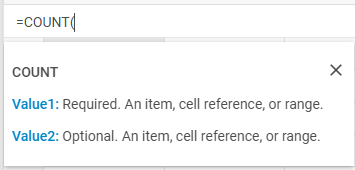
请参阅我们代码示例工具中的示例。
您可以修改公式参数弹出框的默认语言环境并添加自定义语言环境。详情请参阅本地化指南。
自定义公式
从 v6.0 起,您可以使用 addFormula() 方法注册自定义公式函数。注册后,该公式即可在任意单元格中通过其大写名称使用。
该方法接受两个参数:公式名称和一个同步处理函数,该函数接收解析后的单元格值作为参数并返回结果:
spreadsheet.addFormula("DOUBLE", (value) => {
    return value * 2;
});
之后,您可以像使用任何内置函数一样在单元格中使用该公式:
spreadsheet.parse([
    { cell: "A1", value: 4, format: "number" },
    { cell: "B1", value: "=DOUBLE(A1)", format: "number" }
]);
备注
处理函数必须是同步的。不允许在函数内部使用 Promise 或 fetch。
相关示例: Spreadsheet. 添加自定义公式