大按钮让导航更便捷
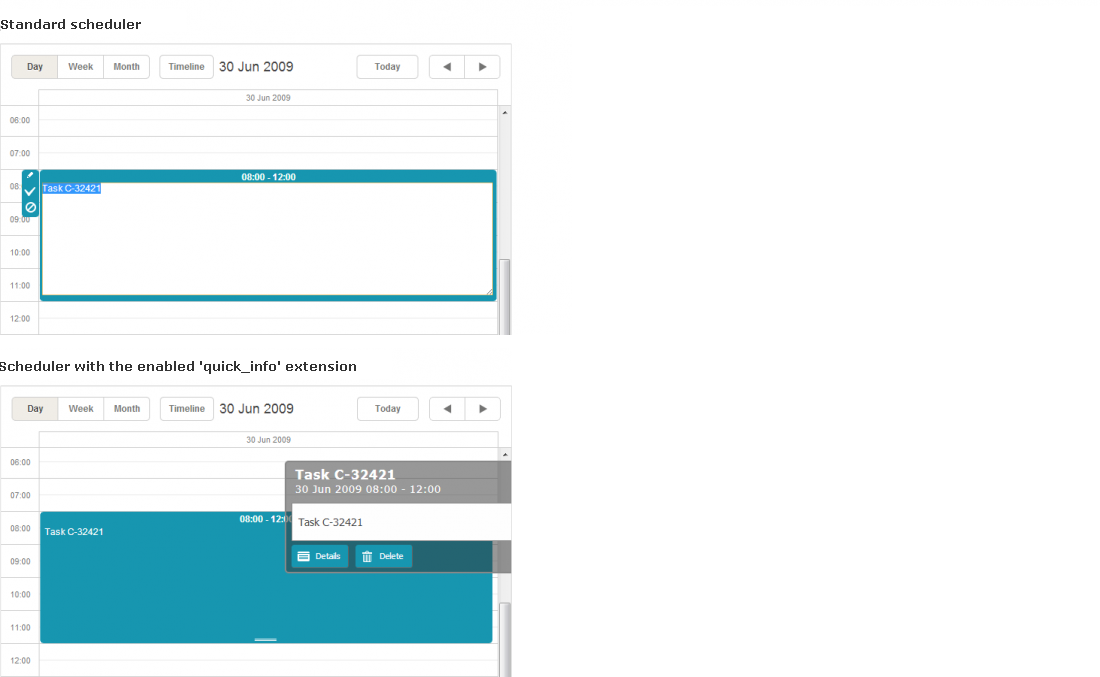
从 3.7 版本开始,dhtmlxScheduler 引入了 "Quick Info" 扩展。该功能允许用更大、更易用的按钮替换常规的侧边栏按钮和简化的编辑表单。
启用大按钮调度器
要启用大按钮调度器,只需在页面上开启 "Quick Info" 扩展:
<script>
    scheduler.plugins({
        quick_info: true
    });
    scheduler.init('scheduler_here',new Date(2009,5,30),"day");
    ...
<script>
启用后,调度器会自动将标准按钮替换为更大的版本:
配置和自定义大按钮调度器
有多种 API 可用于配置或自定义大按钮调度器:
-
3 个模板
-
quick_info_content - 控制弹出编辑表单中显示的内容
-
quick_info_date - 控制弹出编辑表单中显示的日期
-
quick_info_title - 控制弹出编辑表单的标题
-
1 个配置项
-
quick_info_detached - 设置事件表单是在屏幕左右侧显示还是在选中事件旁边显示
-
2 个方法
-
hideQuickInfo - 如果弹出事件表单已打开,则隐藏它
-
showQuickInfo - 为指定事件打开弹出事件表单
Need help?
Got a question about the documentation? Reach out to our technical support team for help and guidance. For custom component solutions, visit the Services page.