更改 Lightbox 中的按钮
您可以自定义 lightbox 中的默认按钮。
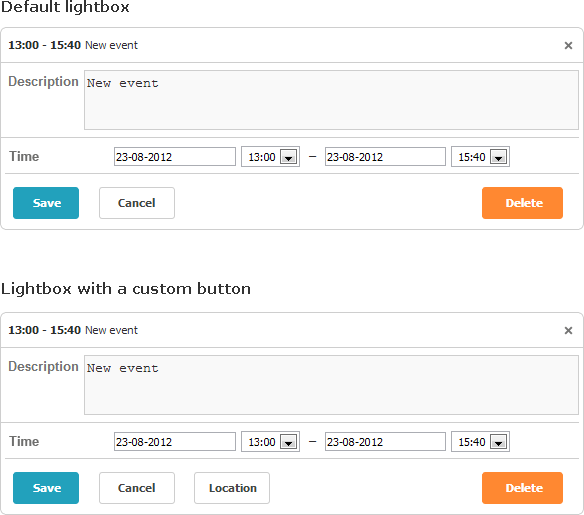
首先来看一下管理这些按钮的集合。
默认情况下,lightbox 包含 3 个按钮("Save"、"Cancel"、"Delete"),它们由 buttons_left 和 buttons_right 配置项控制。
scheduler.config.buttons_left = ["dhx_save_btn", "dhx_cancel_btn"];
scheduler.config.buttons_right = ["dhx_delete_btn"];
如需更新默认按钮组,请按照以下步骤操作:
- 向 buttons_left 或 buttons_right 数组中添加新的条目,例如:
scheduler.config.buttons_left = ["dhx_save_btn","dhx_cancel_btn","locate_button"];
- 使用以下方式定义按钮标签:
scheduler.locale.labels["locate_button"] = "Location";
- 通过选择器 (buttonName)_set 自定义按钮颜色。例如:
.dhx_save_btn_set{
    background-color:#4CAF50;
}
Related sample Custom Color for Buttons
- 为按钮分配图标(或应用其他样式),方法如下:
.locate_button
{
    background-image:url('../../codebase/imgs/location.gif');
    background-position: -2px 0px;
    width:20px;
}
- 实现 onLightboxButton 事件处理器以处理按钮点击,如下所示:
scheduler.attachEvent("onLightboxButton", function(button_id, node, e){
    if(button_id == "locate_button"){
        alert("Location!");
    }
});
Need help?
Got a question about the documentation? Reach out to our technical support team for help and guidance. For custom component solutions, visit the Services page.