xy
Description
定义各种调度器元素的尺寸
xy: SchedulerSizes
Example
scheduler.xy.scale_height = 25; // 设置X轴的高度
...
scheduler.init('scheduler_here', new Date(), "month");
Details
xy 对象包含以下属性:
属性 | 描述 | 默认值 | 适用视图 |
|---|---|---|---|
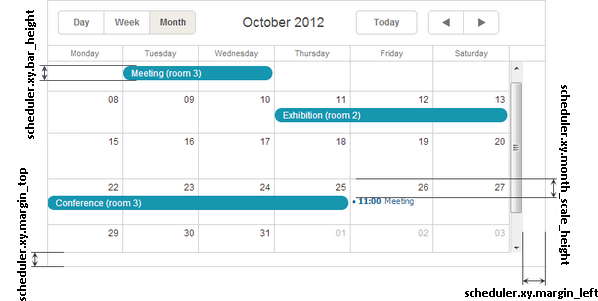
| bar_height | 月视图中任务条的高度 | 20 | month |
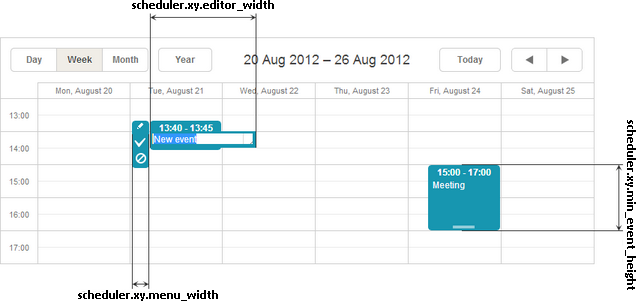
| editor_width | 事件文本输入框的宽度 | 140 | day, week, units |
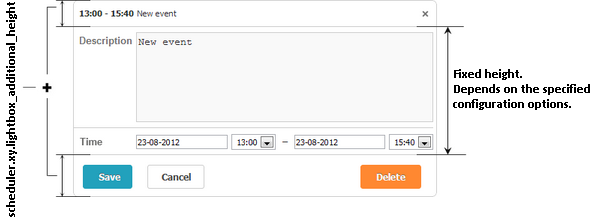
| lightbox_additional_height | 为lightbox增加额外高度 | 50 | all views |
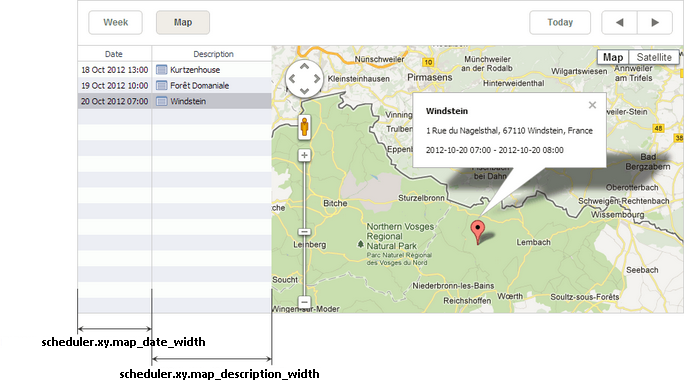
| map_date_width | 地图视图中日期列的宽度 | 188 | map |
| map_description_width | 地图视图中描述列的宽度 | 400 | map |
| margin_left | 主调度器区域的左边距 | 0 | all views |
| margin_top | 主调度器区域的上边距 | 0 | all views |
| menu_width | 选择菜单的宽度 | 25 | day, week, units |
| min_event_height | 事件框的最小高度 | 40 | day, week, units |
| month_scale_height | 月视图中单元格内事件的垂直偏移 | 20 | month |
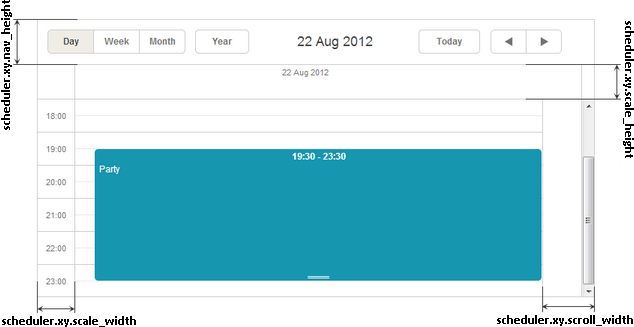
| scale_height | X轴的高度 | 20 | all views |
| scale_width | Y轴的宽度 | 50 | day, week, timeline, units |
| scroll_width | 滚动条区域的宽度 | 18 | all views |
注释
请注意,xy 下的所有属性的数据类型均为 'number'。
示意图
月视图
周视图
日视图
地图视图
Lightbox
Change log
- nav_height 属性在v7.0版本中被移除;工具栏尺寸现在通过CSS控制。
Need help?
Got a question about the documentation? Reach out to our technical support team for help and guidance. For custom component solutions, visit the Services page.