TIMELINE_scale_label
This functionality is available in the PRO edition only.
Description
Specifies items of the Y-Axis
TIMELINE_scale_label: (key: string, label: string, section: object) => string;
Parameters
key- (required) string - the section's id (key)label- (required) string - the section's labelsection- (required) object - the section object containing the 'key' and 'label' properties
Returns
label- (string) - html text for rendering in the scheduler
Example
scheduler.templates.timeline_scale_label = function(key, label, section){
    return label;
};
Applicable views: Timeline view
Details
The template requires the timeline plugin to be activated.
If you insert long text into the header of the folder when the Tree mode of the Timeline view is used, the text will be shown incorrectly by default.
In v5.3.12 and upper, the text will be truncated. To avoid it and display the whole text in one line, you can apply the following CSS rule:
.dhx_matrix_scell.folder > div,
.dhx_matrix_scell.folder .dhx_scell_name {
    white-space: nowrap;
    overflow: visible;
}
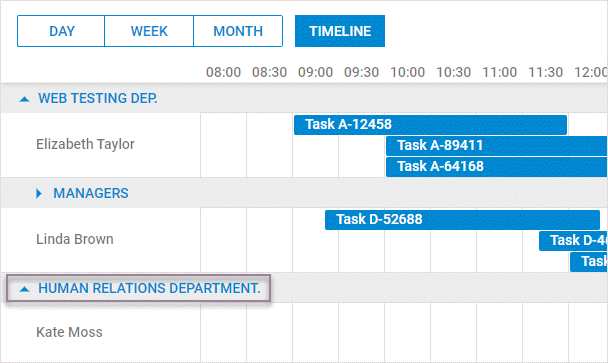
As an alternative way, you may split the text into multiple lines. To do that, you need to enlarge the height of all folders (because it is not possible to change the height of a separate folder) as in:
scheduler.createTimelineView({
      ...
      folder_dy: 80,
});
and apply CSS:
.dhx_matrix_scell.folder .dhx_scell_name{
    line-height: 17px;
}
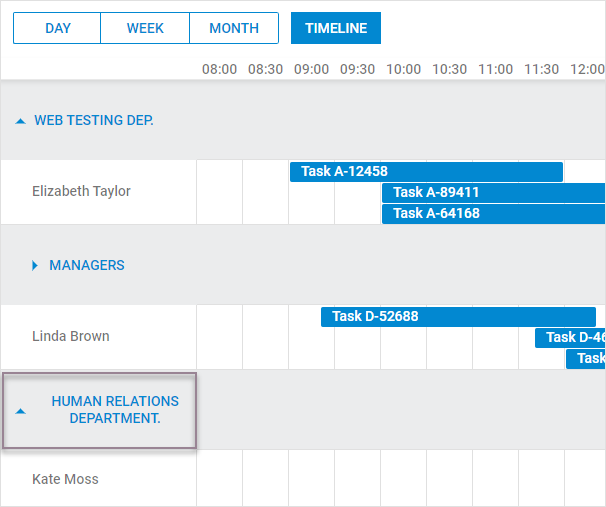
If you use v5.3.11 and lower, the long text will be wrapped to another line and, as a result, it will become invisible. But you can display the whole text in one line by applying more complex CSS:
.dhx_timeline_label_col,
.dhx_row_folder,
.dhx_matrix_scell.folder,
.dhx_scell_level0,
.dhx_scell_name{
    overflow: visible !important;
}

.dhx_matrix_scell.folder .dhx_scell_name{
    float: unset;
    white-space: nowrap;
}

.dhx_cal_data .dhx_timeline_table_wrapper div{
    text-align:left;
}