通用模板
本文介绍了在所有视图中共享的模板。有关每个模板的详细信息,请参阅相关链接文章。
事件
模板允许您自定义事件的文本和颜色。更多详情请参考:
Lightbox
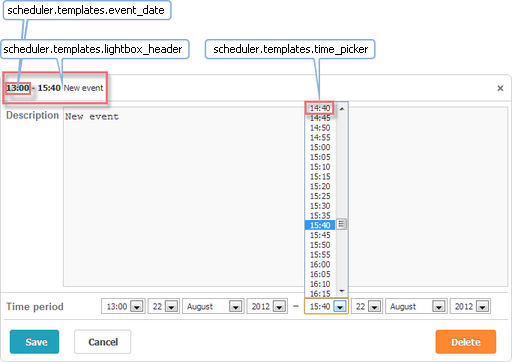
-
time_picker - Lightbox 内部的下拉时间选择器
scheduler.templates.time_picker =
scheduler.date.date_to_str(scheduler.config.hour_date); -
lightbox_header - 定义 Lightbox 的标题栏
scheduler.templates.lightbox_header = function(start,end,ev){
return scheduler.templates.event_header(ev.start_date,ev.end_date,ev)
      + scheduler.templates.event_bar_text(ev.start_date,ev.end_date,ev);
};
其中参数说明:
start - (Date) 事件开始时间
end - (Date) 事件结束时间
event - (object) 事件数据
-
event_date - 格式化事件开始和结束时间的时间部分。通常被其他模板用于显示时间范围
scheduler.templates.event_date = function(date){
const formatFunc = scheduler.date.date_to_str(scheduler.config.hour_date);
return formatFunc(date);
}
参数说明:
date - (Date) 需要格式化的日期
触摸支持
调度器包含一个 'quick info' 扩展,以支持 触摸操作。
该扩展提供了以下三个模板:
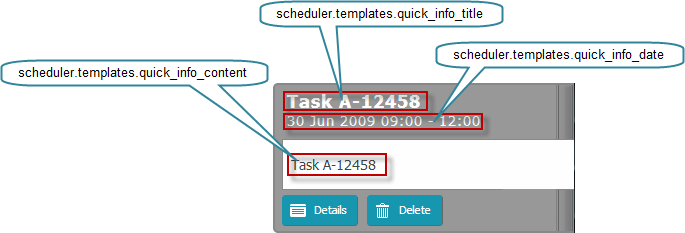
-
quick_info_content - 弹出编辑表单中显示的内容
scheduler.templates.quick_info_content = function(start, end, ev){
return ev.details || ev.text;
}; -
quick_info_date - 弹出编辑表单中显示的日期
scheduler.templates.quick_info_date = function(start, end, ev){
if (scheduler.isOneDayEvent(ev)){
return scheduler.templates.day_date(start, end, ev) + " " +
scheduler.templates.event_header(start, end, ev);
}else{
return scheduler.templates.week_date(start, end, ev);
}
}; -
quick_info_title - 弹出编辑表单的标题
scheduler.templates.quick_info_title = function(start, end, ev){
return ev.text.substr(0,50);
};
触摸支持模板的参数:
start - (Date) 事件开始时间
end - (Date) 事件结束时间
event - (object) 事件数据
工具提示
可以为任意视图中的事件添加工具提示,以便无需打开事件即可显示额外信息。
要启用此功能,请在页面中引入 Tooltip 扩展。
scheduler.plugins({
  tooltip: true
});
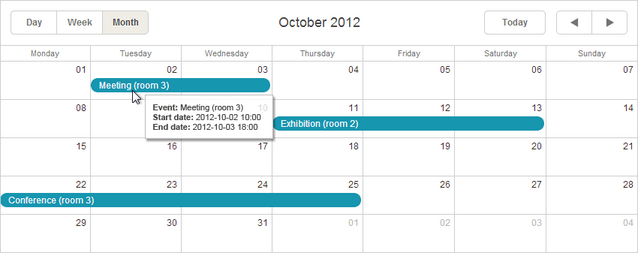
-
tooltip_date_format - 定义工具提示文本模板中使用的日期格式
scheduler.templates.tooltip_date_format="function" (date){
const formatFunc = scheduler.date.date_to_str("%Y-%m-%d %H:%i");
return formatFunc(date);
}
参数说明:
date - (Date) 需要格式化的日期
-
tooltip_text - 工具提示的内容
scheduler.templates.tooltip_text = function(start,end,ev){
return "<b>Event:</b> "+ev.text+"
<b>Start date:</b> " + scheduler.templates.tooltip_date_format(start)+ "
<b>End date:</b> "+scheduler.templates.tooltip_date_format(end)"
};
参数说明:
start - (Date) 事件开始时间
end - (Date) 事件结束时间
event - (object) 事件数据
API 模板
-
api_date - 定义 API 方法解析传入日期时使用的日期格式
scheduler.templates.api_date = function(date){
return scheduler.date.str_to_date(scheduler.config.api_date);
}; -
load_format - 定义动态加载请求时使用的日期格式
scheduler.templates.load_format = function(date){
const dateToStr_func = scheduler.date.date_to_str(scheduler.config.load_date);
return dateToStr_func(date);
} -
parse_date - 使用此模板将 XML 文件中的日期字符串转换为日期对象
const cfg = scheduler.config;
const strToDate = scheduler.date.str_to_date(cfg.date_format, cfg.server_utc);

scheduler.templates.parse_date = function(date){
return strToDate (date);
}; -
format_date - 用于将日期对象转换为字符串,以便将数据发送回服务器
const dateToStr = scheduler.date.date_to_str("%Y-%m-%d %H:%i");
scheduler.templates.format_date = function(date){
return dateToStr (date);
};
上述 API 模板的参数:
date - (Date) 需要格式化的日期
-
scheduler.templates.(viewName)_date - 定义视图标题栏中显示的日期
根据视图类型,模板函数接收的参数如下:
date - (Date) 需要格式化的日期(用于 Day、Month、Year、Units 视图及 Mini Calendar):
scheduler.templates.day_date = function(date){
const formatFunc = scheduler.date.date_to_str(scheduler.config.default_date);
return formatFunc(date);
};
或:
start - (Date) 视图的起始日期
end - (Date) 视图的结束日期
(用于 Week、Agenda、Grid、Map 和 Timeline 视图):
scheduler.templates.week_date = function(start, end){
return scheduler.templates.day_date(start)+" – "+
scheduler.templates.day_date(scheduler.date.add(end,-1,"day"));
};
-
scheduler.templates.(viewName)_scale_date - 定义视图中日期单元格的日期显示 (用于 Timeline 视图的 X 轴项目,或 Mini Calendar 周子标题中的星期名称)
适用于 Day、Week、Year、Timeline 视图及 Mini Calendar
scheduler.templates.day_scale_date = function(date){
return scheduler.date.date_to_str(scheduler.config.default_date);
};
参数说明:
date - (Date) 需要格式化的日期