Month View
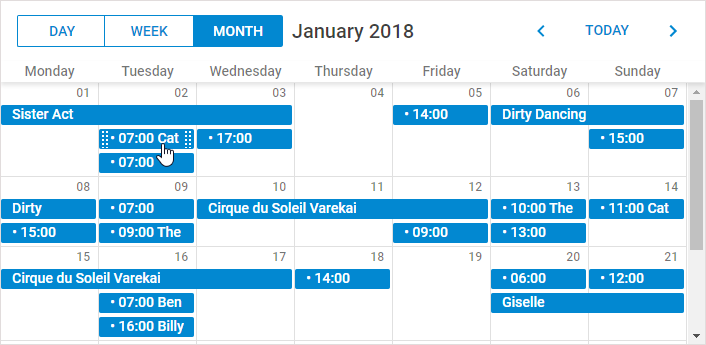
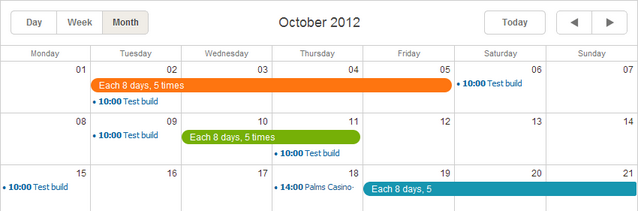
Month View는 한 달의 달력을 보여줍니다.
초기화
Month View는 기본 스케줄러 마크업에 기본적으로 포함되어 있으므로, 별도의 추가 작업 없이 사용할 수 있습니다.
// 표준 초기화; Month View는 자동으로 포함됩니다
scheduler.init('scheduler_here', new Date(2019,0,10), "month");
...
scheduler.load("/data/events");
Month View 탭 제거하기
Month View 탭을 제거하려면, 스케줄러 마크업에서 해당 div를 삭제하면 됩니다:
// Month 탭을 없애려면 이 div를 삭제하세요
<div className="dhx_cal_tab" name="month_tab"></div>
셀에 표시되는 이벤트 개수 제한하기
기본적으로 스케줄러는 모든 이벤트가 셀에 들어가도록 셀 높이를 조정합니다.
버전 4.0부터는 각 셀에 표시되는 이벤트의 최대 개수를 설정할 수 있으며, 셀 높이도 제한됩니다.
셀당 최대 이벤트 개수를 설정하려면 max_month_events 옵션을 사용하세요:
scheduler.config.max_month_events = 3;
..
scheduler.init('scheduler_here', new Date(2019,5,30), "month");
설정한 개수보다 더 많은 이벤트가 있을 경우, 'View more' 링크가 나타납니다. 이 링크를 클릭하면 Day View로 이동하여 모든 이벤트를 확인할 수 있습니다.
'View more' link in the Month view
X축에서 특정 요일 숨기기
스케일에서 특정 요일을 제외하고(예: 주중만 표시하고 주말 숨기기) 싶다면 ignore_month() 메서드를 사용하세요.
이 함수는 셀의 날짜를 매개변수로 받으며, 숨기고 싶은 날짜에 대해 true를 반환하면 됩니다.
// 0은 일요일, 6은 토요일입니다
scheduler.ignore_month = function(date){
    if (date.getDay() == 6 || date.getDay() == 0) // 토요일과 일요일 숨기기
        return true;
};
Hiding week days in the scale of Month view
날짜 숫자를 클릭 가능한 링크로 표시하기
Month View에서 날짜 숫자를 클릭하면 해당 날짜로 이동할 수 있습니다.
날짜 숫자를 클릭 가능하게 하려면:
- active_links 익스텐션을 활성화하세요:
scheduler.plugins({
    active_links: true
});
- (선택사항) 날짜 클릭 시 열리는 뷰를 지정하려면 active_link_view 옵션을 설정하세요. 기본값은 "Day View"입니다:
// 날짜 클릭 시 Week View로 이동
scheduler.config.active_link_view = "week";
...
scheduler.init('scheduler_here', new Date(2012,7,6), "month");
드래그앤드롭으로 이벤트 크기 조절하기 (ver. 4.1+)
기본적으로 Month View에서는 드래그앤드롭으로 이벤트 크기 조절이 불가능하며, 편집 폼을 통해서만 가능합니다.
여러 날에 걸친 이벤트를 드래그앤드롭으로 크기 조절하려면 resize_month_events 옵션을 활성화하세요:
// 여러 날 이벤트 드래그앤드롭 크기 조절 활성화
scheduler.config.resize_month_events = true; /*!*/

scheduler.init('scheduler_here', new Date(2019,0,10), "month");
Resizable events in Month view
드래그앤드롭으로 단일 날짜 이벤트까지 크기 조절을 허용하려면 resize_month_timed 옵션도 true로 설정하세요:
// 단일 및 여러 날 이벤트 모두 드래그앤드롭 크기 조절 활성화
scheduler.config.resize_month_events = true;/*!*/
scheduler.config.resize_month_timed = true;  /*!*/
scheduler.init('scheduler_here', new Date(2019,0,10), "month");
참고:
- resize_month_timed 옵션은 resize_month_events가 활성화되어 있을 때만 동작합니다.
- resize_month_timed가 활성화되면, 단일 날짜 이벤트의 표시 방식이 달라집니다: