드래그 앤 드롭 작업(레거시)
경고
이 문서는 레거시 통합에 대해 설명합니다. 새로 시작하는 경우 프레임워크 통합 또는 바닐라 JS 설정을 참조하세요.
라이브러리는 외부 DHTMLX 구성요소나 다른 스케줄러에서 요소를 드래그하여 새로운 이벤트를 생성할 수 있게 하는 outerdrag 확장을 제공합니다.
외부 구성요소에서 드래그
사용자가 외부 요소를 스케줄러로 드래그하면, 스케줄러가 새 이벤트 생성을 위한 라이트박스를 엽니다.
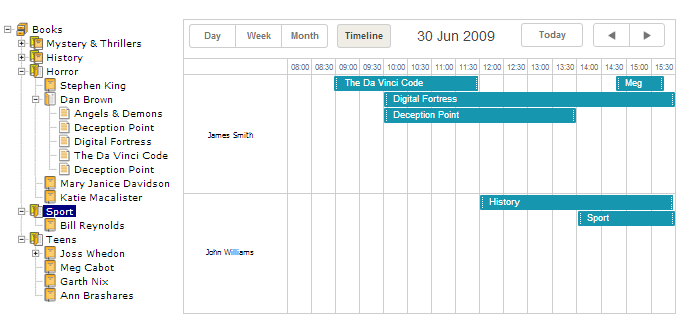
다음은 dhtmlxTree 컴포넌트의 맥락에서 외부 드래그 앤 드롭을 살펴보겠습니다.
다음 단계에 따라 스케줄러를 dhtmlxTree와 통합합니다:
- 다운로드 패키지를 다운로드하고 [YOUR APPLICATION ROOT] 폴더에 내용을 압축 해제합니다
- 페이지에 필요한 js와 css 파일을 포함합니다:
<script src="../codebase/dhtmlxscheduler.js" ...></script>
<link rel="stylesheet" href="../codebase/dhtmlxscheduler.css" ...>
...
- 페이지에서 outerdrag 확장을 활성화합니다:
scheduler.plugins({
    outerdrag: true
});
- dhtmlxTree 구성요소를 초기화합니다(여기를 참고):
var tree = new dhtmlXTreeObject("treebox", "100%", "100%", 0);
tree.setImagePath("../common/dhtmlxTree/imgs/csh_yellowbooks/");
tree.loadXML("./data/tree.xml");
- dhtmlxTree 구성요소에서 드래그 앤 드롭을 활성화합니다(여기를 참고):
tree.enableDragAndDrop(true);
- 스케줄러를 초기화하고 구성합니다:
...
scheduler.init('scheduler_here', new Date(2019, 5, 30), "timeline");
- onExternalDragIn 이벤트에 핸들러를 연결하여 드래그된 텍스트를 이벤트 속성으로 어떻게 변환할지 설정합니다:
scheduler.attachEvent("onExternalDragIn", function(id, source, event){
    var label = tree.getItemText(tree._dragged[0].id);
    scheduler.getEvent(id).text = label;
    return true;
});
이제 트리 데이터가 포함된 새 이벤트를 쉽게 만들 수 있습니다 - 원하는 노드를 드래그 앤 드롭하면 됩니다.
Need help?
Got a question about the documentation? Reach out to our technical support team for help and guidance. For custom component solutions, visit the Services page.