Drag-and-Drop Operations (legacy)
경고
This article describes a legacy integration. If you're starting fresh, see the framework integrations or vanilla JS setup.
The library provides the outerdrag extension that allows creating new events by dragging elements from external DHTMLX components or other schedulers.
Dragging from external components
Once the user drags some external element to the scheduler, the scheduler opens the lightbox for creating a new event.
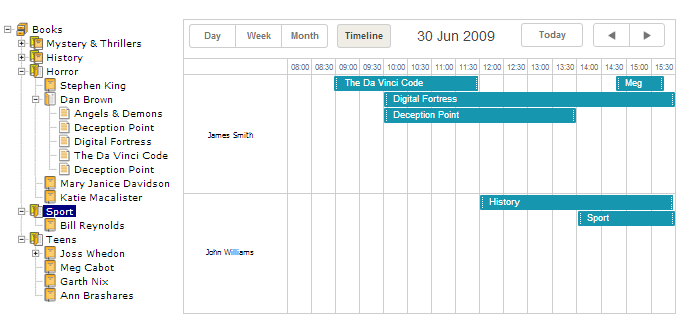
Let's consider external drag-and-drop in the context of the dhtmlxTree component.
Follow these steps, to integrate the scheduler with dhtmlxTree:
- Download the dhtmlxTree package and unzip its content to [YOUR APPLICATION ROOT] folder
- Include the necessary js and css files on the page:
<script src="../codebase/dhtmlxscheduler.js" ...></script>
<link rel="stylesheet" href="../codebase/dhtmlxscheduler.css" ...>
...
- Activate the outerdrag extension on the page:
scheduler.plugins({
    outerdrag: true
});
- Initialize dhtmlxTree component (see instructions here) :
var tree = new dhtmlXTreeObject("treebox", "100%", "100%", 0);
tree.setImagePath("../common/dhtmlxTree/imgs/csh_yellowbooks/");
tree.loadXML("./data/tree.xml");
- Enable drag-and-drop in the dhtmlxTree component (see instructions here) :
tree.enableDragAndDrop(true);
- Initialize and configure the scheduler:
...
scheduler.init('scheduler_here', new Date(2019, 5, 30), "timeline");
- Attach a handler to the onExternalDragIn event to set how the text of the dragged element will be converted to a property of the event:
scheduler.attachEvent("onExternalDragIn", function(id, source, event){
    var label = tree.getItemText(tree._dragged[0].id);
    scheduler.getEvent(id).text = label;
    return true;
});
Now, you can easy create new events, containing tree data - just drag and drop the desired node.
Need help?
Got a question about the documentation? Reach out to our technical support team for help and guidance. For custom component solutions, visit the Services page.