Integration with Angular
Familiarity with the basic concepts and patterns of Angular is assumed. To refresh, see the Angular documentation.
DHTMLX Pivot integrates with Angular as a regular component. For a full working setup, see the Angular Pivot demo on GitHub.
Create a project
Install Angular CLI and Node.js before you start.
The following command scaffolds a new Angular project named my-angular-pivot-app:
ng new my-angular-pivot-app
Disable Server-Side Rendering (SSR) and Static Site Generation (SSG/Prerendering) when prompted by the Angular CLI. This guide assumes a client-rendered app.
The command installs all necessary tools. No additional commands are needed.
Install dependencies
Change into the new project directory:
cd my-angular-pivot-app
Install dependencies and start the dev server with the yarn package manager:
yarn
yarn start # or: yarn dev
The app should run on a local port (for example, http://localhost:3000).
Create Pivot
Add the Pivot package to the project, then wrap Pivot in an Angular component.
Step 1. Install the package
Download the trial Pivot package and follow the steps in the README. The trial Pivot package is valid for 30 days.
Step 2. Create the component
Create an Angular component that mounts Pivot. Add a pivot folder under src/app/ and create src/app/pivot/pivot.component.ts. Then follow these steps:
Import source files
Open src/app/pivot/pivot.component.ts and import the Pivot package. The import path depends on the package edition:
- PRO version (installed from a local folder):
import { Pivot } from 'dhx-pivot-package';
- Trial version:
import { Pivot } from '@dhx/trial-pivot';
This tutorial uses the trial version of Pivot.
Set up the container and mount Pivot
To display Pivot on the page, define a container element in the component template, then initialize Pivot in the ngOnInit hook using the constructor. Destroy Pivot in the ngOnDestroy hook.
The following code snippet defines a minimal Pivot Angular component:
import { Pivot } from '@dhx/trial-pivot';
import { Component, ElementRef, OnInit, ViewChild, OnDestroy, ViewEncapsulation } from '@angular/core';

@Component({
    encapsulation: ViewEncapsulation.None,
    selector: "pivot", // template name used in the "app.component.ts" file as <pivot />
    styleUrls: ["./pivot.component.css"], // include a CSS file
    template: `<div #container className="widget"></div>`,
})

export class PivotComponent implements OnInit, OnDestroy {
    // container reference for Pivot
    @ViewChild('container', { static: true }) pivot_container!: ElementRef;

    private _table!: Pivot;

    ngOnInit() {
        // initialize the Pivot component
        this._table = new Pivot(this.pivot_container.nativeElement, {});
    }

    ngOnDestroy(): void {
        this._table.destructor(); // destroy Pivot on unmount
    }
}
Add styles
To render Pivot correctly, create src/app/pivot/pivot.component.css with styles for the page and the Pivot container:
/* import Pivot styles */
@import "@dhx/trial-pivot/dist/pivot.css";

/* styles for the initial page */
html,
body {
    margin: 0;
    padding: 0;
    height: 100%;
}

/* styles for the Pivot container */
.widget {
    width: 100%;
    height: 100%;
}
Load data
To feed data into Pivot, prepare a dataset. Create src/app/pivot/data.ts and export the data and field metadata:
export function getData() {
    const dataset = [
        {
            "cogs": 51,
            "date": "10/1/2018",
            "inventory_margin": 503,
            "margin": 71,
            "market_size": "Major Market",
            "market": "Central",
            "marketing": 46,
            "product_line": "Leaves",
            "product_type": "Herbal Tea",
            "product": "Lemon",
            "profit": -5,
            "sales": 122,
            "state": "Colorado",
            "expenses": 76,
            "type": "Decaf"
        },
        {
            "cogs": 52,
            "date": "10/1/2018",
            "inventory_margin": 405,
            "margin": 71,
            "market_size": "Major Market",
            "market": "Central",
            "marketing": 17,
            "product_line": "Leaves",
            "product_type": "Herbal Tea",
            "product": "Mint",
            "profit": 26,
            "sales": 123,
            "state": "Colorado",
            "expenses": 45,
            "type": "Decaf"
        }, // other data items
    ];

    const fields: any = [
        {
            "id": "cogs",
            "label": "Cogs",
            "type": "number"
        },
        {
            "id": "date",
            "label": "Date",
            "type": "date"
        }, // other fields
    ];

    return { dataset, fields };
};
Open src/app/pivot/pivot.component.ts, import getData, and apply the dataset in ngOnInit():
import { Pivot } from '@dhx/trial-pivot';
import { getData } from "./data"; // import data
import { Component, ElementRef, OnInit, ViewChild, OnDestroy, ViewEncapsulation } from '@angular/core';

@Component({
    encapsulation: ViewEncapsulation.None,
    selector: "pivot",
    styleUrls: ["./pivot.component.css"],
    template: `<div #container className="widget"></div>`,
})

export class PivotComponent implements OnInit, OnDestroy {
    @ViewChild('container', { static: true }) pivot_container!: ElementRef;

    private _table!: Pivot;

    ngOnInit() {
        const { dataset, fields } = getData(); // unpack data and field metadata
        this._table = new Pivot(this.pivot_container.nativeElement, {
            fields,
            data: dataset,
            config: {
                rows: ["state", "product_type"],
                columns: ["product_line", "type"],
                values: [
                    {
                        field: "profit",
                        method: "sum"
                    }, // other values
                ]
            },
            // other configuration properties
        });
    }

    ngOnDestroy(): void {
        this._table.destructor();
    }
}
The component is now ready to use. On mount, Pivot renders with the supplied data. For the full list of configuration properties, see the Pivot API docs.
Handle events
User actions in Pivot fire events that you can subscribe to. For the full list of events, see Events overview.
The following code snippet extends ngOnInit with an open-filter event listener that logs the field ID when a user opens a filter:
// ...
ngOnInit() {
    const { dataset, fields } = getData();
    this._table = new Pivot(this.pivot_container.nativeElement, {
        fields,
        data: dataset,
        config: {
            rows: ["state", "product_type"],
            columns: ["product_line", "type"],
            values: [
                {
                    field: "profit",
                    method: "sum"
                }, // other values
            ]
        }
    });

    this._table.api.on("open-filter", (ev) => {
        console.log("The field id for which the filter is activated:", ev.id);
    });
}

ngOnDestroy(): void {
    this._table.destructor();
}
Step 3. Add Pivot to the app
To embed PivotComponent in the app, open src/app/app.component.ts and replace the default code with the following:
import { Component } from "@angular/core";

@Component({
    selector: "app-root",
    template: `<pivot/>` // template created in the "pivot.component.ts" file
})
export class AppComponent {
    name = "";
}
Then create src/app/app.module.ts and register PivotComponent:
import { NgModule } from "@angular/core";
import { BrowserModule } from "@angular/platform-browser";

import { AppComponent } from "./app.component";
import { PivotComponent } from "./pivot/pivot.component";

@NgModule({
    declarations: [AppComponent, PivotComponent],
    imports: [BrowserModule],
    bootstrap: [AppComponent]
})
export class AppModule {}
Finally, open src/main.ts and replace its contents with the following bootstrap code:
import { platformBrowserDynamic } from "@angular/platform-browser-dynamic";
import { AppModule } from "./app/app.module";
platformBrowserDynamic()
    .bootstrapModule(AppModule)
    .catch((err) => console.error(err));
Start the app to see Pivot render the data on the page.
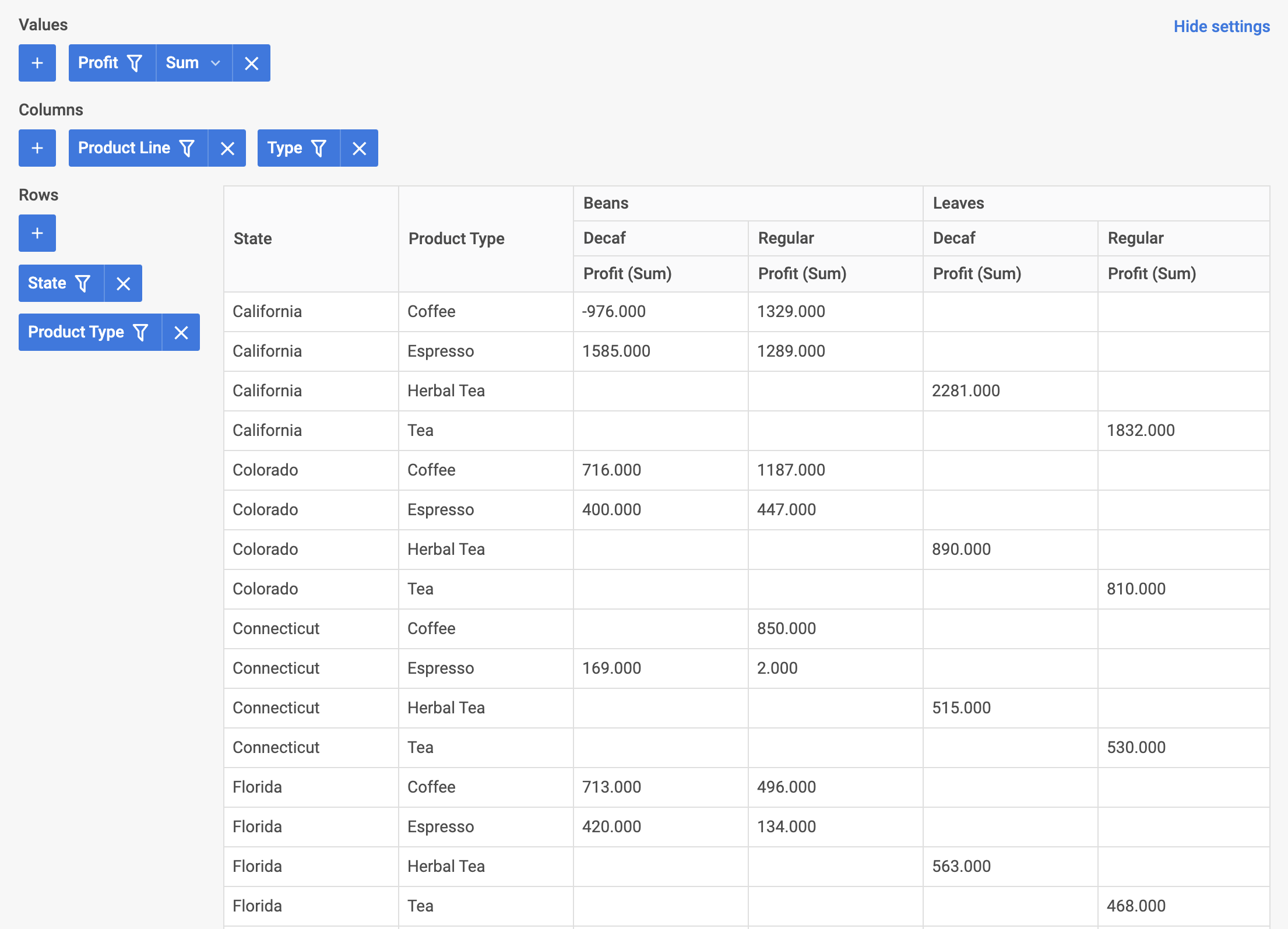
Pivot is now integrated with Angular. Customize the configuration to suit the project requirements. For the final example, see angular-pivot-demo on GitHub.