周议程视图
信息
此视图仅包含在 Scheduler PRO 版本中。
周议程视图结合了周视图和议程视图的元素,显示了本周计划的即将到来的事件列表。
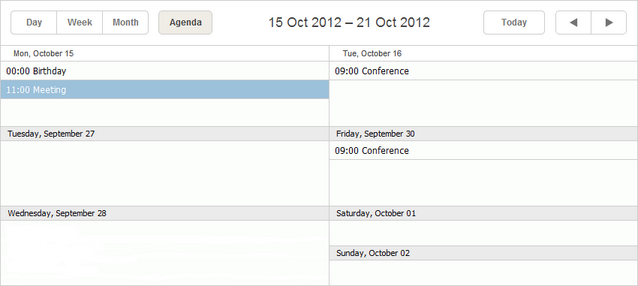
初始化
要在调度器中包含周议程视图,请按照以下步骤操作:
- 在页面上启用 Week Agenda 扩展:
scheduler.plugins({
    week_agenda: true
});
- 将视图的标签添加到调度器的标记中:
<div id="scheduler_here" class="dhx_cal_container" ...>
    <div class="dhx_cal_navline">
       ...
       <div class="dhx_cal_tab" name="week_agenda_tab"></div>
    </div>
    ...
</div>
- 为标签分配文本:
//'weekAg_tab' 是我们 div 的名称
scheduler.locale.labels.week_agenda_tab = "Week Agenda";
界面细节
- 选中的事件会被高亮显示。如果某个事件跨越多天,所有相关记录也会被高亮显示。
- 要创建新事件,请双击对应日期的单元格。
- 要编辑或删除事件,请双击该事件本身以打开 lightbox 进行更改。
相关指南
Need help?
Got a question about the documentation? Reach out to our technical support team for help and guidance. For custom component solutions, visit the Services page.