TIMELINE_scale_label
信息
此功能仅在 PRO 版本中可用。
Description
指定 Y 轴的项目
TIMELINE_scale_label: (key: string, label: string, section: object) => string;
Parameters
key- (required) string - 该部分的 id(key)label- (required) string - 该部分的标签section- (required) object - 包含 'key' 和 'label' 属性的部分对象
Returns
label- (string) - 用于在调度器中渲染的 html 文本
Example
scheduler.templates.timeline_scale_label = function(key, label, section){
    return label;
};
Applicable views: Timeline view
Details
注释
该模板需要激活 timeline 插件。
在 Timeline 视图中使用 Tree 模式时,默认情况下,在文件夹标题中插入较长文本可能会引发显示问题。
从版本 5.3.12 开始,长文本将被截断。若要防止这种截断并保持整行显示完整文本,可以应用以下 CSS:
.dhx_matrix_scell.folder > div,
.dhx_matrix_scell.folder .dhx_scell_name {
    white-space: nowrap;
    overflow: visible;
}
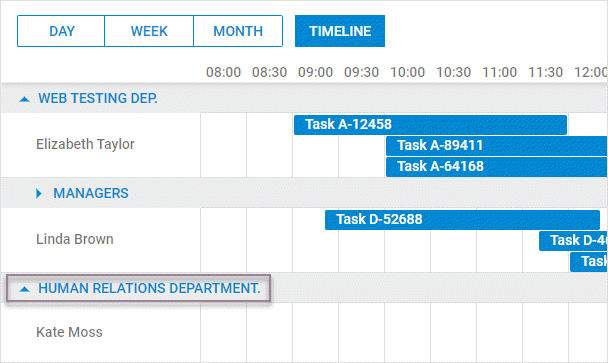
或者,可以通过增加所有文件夹的高度(注意单个文件夹高度无法单独调整)来将文本分成多行。实现方式如下:
scheduler.createTimelineView({
      ...
      folder_dy: 80,
});
并应用以下 CSS:
.dhx_matrix_scell.folder .dhx_scell_name{
    line-height: 17px;
}
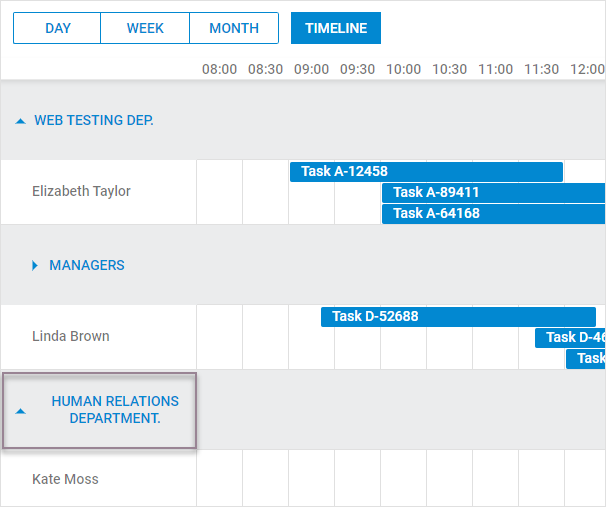
对于版本 5.3.11 及更早版本,长文本会自动换行,可能导致部分文本被隐藏。若希望完整文本在单行内显示,需要更详细的 CSS 调整:
.dhx_timeline_label_col,
.dhx_row_folder,
.dhx_matrix_scell.folder,
.dhx_scell_level0,
.dhx_scell_name{
    overflow: visible !important;
}

.dhx_matrix_scell.folder .dhx_scell_name{
    float: unset;
    white-space: nowrap;
}

.dhx_cal_data .dhx_timeline_table_wrapper div{
    text-align:left;
}
Related Guides
Need help?
Got a question about the documentation? Reach out to our technical support team for help and guidance. For custom component solutions, visit the Services page.