공통 템플릿
이 문서에서는 모든 뷰에서 공유되는 템플릿에 대해 다룹니다. 각 템플릿에 대한 자세한 정보는 링크된 문서를 참고하세요.
이벤트
템플릿을 사용하면 이벤트의 텍스트와 색상을 조정할 수 있습니다. 자세한 내용은 다음 문서를 참고하세요:
라이트박스
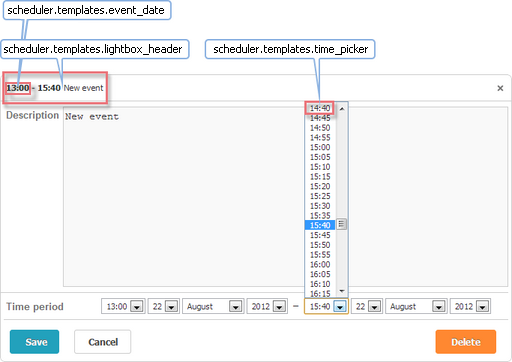
-
time_picker - 라이트박스 내부의 드롭다운 시간 선택기
scheduler.templates.time_picker =
scheduler.date.date_to_str(scheduler.config.hour_date); -
lightbox_header - 라이트박스의 헤더를 정의
scheduler.templates.lightbox_header = function(start,end,ev){
return scheduler.templates.event_header(ev.start_date,ev.end_date,ev)
      + scheduler.templates.event_bar_text(ev.start_date,ev.end_date,ev);
};
여기서:
start - (Date) 이벤트 시작 시간
end - (Date) 이벤트 종료 시간
event - (object) 이벤트 데이터
-
event_date - 이벤트 시작 및 종료 날짜의 시간 부분을 포맷합니다. 다른 템플릿에서 시간 범위를 표시할 때 주로 사용됩니다.
scheduler.templates.event_date = function(date){
const formatFunc = scheduler.date.date_to_str(scheduler.config.hour_date);
return formatFunc(date);
}
여기서:
date - (Date) 포맷할 날짜
터치 지원
스케줄러는 touch support를 활성화하기 위한 'quick info' 확장 기능을 포함하고 있습니다.
이 확장 기능은 세 가지 템플릿을 제공합니다:
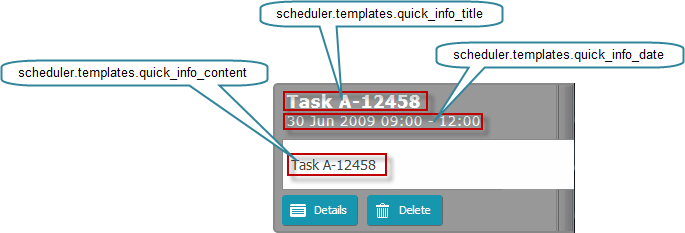
-
quick_info_content - 팝업 편집 폼에 표시되는 내용
scheduler.templates.quick_info_content = function(start, end, ev){
return ev.details || ev.text;
}; -
quick_info_date - 팝업 편집 폼에 표시되는 날짜
scheduler.templates.quick_info_date = function(start, end, ev){
if (scheduler.isOneDayEvent(ev)){
return scheduler.templates.day_date(start, end, ev) + " " +
scheduler.templates.event_header(start, end, ev);
}else{
return scheduler.templates.week_date(start, end, ev);
}
}; -
quick_info_title - 팝업 편집 폼의 제목
scheduler.templates.quick_info_title = function(start, end, ev){
return ev.text.substr(0,50);
};
터치 지원 템플릿의 파라미터:
start - (Date) 이벤트 시작 시간
end - (Date) 이벤트 종료 시간
event - (object) 이벤트 데이터
툴팁
이벤트에 툴팁을 추가하면 이벤트를 열지 않고도 추가 정보를 표시할 수 있습니다.
이 기능을 활성화하려면 페이지에 Tooltip 확장 기능을 포함하세요.
scheduler.plugins({
  tooltip: true
});
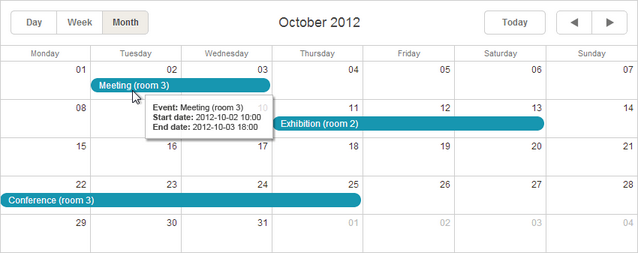
-
tooltip_date_format - 툴팁 텍스트에서 사용되는 날짜 포맷을 정의
scheduler.templates.tooltip_date_format="function" (date){
const formatFunc = scheduler.date.date_to_str("%Y-%m-%d %H:%i");
return formatFunc(date);
}
여기서:
date - (Date) 포맷할 날짜
-
tooltip_text - 툴팁의 내용
scheduler.templates.tooltip_text = function(start,end,ev){
return "<b>Event:</b> "+ev.text+"
<b>Start date:</b> " + scheduler.templates.tooltip_date_format(start)+ "
<b>End date:</b> "+scheduler.templates.tooltip_date_format(end)"
};
여기서:
start - (Date) 이벤트 시작 시간
end - (Date) 이벤트 종료 시간
event - (object) 이벤트 데이터
API 템플릿
-
api_date - API 메서드에서 들어오는 날짜를 파싱할 때 사용되는 날짜 포맷을 정의
scheduler.templates.api_date = function(date){
return scheduler.date.str_to_date(scheduler.config.api_date);
}; -
load_format - 동적 로딩 요청에 사용되는 날짜 포맷을 정의
scheduler.templates.load_format = function(date){
const dateToStr_func = scheduler.date.date_to_str(scheduler.config.load_date);
return dateToStr_func(date);
} -
parse_date - XML 파일에서 날짜 문자열을 날짜 객체로 변환할 때 사용하는 템플릿
const cfg = scheduler.config;
const strToDate = scheduler.date.str_to_date(cfg.date_format, cfg.server_utc);

scheduler.templates.parse_date = function(date){
return strToDate (date);
}; -
format_date - 날짜 객체를 문자열로 변환하여 서버로 데이터를 전송할 때 사용
const dateToStr = scheduler.date.date_to_str("%Y-%m-%d %H:%i");
scheduler.templates.format_date = function(date){
return dateToStr (date);
};
위 API 템플릿의 파라미터:
date - (Date) 포맷할 날짜
-
scheduler.templates.(viewName)_date - 뷰의 헤더에 표시되는 날짜를 정의
뷰에 따라, 템플릿 함수는 다음 중 하나를 받습니다:
date - (Date) 포맷할 날짜 (Day, Month, Year, Units 뷰 및 Mini Calendar에서 사용):
scheduler.templates.day_date = function(date){
const formatFunc = scheduler.date.date_to_str(scheduler.config.default_date);
return formatFunc(date);
};
또는:
start - (Date) 뷰의 시작 날짜
end - (Date) 뷰의 종료 날짜
(Week, Agenda, Grid, Map, Timeline 뷰에서 사용):
scheduler.templates.week_date = function(start, end){
return scheduler.templates.day_date(start)+" – "+
scheduler.templates.day_date(scheduler.date.add(end,-1,"day"));
};
-
scheduler.templates.(viewName)_scale_date - 뷰의 일(day) 셀에 표시되는 날짜를 정의
(Timeline 뷰의 X축 항목 또는 Mini Calendar의 주간 서브헤더의 요일명 등)Day, Week, Year, Timeline 뷰 및 Mini Calendar에서 적용 가능
scheduler.templates.day_scale_date = function(date){
return scheduler.date.date_to_str(scheduler.config.default_date);
};
여기서:
date - (Date) 포맷할 날짜