xy
Description
스케줄러의 다양한 요소 크기를 정의합니다
xy: SchedulerSizes
Example
scheduler.xy.scale_height = 25; // X축의 높이를 설정합니다
...
scheduler.init('scheduler_here', new Date(), "month");
Details
xy 객체는 다음과 같은 속성들을 포함합니다:
속성 | 설명 | 기본값 | 적용 뷰 |
|---|---|---|---|
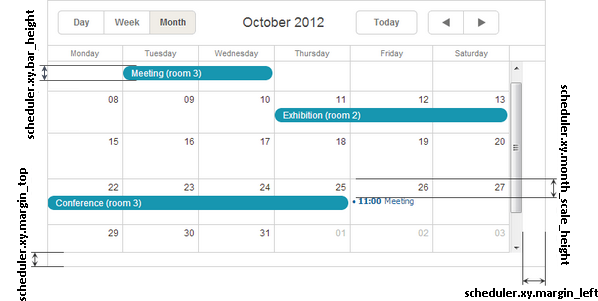
| bar_height | 월별 뷰에서 작업 바의 높이 | 20 | month |
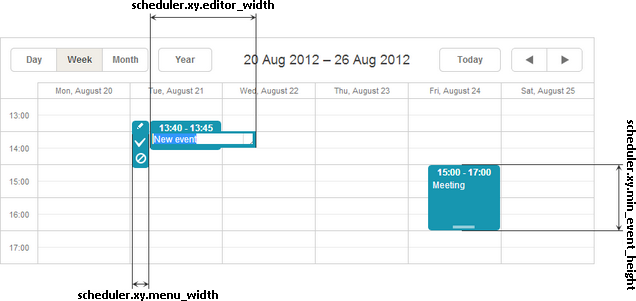
| editor_width | 이벤트 텍스트 입력 필드의 너비 | 140 | day, week, units |
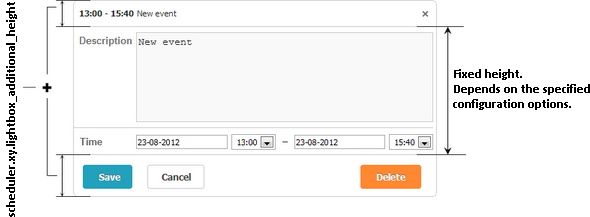
| lightbox_additional_height | 라이트박스에 추가되는 높이 | 50 | 모든 뷰 |
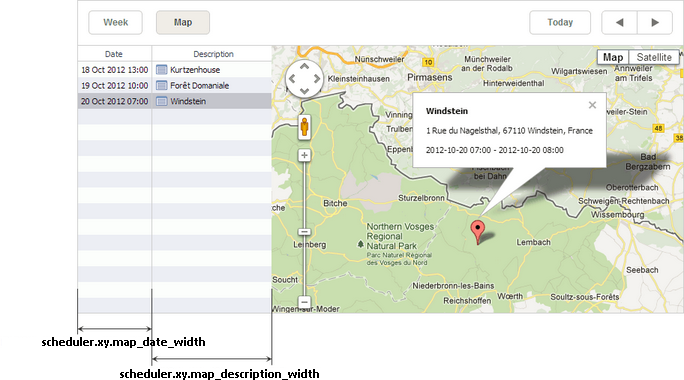
| map_date_width | 맵 뷰에서 날짜 열의 너비 | 188 | map |
| map_description_width | 맵 뷰에서 설명 열의 너비 | 400 | map |
| margin_left | 메인 스케줄러 영역의 왼쪽 여백 | 0 | 모든 뷰 |
| margin_top | 메인 스케줄러 영역의 상단 여백 | 0 | 모든 뷰 |
| menu_width | 선택 메뉴의 너비 | 25 | day, week, units |
| min_event_height | 이벤트 박스의 최소 높이 | 40 | day, week, units |
| month_scale_height | 월별 뷰에서 셀 내부 이벤트의 수직 오프셋 | 20 | month |
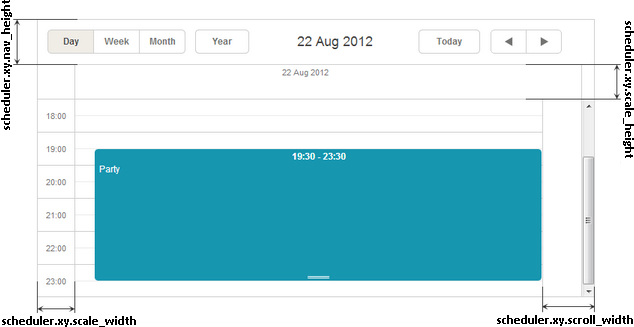
| scale_height | X축의 높이 | 20 | 모든 뷰 |
| scale_width | Y축의 너비 | 50 | day, week, timeline, units |
| scroll_width | 스크롤바 영역의 너비 | 18 | 모든 뷰 |
노트
참고로, xy 하위의 모든 속성들은 'number' 데이터 타입입니다.
Illustration images
월별 뷰
주별 뷰
일별 뷰
맵 뷰
라이트박스
Change log
- nav_height 속성은 v7.0에서 제거되었습니다; 툴바 크기 조절은 이제 CSS로 제어됩니다.
Need help?
Got a question about the documentation? Reach out to our technical support team for help and guidance. For custom component solutions, visit the Services page.