xy
Description
Specifies sizes of the scheduler's elements
xy: SchedulerSizes
Example
scheduler.xy.scale_height = 25;//sets the height of the X-Axis
...
scheduler.init('scheduler_here',new Date(),"month");
Details
The xy object has the following properties:
Property | Description | Default value | Applicable views |
|---|---|---|---|
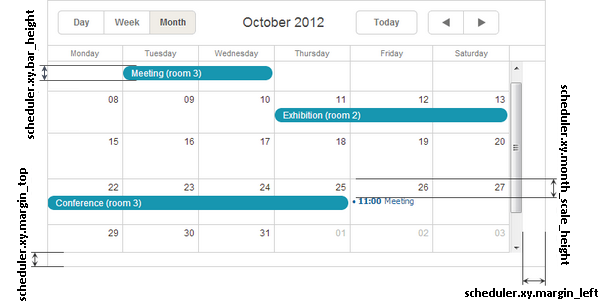
| bar_height | the height of the task bars in the Month view | 20 | month |
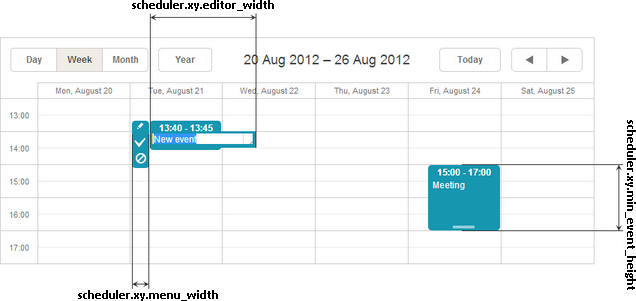
| editor_width | the width of the event's text input | 140 | day, week, units |
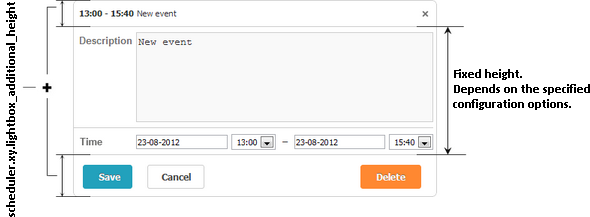
| lightbox_additional_height | increases the length of the lightbox | 50 | all views |
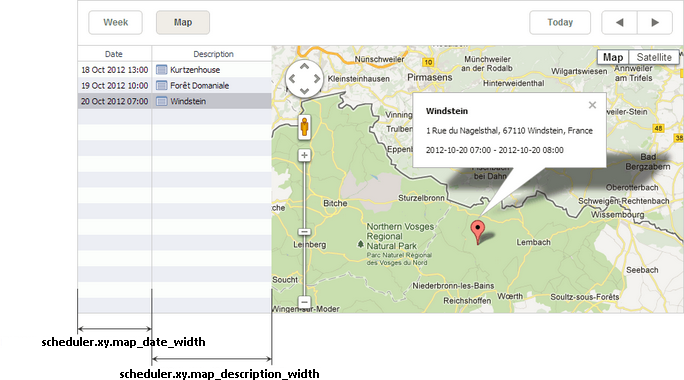
| map_date_width | the width of the date column in the Map view | 188 | map |
| map_description_width | the width of the description column in the Map view | 400 | map |
| margin_left | the left margin of the main scheduler area | 0 | all views |
| margin_top | the bottom margin of the main scheduler area | 0 | all views |
| menu_width | the width of the selection menu | 25 | day, week, units |
| min_event_height | the minimal height of the event's box | 40 | day, week, units |
| month_scale_height | the top offset of an event in a cell in the month view | 20 | month |
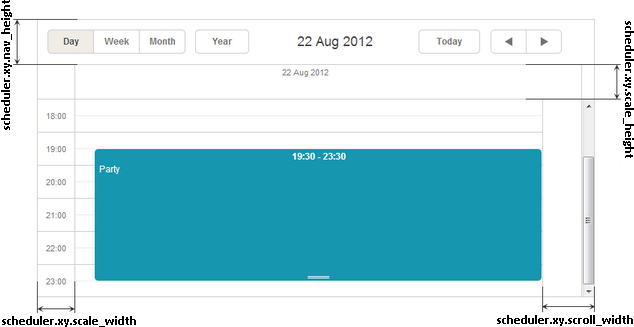
| scale_height | the height of the X-Axis | 20 | all views |
| scale_width | the width of the Y-Axis | 50 | day, week, timeline, units |
| scroll_width | the width of the scrollbar area | 18 | all views |
note
Note, all the xy' properties have the data type 'number'.
Illustration images
Month view
Week view
Day view
Map view
Lightbox
Change log
- nav_height property was removed in v7.0, the toolbar can be sized by css.
Need help?
Got a question about the documentation? Reach out to our technical support team for help and guidance. For custom component solutions, visit the Services page.