autoPlace()
The autoPlace() method works only in the default mode of the diagram and only for shapes
Description
Automatically arranges connected diagram shapes in the hierarchical structure
Usage
autoPlace(config?: object): void;
Parameters
config- (optional) an object with configuration settings of the autoplacement. If not specified, the default settings will be applied. Here you can specify the following parameters:mode- (optional) the mode of connecting shapes, "direct" (by default) or "edges"graphPadding- (optional) sets the distance between unconnected diagrams, 200 by defaultplaceMode- (optional) sets the mode of placement of shapes, "orthogonal" (by default) or "radial"
Example
const diagram = new dhx.Diagram("diagram_container");
diagram.data.parse(data);

diagram.autoPlace({
    mode: "edges",
    placeMode: "radial"
});
Modes of connecting shapes
"direct" mode
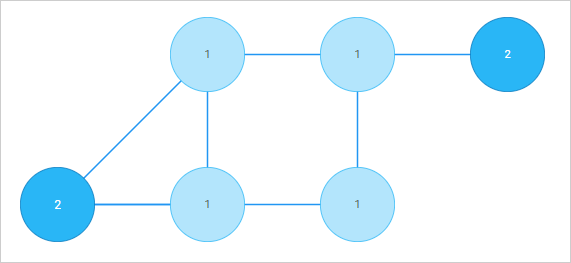
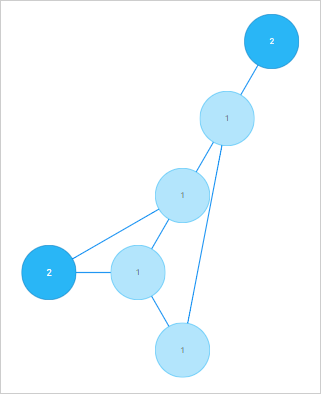
Connector lines with no arrows are aligned "from center to center"; they are straight and diagonal.

"edges" mode
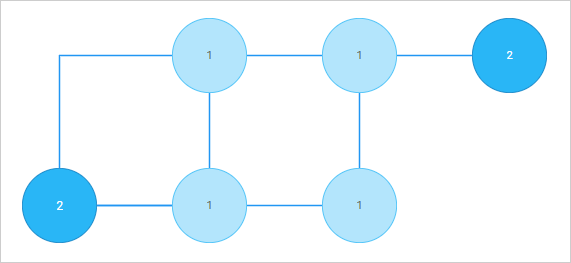
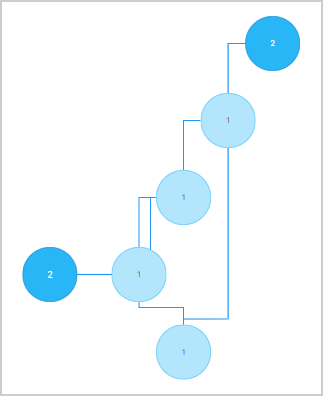
Connector lines are aligned "from side to side".
To add arrows to the lines, specify forwardArrow: "filled" or backArrow: "filled" in the configuration of a line object.
The connector lines in the "edges" mode can be:
- either straight (if you set connectType: "straight" property of a line object)

- or 90-degree curved (if you set connectType: "elbow" property of a line object)

Modes of placement of shapes
"orthogonal" mode
Shapes are arranged along vertical and horizontal lines
- "orthogonal" arrangement with lines in the "direct" mode
- "orthogonal" arrangement with lines in the "edges" mode
"radial" mode
Shapes are arranged on imaginary circles relative to the central shape, i.e. a shape with the most connections
- "radial" arrangement with lines in the "direct" mode
- "radial" arrangement with lines in the "edges" mode
Change log:
- The placeMode parameter is added in v5.0
- The autoplacement property is added in v3.0
Related articles: Arranging shapes automatically
Related sample: Diagram. Default mode. Autoplacement