快速入门
本教程将引导您完成在页面上构建一个功能完整的 Booking 应用程序所需的步骤。
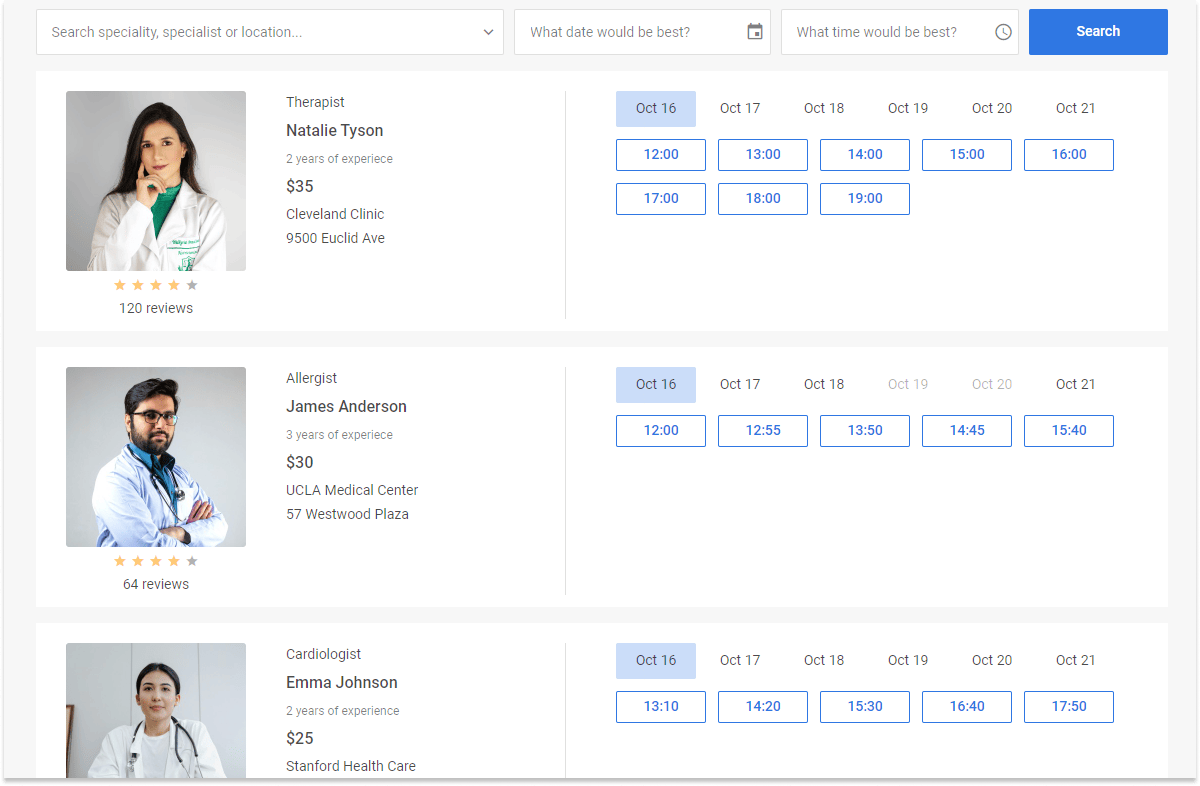
第一步:下载并安装包
下载安装包并将其解压到您的项目文件夹中。
您可以使用 yarn 或 npm 包管理器将 JavaScript Booking 导入到您的项目中。
通过 npm 或 yarn 安装试用版 Booking
信息
如果您想使用 Booking 的试用版本,请下载试用版 booking 安装包,并按照 README 文件中的步骤进行操作。请注意,试用版 booking 仅可使用 30 天。
通过 npm 或 yarn 安装专业版 Booking
信息
您可以在客户专区中通过生成 npm 登录名和密码,直接访问 DHTMLX 私有 npm。详细的安装指南也可在该页面获取。请注意,访问私有 npm 仅在您的专有 Booking 许可证有效期间内可用。
第二步:引入源文件
首先创建一个 HTML 文件,并将其命名为 index.html。然后将 Booking 源文件引入到该文件中。
需要引入两个必要文件:
- booking 的 JS 文件
- booking 的 CSS 文件
index.html
<!DOCTYPE html>
<html>
    <head>
        <title>How to Start with Booking</title>
        <script src="./dist/booking.js"></script>
        <link href="./dist/booking.css" rel="stylesheet">
    </head>
    <body>
        <script>
        // 您的代码将写在这里
        </script>
    </body>
</html>
提示
如果您希望将 JavaScript Booking 集成到 React、Angular 或 Vue 项目中,请参考 CodeSandbox 上的示例 获取更多信息。
第三步:创建 booking
现在您可以开始向页面中添加 booking 了。首先,为 Booking 创建一个 DIV 容器。
index.html
<!DOCTYPE html>
<html>
    <head>
        <title>How to Start with Booking</title>
        <script src="./dist/booking.js"></script>
        <link href="./dist/booking.css" rel="stylesheet">
    </head>
    <body>
        <div id="root"></div>
        <script>
            const widget = new booking.Booking("#root", {
                // 配置属性
            });
        </script>
    </body>
</html>
第四步:配置 Booking
要开始使用 Booking,首先需要提供初始数据,然后可以添加其他在初始化时应用的配置属性。以下示例创建了包含两张卡片的 Booking:
const data = [
    {
        id: "ee828b5d-a034-420c-889b-978840015d6a",
        title: "Natalie Tyson",
        category: "Therapist",
        subtitle: "2 years of experience",
        details: "Cleveland Clinic\n9500 Euclid Ave",
        preview: "https://snippet.dhtmlx.com/codebase/data/booking/01/img/01.jpg",
        price: "$35",
        review: {
            stars: 4,
            count: 120
        },
        slots: [
            {
                from: 9,
                to: 20,
                days: [1, 2, 3, 4, 5]
            },
            {
                from: 10,
                to: 18,
                days: [6, 0]
            }
        ]
    },
    {
        id: "5c9b64ad-1830-4e5b-a5f9-8acea10706df",
        title: "James Anderson",
        category: "Allergist",
        subtitle: "3 years of experience",
        details: "UCLA Medical Center\n57 Westwood Plaza",
        preview: "https://snippet.dhtmlx.com/codebase/data/booking/01/img/11.jpg",
        price: "$30",
        review: {
            stars: 4,
            count: 64
        },
        slotSize: 45,
        slotGap: 10,
        slots: [
            {
                from: "9:15",
                to: 17,
                days: [1, 2, 3, 4, 5]
            }
        ]
    }
];

const cardShape = {
    review: false,
    subtitle: false,
    price: false
};

new booking.Booking("#root", {
    data,
    cardShape,
    // 其他参数
});
下一步
以上就是在页面上创建一个简单 Booking 所需的全部内容。接下来,探索 Booking API:
- 指南页面提供了有关安装、加载数据、样式设置及其他有用提示的说明,帮助您顺利完成 Booking 配置
- API 参考提供了 Booking 功能的详细描述
- DHTMLX MCP server 将 AI 编码助手连接到本文档,让它在您开发时随时查阅当前的 Booking API