Week Agenda View
정보
이 뷰는 Scheduler PRO 버전에만 포함되어 있습니다.
Week Agenda 뷰는 Week 뷰와 Agenda 뷰의 요소를 결합하여, 한 주 동안 예정된 이벤트 목록을 보여줍니다.
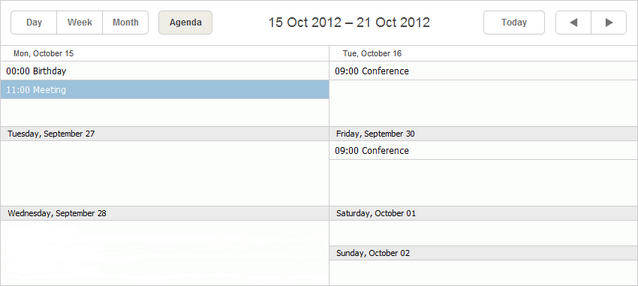
초기화
스케줄러에 Week Agenda 뷰를 포함하려면 다음 단계를 따르세요:
- 페이지에서 Week Agenda 확장 기능을 활성화하세요:
scheduler.plugins({
    week_agenda: true
});
- 뷰의 탭을 스케줄러 마크업에 추가하세요:
<div id="scheduler_here" class="dhx_cal_container" ...>
    <div class="dhx_cal_navline">
       ...
       <div class="dhx_cal_tab" name="week_agenda_tab"></div>
    </div>
    ...
</div>
- 탭의 라벨을 지정하세요:
//'weekAg_tab'은 우리의 div 이름입니다
scheduler.locale.labels.week_agenda_tab = "Week Agenda";
GUI 세부사항
- 선택된 이벤트는 강조 표시됩니다. 이벤트가 여러 날에 걸쳐 있으면, 관련된 모든 레코드도 함께 강조됩니다.
- 새로운 이벤트를 생성하려면, 이벤트를 추가할 요일 셀을 더블 클릭하세요.
- 이벤트를 수정하거나 삭제하려면, 해당 이벤트를 더블 클릭하여 lightbox를 열고 변경하세요.
관련 가이드
Need help?
Got a question about the documentation? Reach out to our technical support team for help and guidance. For custom component solutions, visit the Services page.