TIMELINE_scale_label
정보
이 기능은 PRO 에디션에서만 사용할 수 있습니다.
Description
Y축 항목을 지정합니다
TIMELINE_scale_label: (key: string, label: string, section: object) => string;
Parameters
key- (required) string - 섹션의 ID (key)label- (required) string - 섹션의 레이블section- (required) object - 'key'와 'label' 속성을 포함하는 섹션 객체
Returns
label- (string) - 스케줄러에 렌더링할 HTML 텍스트
Example
scheduler.templates.timeline_scale_label = function(key, label, section){
    return label;
};
Applicable views: Timeline view
Details
노트
이 템플릿은 timeline 플러그인이 활성화되어 있어야 합니다.
Timeline 뷰에서 Tree 모드를 사용할 때, 폴더 헤더에 긴 텍스트를 삽입하면 기본적으로 표시 문제가 발생할 수 있습니다.
버전 5.3.12부터 긴 텍스트는 자동으로 잘리게 됩니다. 이 잘림 현상을 방지하고 전체 텍스트를 한 줄에 유지하려면 다음 CSS를 적용할 수 있습니다:
.dhx_matrix_scell.folder > div,
.dhx_matrix_scell.folder .dhx_scell_name {
    white-space: nowrap;
    overflow: visible;
}
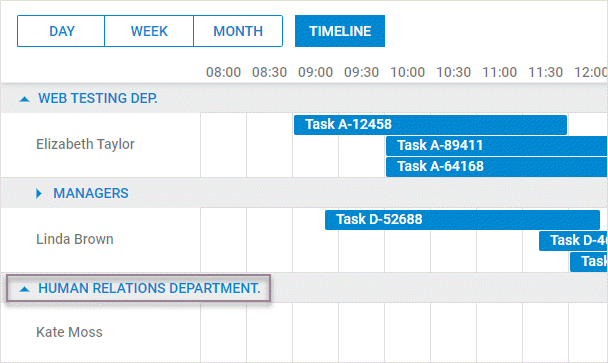
또는 모든 폴더의 높이를 늘려 텍스트를 여러 줄로 나누는 방법도 있습니다(개별 폴더 높이는 조절할 수 없습니다). 다음과 같이 설정할 수 있습니다:
scheduler.createTimelineView({
      ...
      folder_dy: 80,
});
그리고 아래 CSS를 적용합니다:
.dhx_matrix_scell.folder .dhx_scell_name{
    line-height: 17px;
}
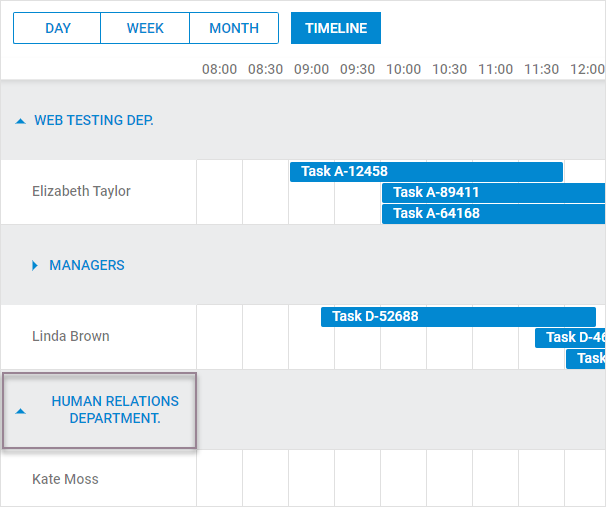
버전 5.3.11 및 이전 버전에서는 긴 텍스트가 줄 바꿈되어 숨겨질 수 있습니다. 전체 텍스트가 한 줄에 보이도록 하려면 좀 더 상세한 CSS 조정이 필요합니다:
.dhx_timeline_label_col,
.dhx_row_folder,
.dhx_matrix_scell.folder,
.dhx_scell_level0,
.dhx_scell_name{
    overflow: visible !important;
}

.dhx_matrix_scell.folder .dhx_scell_name{
    float: unset;
    white-space: nowrap;
}

.dhx_cal_data .dhx_timeline_table_wrapper div{
    text-align:left;
}
Related Guides
Need help?
Got a question about the documentation? Reach out to our technical support team for help and guidance. For custom component solutions, visit the Services page.