iCal export/import
This tool is deprecated and no longer supported. So please, don't use it in your applications!
The legacy exporter/importer is PHP-based, so the snippets below are PHP examples. If you are using a different backend, use your platform's iCalendar library and map fields to Scheduler event properties.
You have the possibility to import/export data of iCal format by using either ready-to-use utility or API methods.
iCal exporter (Front-end)
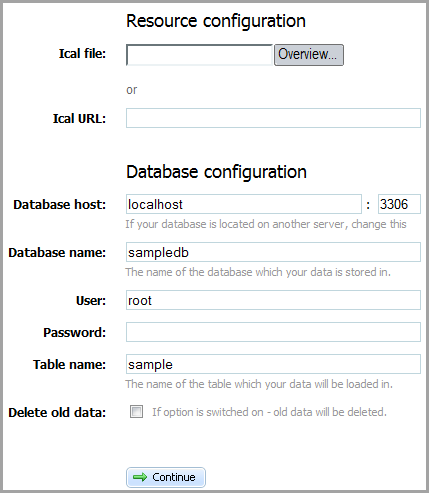
The front-end of the utility consists of two parts:
- Resource configuration
- Database configuration.
In the first part you set the path to the data. You may do this by either choosing the path from the opened dialog window (Ical file, the button "Overview") or specifying it manually (Ical URL).
The second part contains the standard settings of the database ( host, database and table names, user's name and password), which you want to save the iCal data in. Also here you may set, whether your old data must be deleted or not (Delete all data).
API Methods
Here you can find all the API methods that can be used to implement iCal export/import in an app.
Initialization
To initialize iCal exporter/importer, use the following code:
require_once("codebase/class.php");
$export = new ICalExporter();
iCalendar import
You can import iCal data using the following methods:
- setTitle($title) - sets the title of the iCal file in the toICal() method
- getTitle() - gets the title of the iCal file
- toICal($events) - converts the information from the array or xml string to icalendar format
iCalendar export
You can export iCal data using the following methods:
- toHash($ical) - converts an iCal string to an array of events
- toXML($ical) - converts an iCal string to the XML format
Examples
A number of code snippets that show how to execute iCal export/import are presented here.
- Setting iCalendar title
The following code allows you to set the title of imported/exported iCalendar data.
$xml = file_get_contents("events_rec.xml");
require_once("codebase/class.php");
$export = new ICalExporter();
$export->setTitle("Calendar name");
$ical = $export->toICal($xml);
file_put_contents("ical.ics", $ical);
- Array of events
It's an example of events' array that is referred to in import/export data from/to array.
$events = array(
    array(
        "id" => 1,
        "start_date" => "2010-04-05 08:00:00",
        "end_date" => "2012-04-09 09:00:00",
        "text" => "text1",
        "rec_type" => "week_2___3,5",
        "event_pid" => null,
        "event_length" => 3600
    ),

    array(
        "id" => 2,
        "start_date" => "2010-04-06 12:00:00",
        "end_date" => "2010-04-06 18:00:00",
        "text" => "text2",
        "rec_type" => "",
        "event_pid" => null,
        "event_length" => null
    ),

    array(
        "id" => 3,
        "start_date" => "2010-04-07 12:00:00",
        "end_date" => "2010-04-07 18:00:00",
        "text" => "text3",
        "rec_type" => "",
        "event_pid" => null,
        "event_length" => null
    ),

    array(
        "id" => 4,
        "start_date" => "2010-04-08 12:00:00",
        "end_date" => "2010-04-08 18:00:00",
        "text" => "text4",
        "rec_type" => "",
        "event_pid" => null,
        "event_length" => null
    )
);
- From Array to iCal
Use this code to export data from an array to an iCal string:
require_once("codebase/class.php");
$export = new ICalExporter();
$ical = $export->toICal($events);
file_put_contents("ical.ics");
- From XML to iCal
Use this code to export data from XML to iCal:
$xml = file_get_contents("events_rec.xml");
require_once("codebase/class.php");
$export = new ICalExporter();
$ical = $export->toICal($xml);
file_put_contents("ical.ics");
- From iCal to Array
Use this code to export data from iCal to array:
$ical = file_get_contents("ical.ics");
require_once("codebase/class.php");
$export = new ICalExporter();
$events = $export->toHash($ical);
- From iCal to XML
Use this code to export data from iCal to XML:
$ical = file_get_contents("ical.ics");
require_once("codebase/class.php");
$export = new ICalExporter();
$xml = $export->toXML($ical);
file_put_contents("events_rec.xml", $xml);