Agenda View (v6.0)
The article refers to dhtmlxScheduler 6.0 or earlier versions. If you use dhtmlxScheduler 7.0+, see details here.
The Agenda view allows displaying a list of upcoming events.
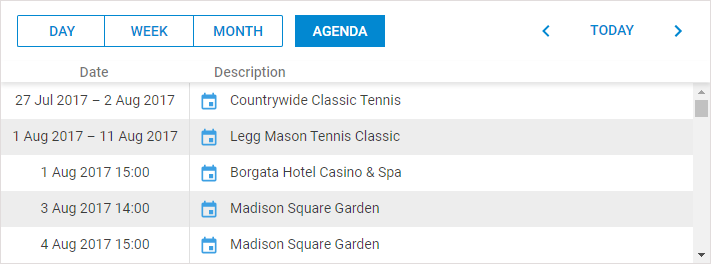
By default, the left list of the view displays events beginning from the current date. To change such behavior, use the agenda_start, agenda_end properties.
Initialization
To add the Agenda view to the scheduler, follow these steps:
- Activate the Agenda extension on the page:
scheduler.plugins({
    agenda_view: true
});
- Add the view's tab to the scheduler's markup:
<div id="scheduler_here" class="dhx_cal_container" ...>
    <div class="dhx_cal_navline">
       ...
       <div class="dhx_cal_tab" name="agenda_tab" style="right:280px;"></div>
    </div>
    ...
</div>
- Set the label for the tab:
//'agenda_tab' is the name of our div. By default, the label is 'Agenda'
scheduler.locale.labels.agenda_tab="My Agenda";
GUI details
- To create a new event, double click an empty cell in the list.
- To edit/delete an event - double click the 'Details' icon on the left side of the event description to open the lightbox and perform the needed operation.
Localization Tips
The Agenda view has 3 labels defined in the locale:
- scheduler.locale.labels.(agendaName)_tab - the name of the view tab
- scheduler.locale.labels.date - the header of the date column
- scheduler.locale.labels.description - the header of the description column
The first label is commonly specified while adding the view tab to the scheduler, but the remaining labels should be redefined only if you localize the application to a language, different from English.
Setting the range of displayable dates
To set the range of displayable dates, use the agenda_end and agenda_start properties:
//to display dates from 1st June 2019
scheduler.config.agenda_start = new Date(2019, 5, 1);

//to display dates until 1st June,2020
scheduler.config.agenda_end = new Date(2020,5,1);
Enabling Next/Previous/Today buttons
It is possible to enable the Next/Previous and Today buttons in the Agenda view. You can implement it by redefining the scheduler.date.agenda_start()/scheduler.date.add_agenda() functions.
scheduler.date.agenda_start(date) returns the start of the displayed interval of the view for a given date. The default implementation of the agenda view always returns a fixed date value, that's why the agenda view doesn't react on the change of dates on the "next/prev" buttons clicks.
You can redefine these functions, for example, to return the current month:
scheduler.date.agenda_start = function(date){
  return scheduler.date.month_start(new Date(date));
};

scheduler.date.add_agenda = function(date, inc){
  return scheduler.date.add(date, inc, "month");
};
After that all buttons will work as usual.
Related sample Next/Previous/Today buttons in Agenda view
Width of columns
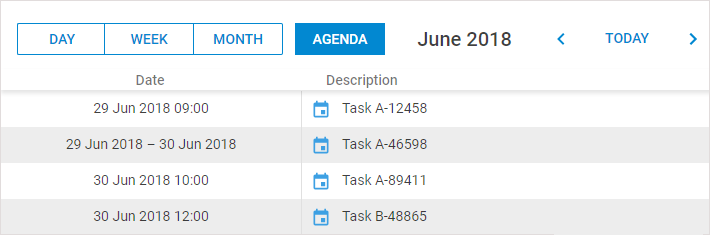
The width of columns in the Agenda view can be adjusted through the related CSS classes:
<style>
  .dhx_agenda_line div{
     width: 300px;
  }
  .dhx_v_border{
     left: 299px;
  }
</style>
Related sample Adjusting width of columns