day_date
Description
Gibt das Datumsformat an, das auf der X-Achse in den Ansichten Week und Units verwendet wird
day_date: string
Example
scheduler.config.day_date = "%F %j";
...
scheduler.init('scheduler_here', new Date(2013, 7, 5), "week");
Default value: "%D, %F %j"
Applicable views: Week view, Units view
Details
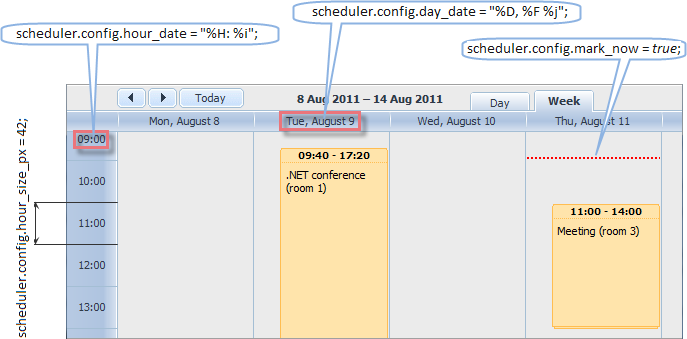
Diese Konfiguration wird nur wirksam, wenn sie vor der ersten Initialisierung des Schedulers gesetzt wird:
scheduler.config.day_date = "%F %j";
scheduler.init('scheduler_here', new Date(2020, 7, 5), "day");
Um das Datumsformat nach der Initialisierung zu ändern, muss das day_date Template überschrieben werden:
var formatDayDate = scheduler.date.date_to_str("%F %j");
scheduler.templates.day_date = function(date) {
    return formatDayDate(date);
};
Related Guides
Need help?
Got a question about the documentation? Reach out to our technical support team for help and guidance. For custom component solutions, visit the Services page.